Get to Know The BookWidgets Ambassadors as They Reveal Their Favorite Classroom Activities - Part 6
 Chelsey Both —
Education may look different from one country to another, but teachers everywhere share something important: a desire to help their students learn. That’s what makes our BookWidgets Ambassador community so special. Even in different classrooms and countries, we can connect through the ideas and experiences we share.
In part six of our Ambassador Series, we’re excited to introduce two more educators from our community and share their stories with you. ❤️
Meet Yolande Doensen from the Netherlands and Demetrius Wellman from the United States, and discover some of the BookWidgets activities they’ve created along the way.
Ambassador Lesson Ideas in This Post
In this post, we’re highlighting five inspiring lesson ideas developed by our ambassadors. Below, you’ll find an overview of what they’ve created, but there’s plenty more to discover! Keep reading to get to know the ambassadors behind these ideas and see how they bring them to life in the classroom.
- Practicing Listening and Comprehension with a Video
- Getting Started with Spanish Using a Bingo Card
- Ordering at a Restaurant in Spanish with a Randomness Widget
- Learning to Write Better Questions to Support Better Thinking
- Exploring Energy Transformations with an Interactive PhET Simulation
- Introducing a New Topic with Resources and Questions
Looking to transform your classroom with digital learning? Let me explain BookWidgets in 3 sentences:
- BookWidgets is an all-in-one content creation tool for teachers that helps all teachers create interactive digital assignments and assessments (with a variety of 37 interactive question types.)
- Teachers can share BookWidgets evaluation through their connected learning management system, such as Google Classroom, Microsoft Teams, Canvas, Moodle, and many more, making digital activities easy to manage within their existing workflow.
- Students answers are collected and organized in a reporting dashboard, where teachers can review work, give feedback, and evaluate performance efficiently.
Meet Yolande Doensen: Bringing Spanish Learning to Life with Interactive Experiences
Most of Yolande’s work takes place in secondary education in the Netherlands, where she has explored a wide range of ways to use BookWidgets in her teaching. What she particularly appreciates is the freedom to create learning experiences that fit the needs of her students and the goals of her lessons.
Beyond her own classroom, Yolande shares her experience with fellow educators through workshops and finds inspiration in the groups on BookWidgets. Adapting ideas from other teachers to suit her own lessons has helped her discover new possibilities and connect with educators from around the world. If you don’t know how to find or join groups, check out our tutorial to learn how to get started.
The activities below offer a glimpse into Yolande’s approach and show just a few of the many ways she uses BookWidgets to bring variety and interaction into her Spanish lessons. 👇
1. Practicing Listening and Comprehension with a Video
| Area | Explanation | |
|---|---|---|
| 🎓 | Subject | Spanish |
| 🎯 | Learning goal | Students develop their Spanish listening and comprehension skills by identifying and understanding key information in a video. |
| ❓ | BookWidgets widget type | Split Worksheet |
This activity shows how a video can become more than just something students watch. Using the Split Worksheet Widget, she pairs a video with interactive questions that encourage students to listen carefully and demonstrate their understanding.
Students can also work at their own pace, going back to the video whenever they need to check a detail before answering. This gives them more control over their learning and allows them to work through the activity at a pace that suits them.

💡 BookWidgets Teacher tip: Videos can be a great starting point for interactive learning activities. But they’re not the only multimedia resources you can use with BookWidgets, and you can add videos to different widget types, too! Explore this blog post for ideas on using multimedia in your BookWidgets activities.
2. Getting Started with Spanish Using a Bingo Card
| Area | Explanation | |
|---|---|---|
| 🎓 | Subject | Spanish |
| 🎯 | Learning goal | Students practice understanding and responding to simple statements. |
| ❓ | BookWidgets widget type | Bingo Card |
To help students get to know each other and get started with Spanish, Yolande uses a fun Bingo Card activity with statements about students’ lives, experiences, and interests. She gives a statement, and students check their Bingo cards to see if they have that exact statement. If they do, they can mark it off.
After each statement, the teacher can ask the students who were able to check it off whether it applies to them. This gets students talking about themselves and gives them a natural opportunity to use Spanish while discovering things they have in common with their classmates.
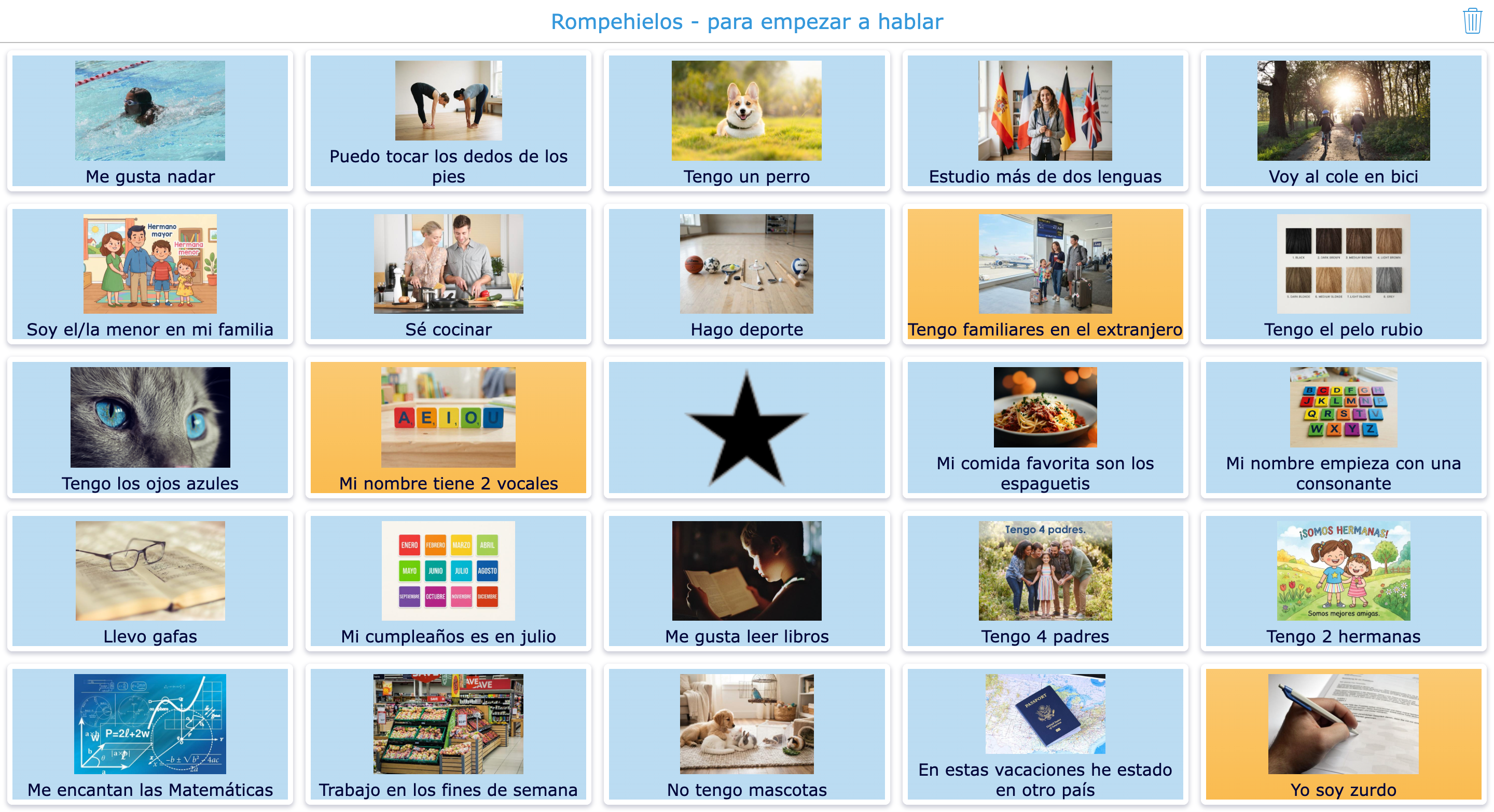
💡 BookWidgets Teacher tip: You can make bingo activities more accessible by turning on text selection and text-to-speech support. This is especially helpful when your Bingo card uses words or sentences without images, as students who have difficulty reading can select the text and have it read aloud.
For more ideas on using BookWidgets to support different learners, check out our blog post on student tools that boost learning and accessibility.
3. Ordering at a Restaurant in Spanish with a Randomness Widget
| Area | Explanation | |
|---|---|---|
| 🎓 | Subject | Spanish |
| 🎯 | Learning goal | Students practice their Spanish speaking skills by creating and performing a dialogue for ordering at a restaurant. |
| ❓ | BookWidgets widget type | Randomness Widget |
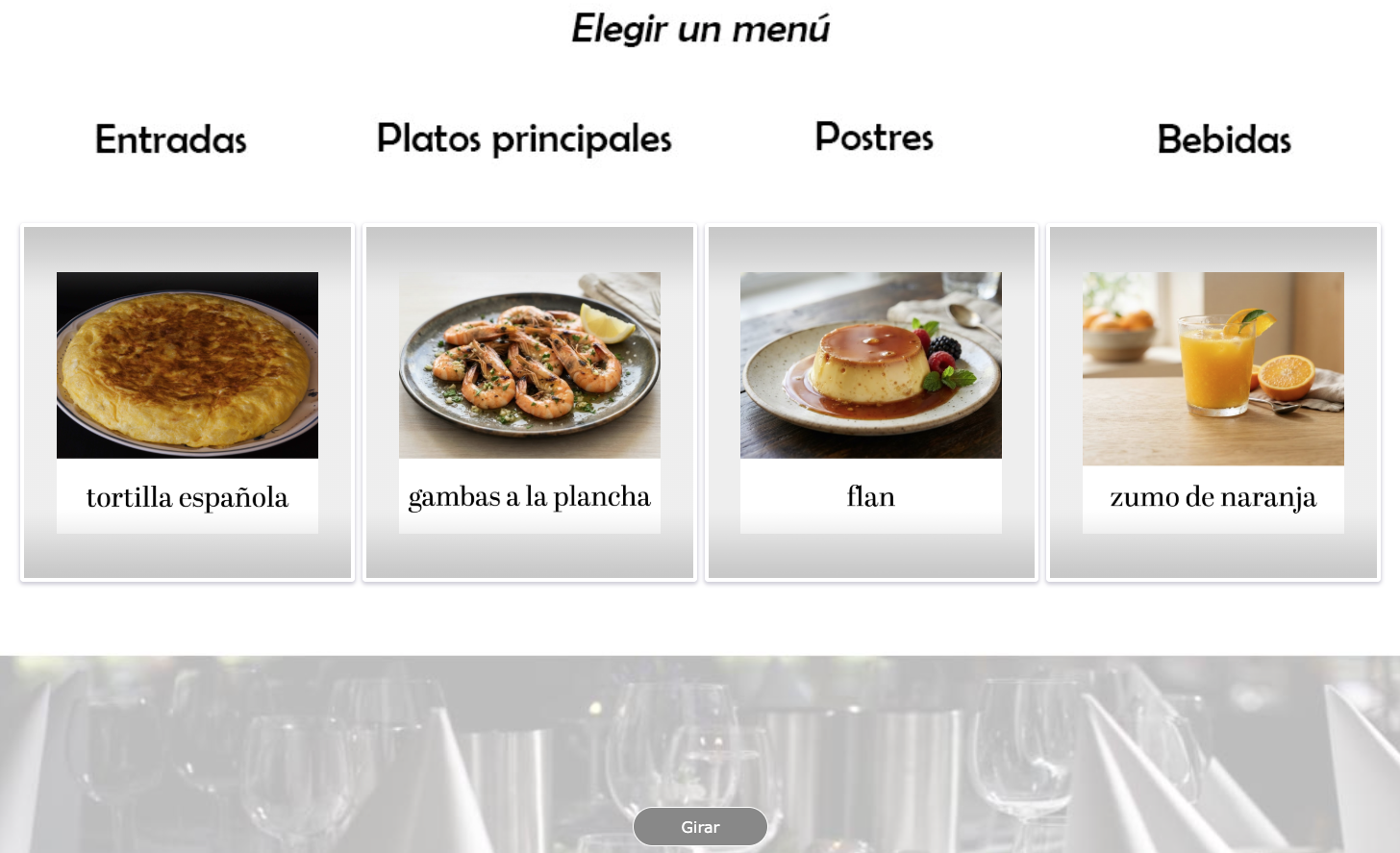
Yolande uses a Randomness Widget to give students a random restaurant order as the starting point for a Spanish dialogue. The widget has four wheels for starters, main courses, desserts, and drinks, with several options on each wheel. Once the order is generated, students use it to create and act out a restaurant dialogue in Spanish.
The activity can be reused in different ways. During a test, she can use the randomizer to give each student a different order, helping to keep the test fair by assigning the orders randomly. In class, students can spin the wheels themselves and use the randomly generated order to practice their dialogue with a partner.
Meet Demetrius Wellman: Bringing Interactive Simulations and Reflection into Science Learning
Based in the United States, Demetrius teaches science in secondary education and uses Google Classroom as his LMS. He likes to combine his assignments with different resources, such as articles and images, to give students more ways to engage with the subject.
He also uses BookWidgets to get students actively involved in their learning, including activities that encourage them to reflect on their answers.
The activities below offer a glimpse into how Demetrius brings these ideas into his teaching with BookWidgets. 👇
1. Learning to Write Better Questions to Support Better Thinking
| Area | Explanation | |
|---|---|---|
| 🎓 | Subject | Science |
| 🎯 | Learning goal | Students practice creating clear and meaningful questions using a question matrix. |
| ❓ | BookWidgets widget type | Split Worksheet |
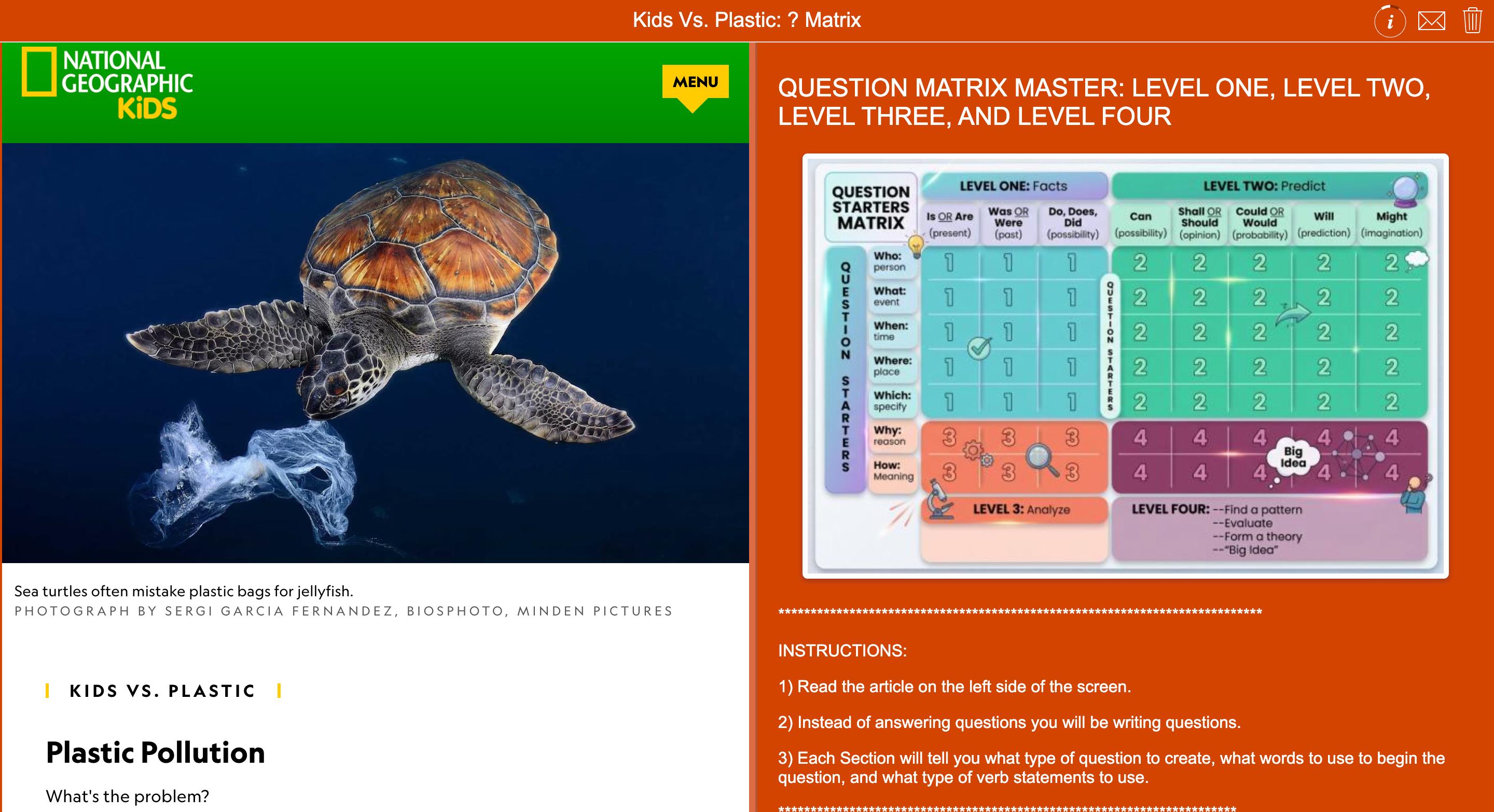
In this Split Worksheet activity, Demetrius uses an article about plastic pollution as a starting point for teaching students how to write their own questions. With the help of a question matrix, students explore different ways to turn information from the article into questions. For Demetrius, learning how to ask good questions is an important part of developing students’ thinking skills.
The activity also includes self-reflection questions that encourage students to look back at their own work and check whether they’ve completed all the tasks.
The article shown in this activity is from National Geographic Kids.
💡 BookWidgets Teacher tip: You could use Question Pages to keep reflection questions separate from the other questions in an activity. This gives students a dedicated space to reflect on their work. Take a moment to read this blog post to explore the different possibilities.
2. Exploring Energy Transformations with an Interactive PhET Simulation
| Area | Explanation | |
|---|---|---|
| 🎓 | Subject | Science |
| 🎯 | Learning goal | Students identify the energy transformations they observe and explain them using relevant vocabulary. |
| ❓ | BookWidgets widget type | Split Worksheet |
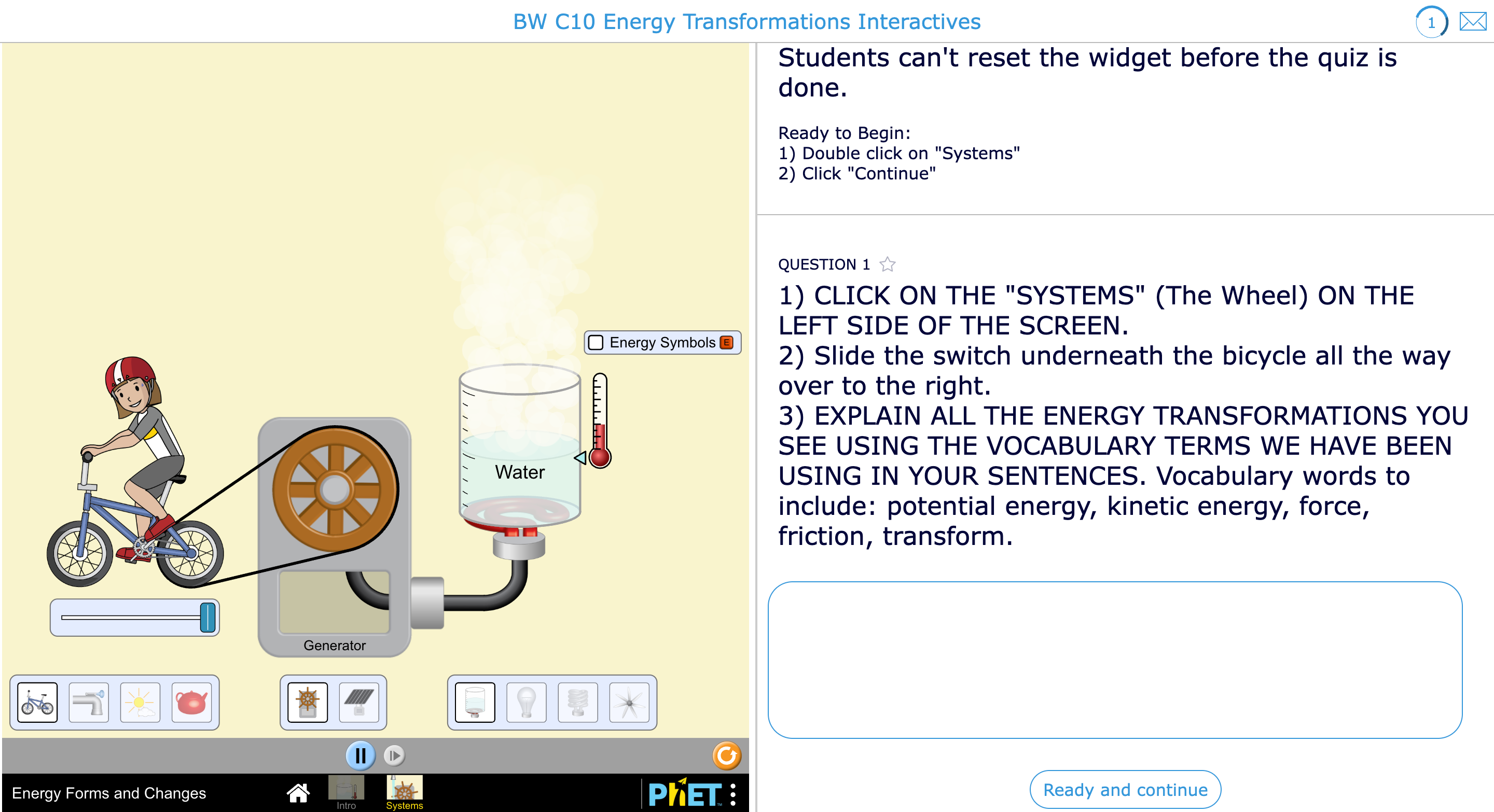
By placing a PhET simulation alongside the instructions, Demetrius gives students the opportunity to learn by doing. They can follow the instructions on one side of the worksheet while manipulating the simulation on the other, allowing them to immediately see how their actions affect the results.
This gives students a hands-on way to explore energy transformations and connect what they see in the simulation to the vocabulary they’ve been learning.
💡 BookWidgets Teacher tip: Demetrius’ activity is a great example of what you can do with the BookWidgets PhET integration. You can bring a PhET simulation into your activity and combine it with your own instructions, questions, feedback, and assessment. Read our blog post or watch the webinar to learn more about the integration.
3. Introducing a New Topic with Resources and Questions
| Area | Explanation | |
|---|---|---|
| 🎓 | Subject | Science |
| 🎯 | Learning goal | Students review genotype and phenotype concepts by finding information in their notes and using it to answer questions. |
| ❓ | BookWidgets widget type | Quiz with resources |
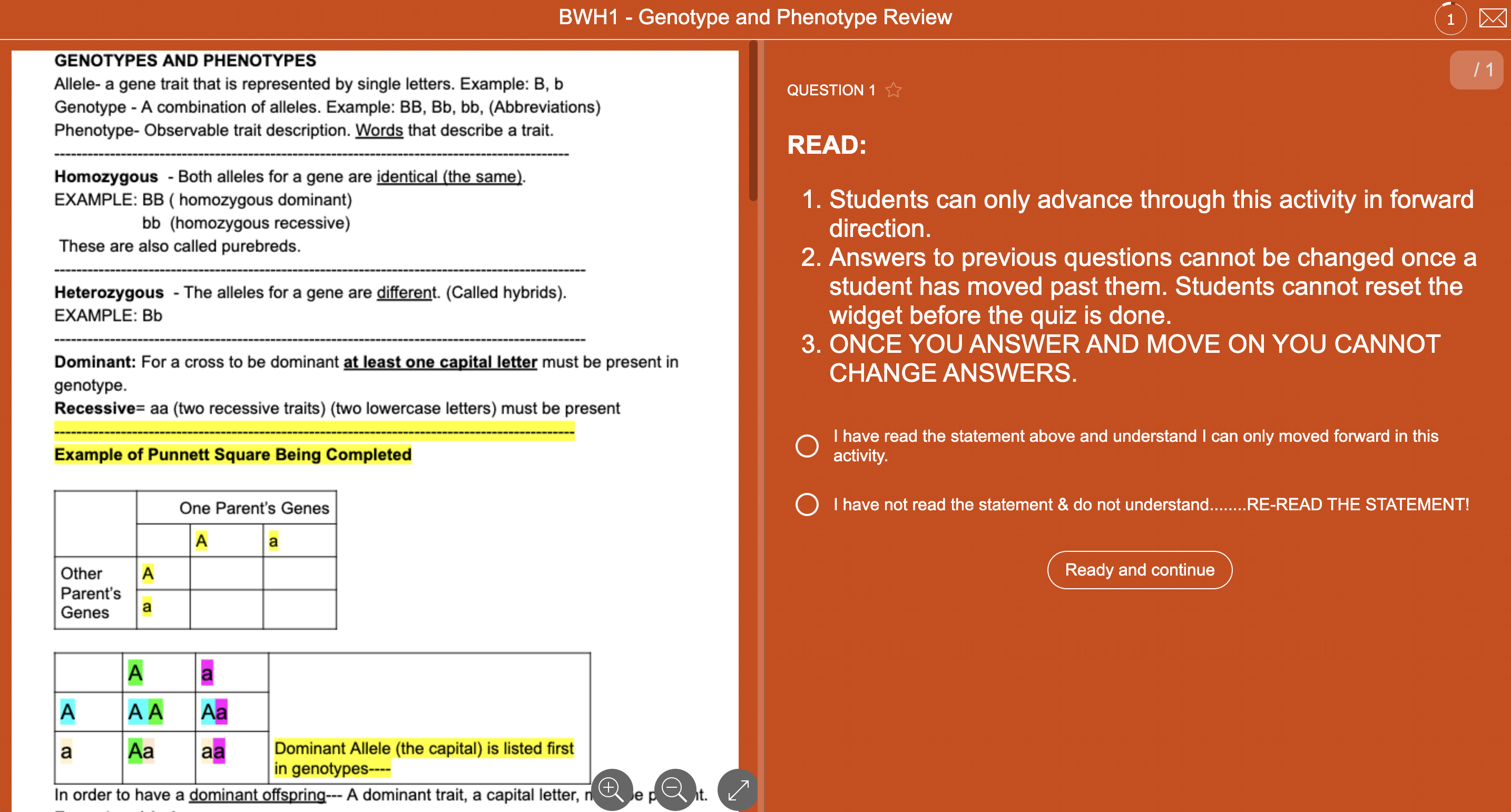
Having students open multiple browser windows to find the information they need can quickly become frustrating and distracting. With a Split Worksheet, Demetrius keeps the notes and questions together on one page. Students can read the PDF about genotype and phenotype on one side and use the information to answer the multiple-choice questions on the other.
He also prefers having students answer one question at a time, giving them a clear and focused way to work through the activity without feeling overwhelmed by too much information at once. Before students begin, an opening question asks them to acknowledge how the activity works: they will answer one question at a time and cannot return to previous questions or change their answers. This encourages students to slow down, think carefully, and take responsibility for each response.
Demetrius prefers this setup because it helps students stay focused while working through the activity. It also gives him a clearer picture of what students understood or missed on their first attempt.
Overview Ambassador Blog Post Series
Enjoyed getting to know our ambassadors? You’ve just read part six of our Ambassador Blog Series, but there’s more to discover! If you haven’t already, take a look at the previous editions below to meet more educators from the BookWidgets community and explore their stories:
- Get to Know The BookWidgets Ambassadors - Part One
- Get to Know The BookWidgets Ambassadors - Part Two
- Get to Know The BookWidgets Ambassadors - Part Three
- Get to Know The BookWidgets Ambassadors - Part Four
- Get to Know The BookWidgets Ambassadors - Part Five
And stay tuned for more ambassador stories coming your way!
Wrap Up
It’s always inspiring to see how teachers in different parts of the world bring their own ideas into the classroom. We hope the stories and activities from Yolande and Demetrius have given you some new ideas to try in your own teaching. ❤️
Want to stay connected? Follow us on Instagram for more teaching ideas and BookWidgets inspiration, or join our Facebook Teacher Community to connect with fellow educators and stay up to date with the latest resources and updates. 💡
And me? I’m Chelsey, the person behind the Ambassador Blog Post Series. Feel free to connect with me on LinkedIn! 👋


