
Get to Know The BookWidgets Ambassadors as They Reveal Their Favorite Classroom Activities - Part 5
 Chelsey Both —
We love seeing our ambassadors spread across the world, and even though we may be miles apart, we share one common goal: creating engaging and meaningful learning experiences for our students. In part five of our Ambassador Blog Series, we’re excited to introduce two more educators who are doing exactly that. ❤️
Their stories highlight how BookWidgets can be used in many different ways, shaped by each teacher’s unique classroom, students, and teaching style, and show just how inspiring this global community has become.
In this blog post, we'll share the stories of David Messner from Austria and Caesar JVR from Mexico, along with the creative activities, classroom ideas, and BookWidgets tips they use to engage their students.
BookWidgets Ambassador Lesson Ideas in This Post
This post includes six lesson ideas created by our ambassadors. I'll give you a quick overview here, but don't stop there! Scroll down to meet our ambassadors, explore each widget activity in more detail, discover classroom tips, and get inspired.
- Practice English Grammar Through a Spy Mission
- Learning Telling Time Through Varied Exercises
- Exploring Key Geography Concepts
- Reimagining the Whiteboard Widget with "Scrabble"
- Interactive Vocabulary and Grammar Practice
- Learning Prepositions with a Listening Activity
Looking to transform your classroom with digital learning? Let me explain BookWidgets in 3 sentences:
- BookWidgets is an all-in-one content creation tool for teachers that helps all teachers create interactive digital assignments and assessments (with a variety of 37 interactive question types).
- Teachers can share BookWidgets evaluations through their connected learning management systems, such as Google Classroom, Microsoft Teams, Canvas, Moodle, and many more, making digital activities easy to manage within their existing workflow.
- Student answers are collected and organized in a grading dashboard, where teachers can review work, give feedback, and evaluate performance efficiently.
Meet David Messner: Using Multi-Modal Learning to Promote Authentic Student Thinking
The question on many educators’ minds today is simple: if students use AI, are they still learning? For David Messner, a secondary educator from Austria, the answer lies in designing richer, more engaging learning experiences that require students to think, analyze, and interact with content themselves.
Teaching English Language Arts, Geography, Computer Science, and LEGO Robotics, David works with a wide range of learners while also sharing his expertise with fellow educators through professional development sessions and conference presentations. Using BookWidgets in Microsoft Teams, he creates interactive learning activities that combine different media formats to support personalized learning and encourage active participation.
Rather than relying solely on traditional text-based assignments, he embraces a multi-modal approach that integrates images, audio, and video into classroom activities. By doing so, he creates learning experiences that are more engaging for students and more difficult to outsource entirely to AI tools. The result is a classroom where learners are encouraged to interact directly with content, demonstrate authentic understanding, and take ownership of their learning.
The three widgets below provide a glimpse into David’s teaching approach and highlight how he uses BookWidgets to create engaging, interactive, and meaningful learning experiences. 👇
1. Practice English Grammar Through a Spy Mission
| Area | Explanation | |
|---|---|---|
| 🎓 | Subject | English Language Arts / ESL / EFL |
| 🎯 | Learning goal | Students learn how to use the Present Progressive. |
| ❓ | BookWidgets widget type | Worksheet |
Grammar practice becomes much more engaging when students have a mission to complete. In this spy-themed activity, learners take on the role of secret agents and work their way through a series of challenges to solve a case. Along the way, they listen to intercepted conversations, analyze surveillance reports, describe suspicious activities, and decode secret messages.
What makes this activity so effective is how David turned a potentially repetitive grammar lesson into a motivating spy mission. By embedding each task within a larger storyline, students have a clear purpose for every challenge they complete.
As they gather clues and work their way through the case, they naturally practise the Present Progressive through listening, observation, and problem-solving. The result is an immersive learning experience where grammar becomes a tool for completing the mission rather than the sole focus of the lesson.

💡 Teacher Tip: Use the "Hint" feature to provide just-in-time support without giving away the answer. Students can access help when they need it, promoting independence while keeping them engaged and moving through the activity.
2. Learning Telling Time Through Varied Exercises
| Area | Explanation | |
|---|---|---|
| 🎓 | Subject | English & Math |
| 🎯 | Learning goal | Students apply telling time skills by reading and expressing time correctly. |
| ❓ | BookWidgets widget type | Worksheet |
This activity from David shows that effective lessons don't have to be complex. Using the Worksheet Widget, he combines different question types, including Audio-Picture Matching, Drag Words into Sentence, and the Question Table, to create a varied and engaging learning experience.
By mixing multiple question types within a single activity, students stay actively involved while practicing different language skills. It's a great example of how even a straightforward worksheet can become interactive and engaging with BookWidgets.

💡 Teacher Tip: Explore all our question types to take your formative and summative assessments to the next level. This worksheet showcases all our question types, giving you a clear overview of what's possible and helping you discover new ways to engage your students.
3. Exploring Key Geography Concepts
| Area | Explanation | |
|---|---|---|
| 🎓 | Subject | Geography |
| 🎯 | Learning goal | Students demonstrate their understanding of geography concepts. |
| ❓ | BookWidgets widget type | Worksheet |
The final activity from David that I'd like to share is another great example of the Worksheet Widget in action. Just like in the previous activity, David makes thoughtful use of multiple pages to structure the learning experience. Rather than placing all questions on a single page, he carefully spreads them across the worksheet. Some pages contain several short tasks, while others focus on a single question. This creates a clean and uncluttered layout that helps students stay focused on the task at hand.
It's a simple but effective design choice. By presenting information in manageable chunks, David creates a calm learning environment and makes it clear what is expected from students at each stage of the activity.
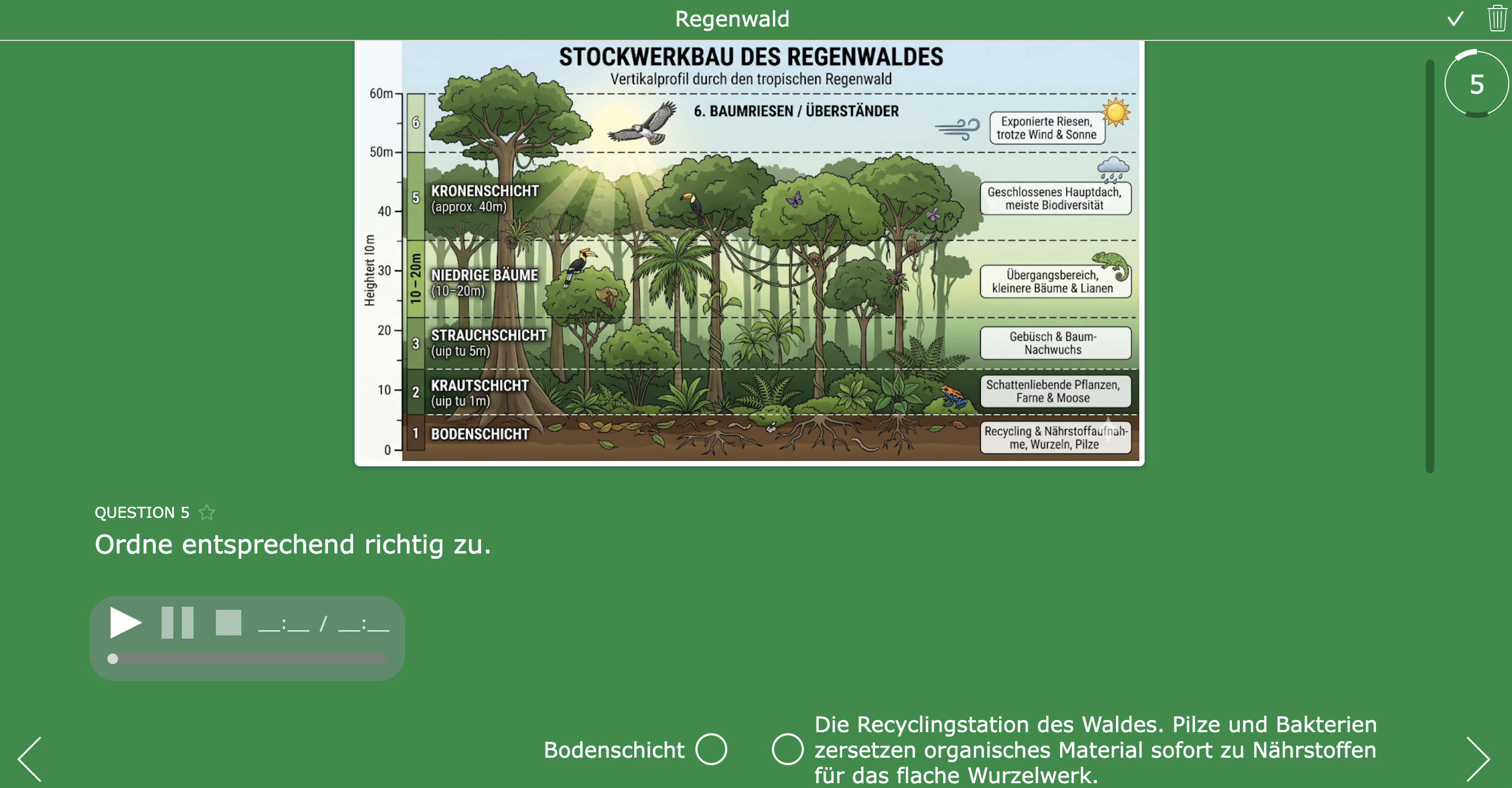
💡 Teacher Tip: You can read our blog post on how to create your own structured quiz in BookWidgets. Prefer a more hands-on approach? Follow our step-by-step video tutorial instead.
Meet Caesar JVR: Reimagining the Whiteboard Widget for Language Learning
For Caesar JVR, an English Language Arts educator from Mexico, meaningful learning happens when students move beyond consuming content and start creating it themselves.
"When we empower students to be the designers of their own learning artifacts, the meaning sticks. We aren't just teaching English; we're giving them the pieces to build it themselves." says teacher and BookWidgets Ambassador Caesar JVR.
This philosophy guides everything he does, whether he's working with students in the classroom, sharing ideas with fellow educators during professional development sessions, or inspiring teachers through social media.
Rather than viewing educational technology as a collection of tools and features, Caesar sees it as an opportunity to foster creativity, exploration, and student ownership. He is particularly passionate about finding new and unexpected ways to use BookWidgets, transforming familiar activities into engaging learning experiences that place students at the center of the learning process. One example of this mindset is his innovative use of the Whiteboard Widget. Rather than limiting himself to a widget's original purpose, he enjoys exploring new possibilities and uncovering creative ways to support learning. His approach demonstrates how even the most familiar widget types can be transformed into engaging, student-centered experiences.
Ready to see creativity in action? Explore the three widgets below and discover how Caesar reimagines the Whiteboard question type to create engaging, student-driven learning experiences. 👇
1. Reimagining the Whiteboard Widget with "Scrabble"
| Area | Explanation | |
|---|---|---|
| 🎓 | Subject | Language |
| 🎯 | Learning goal | Students strengthen their spelling and word-building skills |
| ❓ | BookWidgets widget type | Whiteboard |
The first activity we can share with you immediately shows how Caesar pushes tools to their limits. This whiteboard isn’t just a whiteboard. He transformed it from a simple drawing space into a fully functional, randomized Scrabble game.
Creating a seamless experience like this required a cocktail of tools to ensure the aesthetics matched the functionality. It takes time to create an activity like this, but in the long run, it will save you time when you start reusing it.
It’s a challenge to find activities that translate across different environments. Caesar shared two ways in which you can use it:
- Online classes: Students share their screens or submit their unique boards, which allows for a collaborative “Word Gallery.”
- Face-to-face sessions: Project the widget and have students come up to the touchscreen. This brings a physical, gamified energy to the room.

2. Interactive Vocabulary and Grammar Practice
| Area | Explanation | |
|---|---|---|
| 🎓 | Subject | English Language Arts / ESL / EFL |
| 🎯 | Learning goal | Students use English vocabulary and grammar correctly. |
| ❓ | BookWidgets widget type | Whiteboard |
This whiteboard-based exercise invites students to practise English through a set of structured, interactive tasks. Instead of passively completing traditional questions, learners engage directly with the content by using draggable stickers to build their answers visually.
The activity is organised around four different language exercises that encourage students to apply vocabulary and grammar in context. By working with images, words, and visual cues, students are guided to actively construct meaning rather than simply recall information.
It works seamlessly in both online and face-to-face settings. In online classes, students complete the tasks individually on their own devices and can easily submit their work. In physical classrooms, the same setup allows each student to work independently while the teacher follows progress in real time, combining autonomy with structured support.

💡 Teacher Tip: A powerful addition to this type of activity is the use of BookWidgets scoring rubrics. Teachers can attach a scoring rubric directly to open question types, allowing them to evaluate student responses in a structured and consistent way.
This keeps the assessment criteria closely connected to the actual student work, making corrections clearer, faster, and more consistent while also improving transparency in feedback for students. Learn more about these scoring rubrics in our blog post.
3. Learning Prepositions with a Listening Activity
| Area | Explanation | |
|---|---|---|
| 🎓 | Subject | English Language Arts / ESL / EFL |
| 🎯 | Learning goal | Students identify and use prepositions correctly. |
| ❓ | BookWidgets widget type | Whiteboard |
What stands out in this next whiteboard activity is how Caesar uses the format to teach prepositions through listening and movement. Instead of a traditional exercise, students are guided by audio instructions and respond by dragging and dropping animal stickers into the correct positions on the background.
This setup turns a simple listening task into an interactive spatial exercise, where students must carefully interpret directions and apply them in real time. It adds a playful, almost game-like layer to language learning while still focusing on accurate comprehension.
We love seeing how he's pushing the possibilities of the whiteboard. It really shows that the tool has virtually unlimited potential, allowing teachers to design highly engaging and varied learning experiences that go far beyond standard exercises.

Wrap up
Every ambassador brings a unique perspective to teaching, and that's exactly what makes this series so inspiring. From creative classroom activities to practical teaching strategies, their ideas continue to demonstrate the many ways BookWidgets can support meaningful learning. We can't wait to introduce you to more educators and their stories in future editions of this series.
Want even more ambassador-inspired lesson ideas? Check out our earlier blog posts:
- Get to Know The BookWidgets Ambassadors - Part One
- Get to Know The BookWidgets Ambassadors - Part Two
- Get to Know The BookWidgets Ambassadors - Part Three
- Get to Know The BookWidgets Ambassadors - Part Four
Want to stay connected? Follow us on Instagram, Bluesky, and LinkedIn for more teaching ideas and BookWidgets inspiration, or join our Facebook Teacher Community to connect with fellow educators and stay up to date with the latest resources and updates. 💡
And if you'd like to stay connected, feel free to follow me, Chelsey, on LinkedIn ! 👋


