
4 Graphic Organizers to Build Student Writing Confidence in the Age of AI
 Kate Baker —
Stop the AI cheating cycle. Learn how to use graphic organizers and short-form writing to reclaim student thinking. Perfect for teachers seeking AI-resistant lesson plans.
Students are not turning to AI simply to avoid work. Many turn to it because they do not know how to begin, do not feel confident in their thinking, or do not see value in the writing assignment. When a task feels out of reach, a chatbot becomes a rational shortcut.
This shifts the question for educators. Instead of asking how to prevent AI plagiarism, it is more productive to ask how to teach writing in the age of AI by designing writing assignments and scaffolded writing instruction that builds thinking. When we help students surface their ideas in manageable ways, they feel more confident sharing their own voices rather than defaulting to a generated response.
What’s often missing is the "middle space" between reading and writing. This is where graphic organizers and short-form writing tasks come in. By designing this space with structured visible thinking routines, we make thinking visible earlier. This creates opportunities for formative assessment and targeted feedback—without adding more grading. Instead of waiting for a final product, teachers can respond to student thinking as it develops, when it has the greatest impact on student learning.
Quick Summary: This article shares four graphic organizers for writing that help students build confidence, strengthen critical thinking, and use AI more productively. Teachers will find ready-to-use BookWidgets templates for comparison, character analysis, synthesis, and literary interpretation, along with practical strategies for formative assessment and AI-assisted learning.
Ready-to-use BookWidgets Templates and Lessons
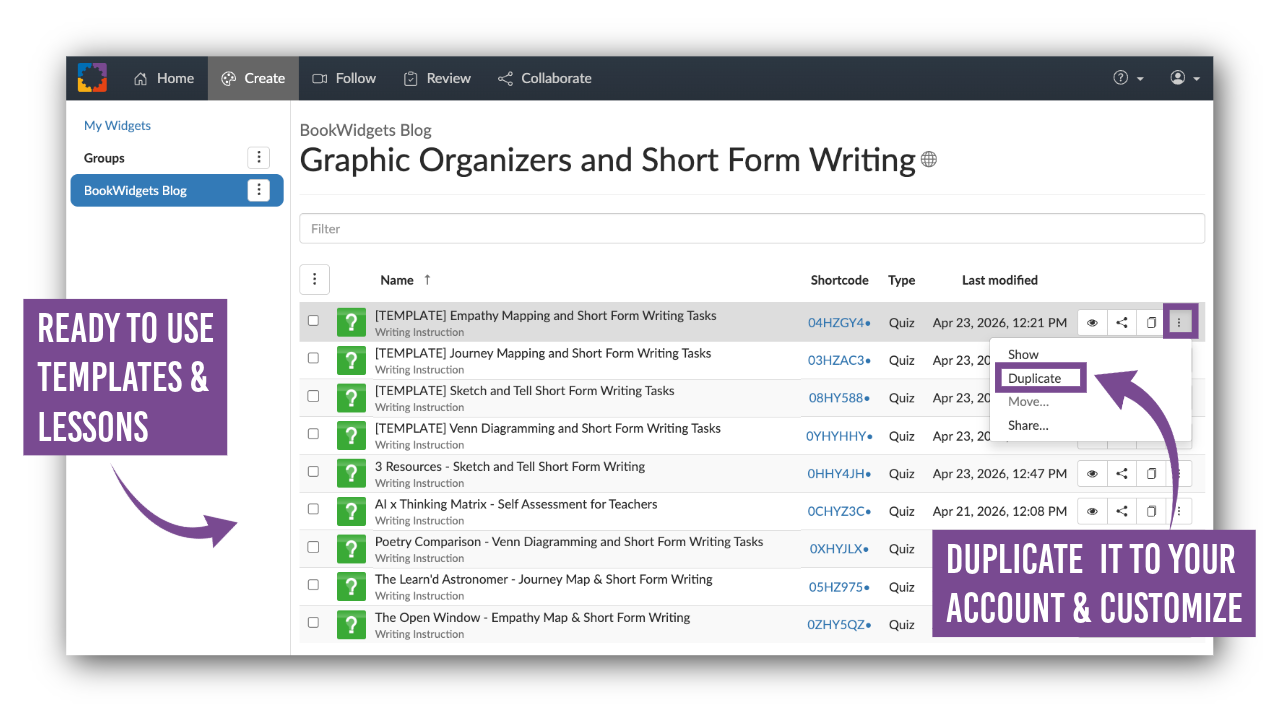
All graphic organizers and short-form writing activities featured in this article are made with BookWidgets and can be copied, adapted, and shared immediately with students. Browse the complete Graphic Organizers and Short-Form Writing Collection and customize the lessons for your own texts, grade levels, and learning goals.
Not sure where to start? Use the guide below to choose the graphic organizer that best matches your instructional goal.
| Teaching Goal | Best Graphic Organizer | Why It Works | Example Lesson |
|---|---|---|---|
| Compare two texts, characters, perspectives, or ideas | Venn Diagram | Helps students identify meaningful similarities, differences, and relationships before writing. | Poetry Comparison: Whitman & Bishop |
| Analyze a character's motivations, emotions, and actions | Empathy Mapping | Encourages close reading and evidence-based inference by exploring what a character thinks, feels, says, and does. | Character Analysis: "The Open Window" by Saki |
| Track character growth, emotional shifts, or change over time | Journey Mapping | Helps students identify turning points, evaluate significance, and analyze development. | Whitman's "When I Heard the Learn'd Astronomer" |
| Synthesize ideas across multiple texts, sources, or media | Sketch & Tell | Supports visual thinking, synthesis, creativity, and deeper conceptual understanding. | Poetry + AI + PhET Simulation Synthesis Activity |
What You'll Learn in This Article
The ready-to-use templates above provide practical starting points, but the real power lies in how and why these structures work. In the sections below, you'll explore the AI × Thinking Matrix, learn how graphic organizers and short-form writing support student thinking, dig deeper into the four adaptable pre-writing strategies, and find practical tips for feedback, assessment, and using AI as a thinking partner.
- The AI × Thinking Matrix: Designing Writing Assignments That Promote Student Thinking
- Why Graphic Organizers and Short-Form Writing Build Student Thinking
- 4 Graphic Organizers with Short-Form Writing Activities to Strengthen Student Writing
- How to Assess Short-Form Writing and Provide Feedback Efficiently
- How to Use AI as a Thinking Partner in Student Writing
- Frequently Asked Questions About Graphic Organizers, Writing Instruction, and AI
- Final Thought: Designing Writing Tasks in the Age of AI
The AI × Thinking Matrix: Designing Writing Assignments That Promote Student Thinking
The AI × Thinking Matrix, a framework I developed to help educators evaluate writing assignments in the age of AI, considers two factors: how much thinking a task requires and how easily AI could complete it.
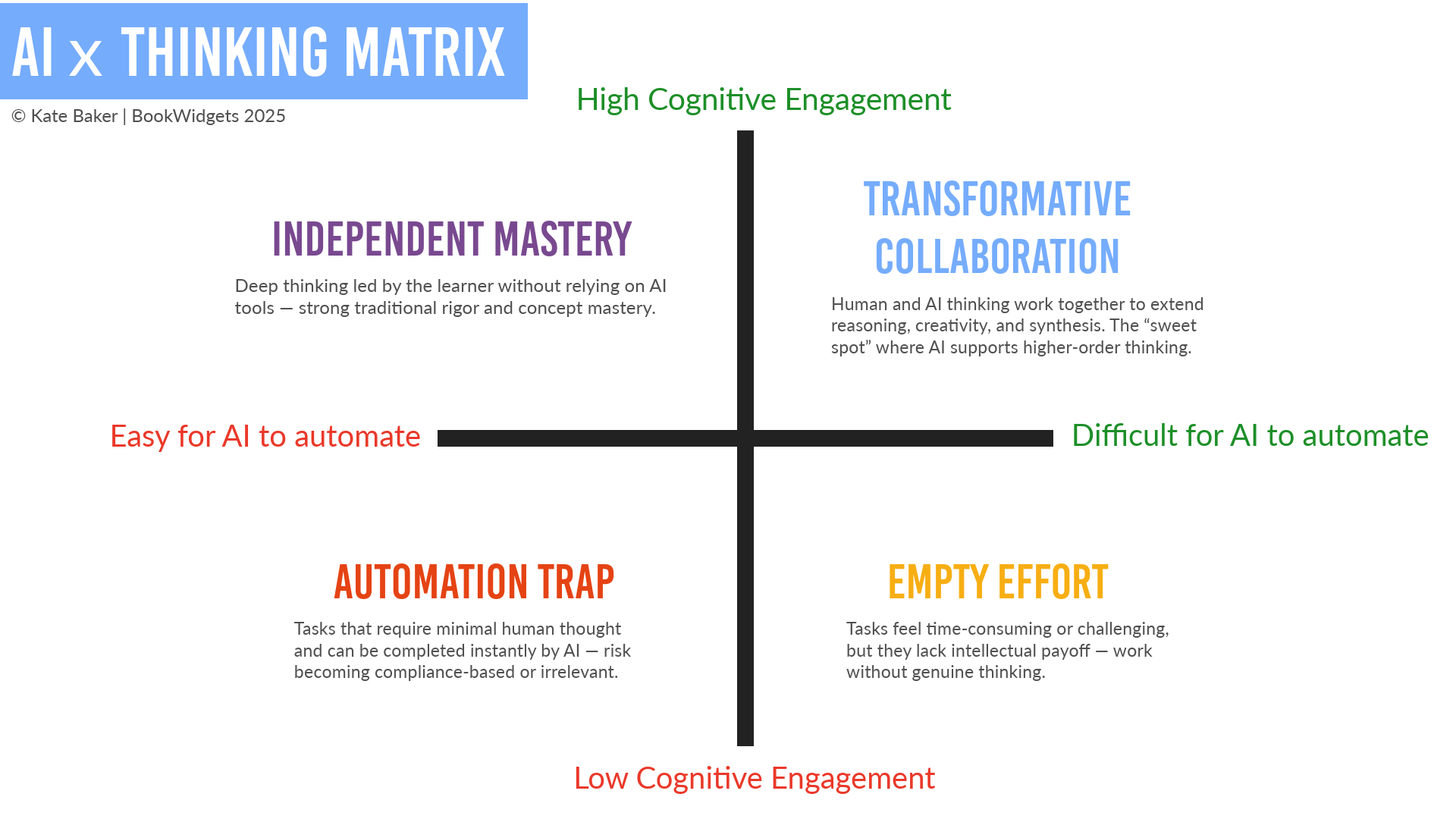
Writing tasks can fall into different categories depending on how much thinking they require and how easily AI can complete them. One category is the “automation trap,” where tasks require minimal thinking and can be completed quickly by AI. Another is what might be called “empty effort,” where tasks feel time-consuming or even challenging, but do not lead to meaningful intellectual payoff. In both cases, students may complete the work, but the thinking behind it remains limited or underdeveloped.
The goal is not to eliminate AI, but to move writing assignments into more productive spaces. In one direction, that means designing for independent mastery, where students are clearly doing the intellectual work. In another, it means enabling transformative collaboration, where AI supports and extends thinking rather than replaces it.
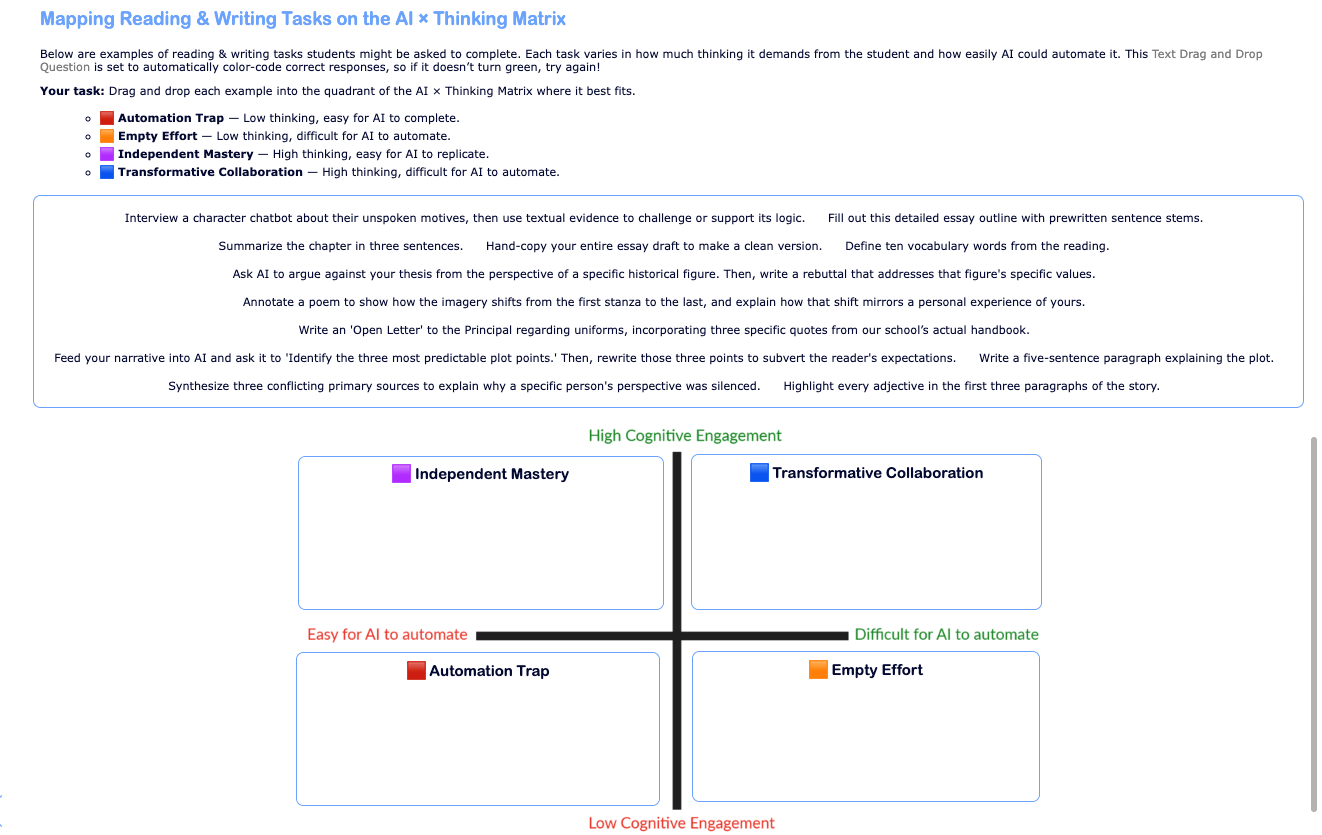
To see how this plays out in practice, try mapping sample reading and writing tasks onto the AI × Thinking Matrix using this interactive drag-and-drop activity.
Why Graphic Organizers and Short-Form Writing Build Student Thinking
To strengthen student writing skills, we must rethink the "middle space" between reading and writing the final essay. Many current tasks—like vocab lists or basic comprehension questions—are classic automation traps. They require low-level recall that AI handles in seconds, providing students with very little of the "fodder" or thinking reps they actually need to write.
Unlike a list of definitions or comprehension questions, a graphic organizer helps students map out evidence and connections. This creates the raw material they actually need to build an argument. While students can try to use AI to fill these boxes, it’s far less straightforward than a generic prompt. To do it well, they must prompt, select, and transfer ideas to fit a specific structure. Students will soon realize that it is easier to complete the graphic organizer themselves.
Short-form writing tasks then allow students to focus on specific "thinking moves"—analyzing a moment, interpreting meaning, or explaining reasoning—without the complexity of a full essay. When these tasks are tied to the specific evidence from their graphic organizers, AI responses usually remain too generic to be useful.
For teachers, this shift makes student thinking visible earlier. It allows for quick, targeted feedback that has a greater impact on student learning without adding to the grading load.
By building ideas step-by-step, we create a process that is both logistically manageable and psychologically safe. Students gain a clear entry point and the confidence to try out their thinking and be creative without the pressure of a final grade looming over every sentence.
Together, graphic organizers and short-form writing create a simple, repeatable structure:
- The graphic organizer helps students generate and structure their thinking
- The short-form writing tasks help them interpret and communicate that thinking
4 Graphic Organizers with Short-Form Writing Activities to Strengthen Student Writing
The following structures combine a thinking graphic organizer with targeted short-form writing activities. Each pre-writing strategy can be used across grade levels and subject areas, creating a clear pathway from reading to writing.
Across all four approaches, the pattern is consistent:
- Students build thinking visually and structurally first
- Then they write from that thinking in focused ways
This reduces cognitive overload, increases confidence, and produces writing that is grounded in evidence and interpretation. For teachers, it also creates a more manageable feedback loop. Instead of responding only to final products, you can see student thinking earlier, respond more efficiently, and guide learning in real time.
In BookWidgets, these activities can be built using an Annotate Picture question for the organizer, followed by Long Answer questions for the short form writing tasks. This allows teachers to quickly review responses, identify patterns, leverage auto-scoring, and provide targeted feedback without increasing grading time.
All of the Graphic Organizers and Short Form Writing Tasks featured in this post were created with BookWidgets, an all-in-one platform that integrates with your LMS for creating interactive lessons, assessing student learning, and providing instant feedback.
You can make a free copy of each activity directly from this post, or browse the full collection of graphic organizers and short form writing activities here: Graphic Organizers and Short Form Writing Collection
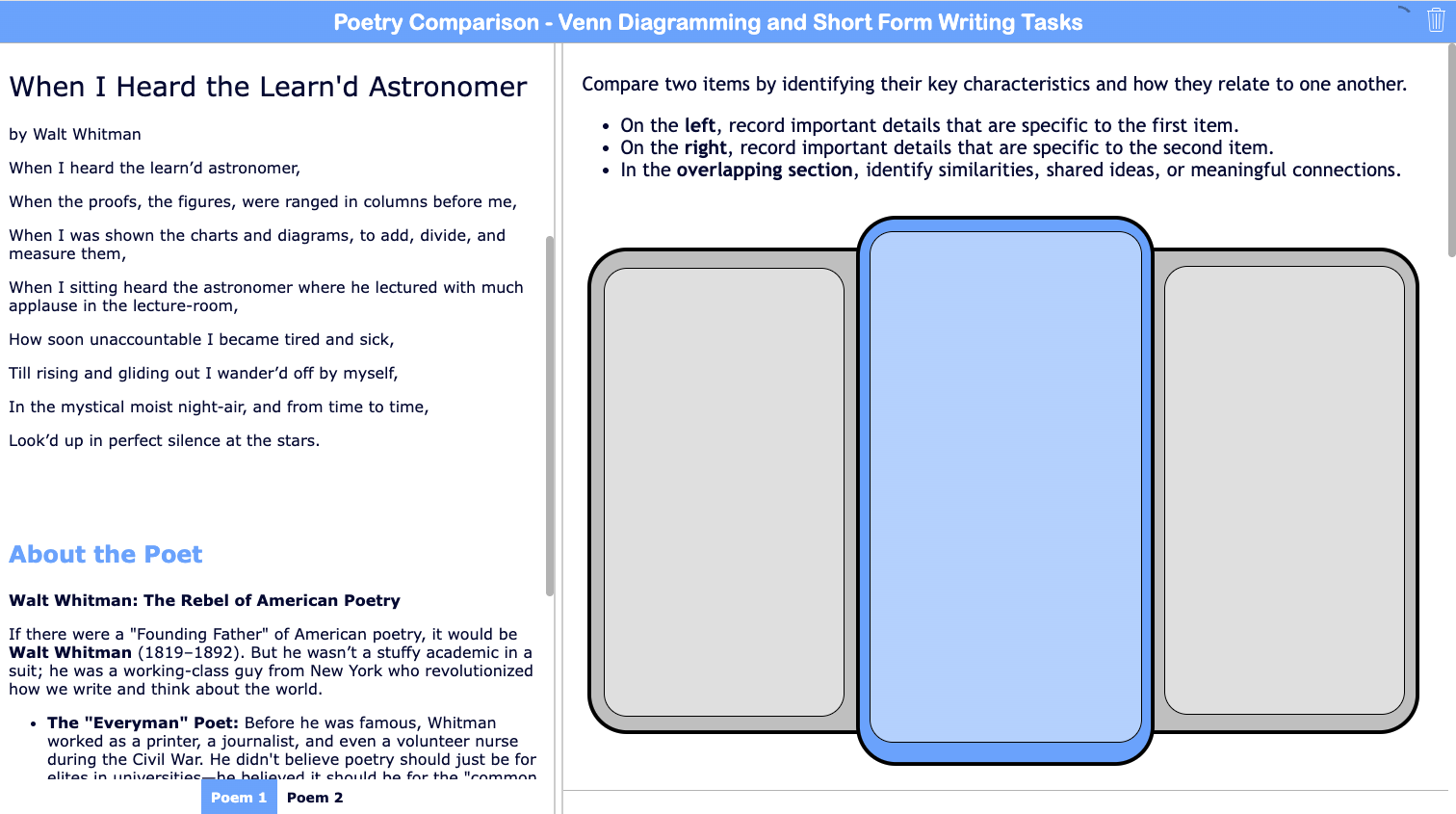
1. Venn Diagram for Writing: A Graphic Organizer for Comparison and Synthesis
The Venn diagram is a familiar structure, but its impact depends on what students are asked to compare and how they use the information. Students might compare two texts, two characters, two perspectives, two solutions, or two representations of the same idea. The goal is not simply to identify similarities and differences, but to determine which details matter and how those details shape meaning.
This shifts the task from listing to decision-making. Students must choose what belongs in each section, justify those choices, and consider how the parts relate to a larger idea. The comparison itself matters less than the thinking it produces.
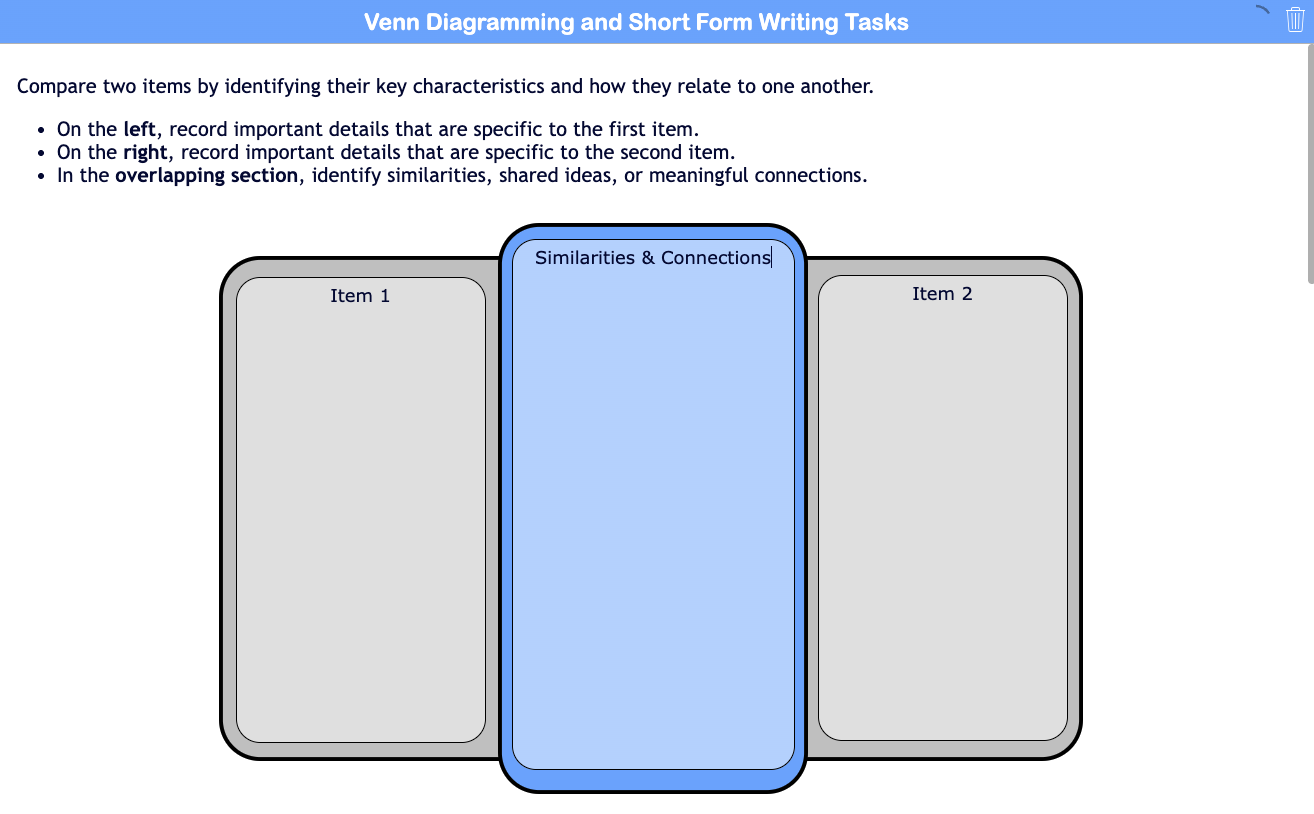
When used this way, the Venn diagram becomes a bridge to writing. The overlap is not just a shared space—it becomes a site of meaning, while the differences introduce tension that can be explored, challenged, or resolved through writing.
Short-form writing tasks extend that thinking in more open and inventive ways:
- Write a “rule” or principle that explains when the two ideas align and when they diverge.
- Compose a short dialogue where each side responds to the other, revealing their key differences.
- Create a metaphor or image that captures how the two ideas relate to one another.
- Write a “tension statement” that names the most important conflict between the two perspectives.
- Identify a blind spot: what is something neither side fully accounts for?
- Write a one-sentence insight that could only be formed by considering both together.
- Design a “third space” response: what would a new idea look like if it combined or moved beyond both?
- Write a headline or title that captures the relationship between the two ideas.
These prompts push students beyond comparison into interpretation, synthesis, and idea-building. Because students are writing from their own diagram, their responses are more specific, more original, and more difficult to generalize.
This structure works across disciplines and contexts, providing a flexible entry point into deeper thinking while building toward more extended writing and stronger performance on compare-and-contrast writing assignments.

Ready-to-Use Venn Diagram and Short Form Writing Activity
This ready-to-use activity invites students to compare two poems—Walt Whitman’s "When I Heard the Learn’d Astronomer" and Elizabeth Bishop’s "Sandpiper"—using a Venn diagram to organize their thinking. As they read and listen, students use the multi-colored highlighter tool to annotate each text, identifying patterns, language, and details that stand out. They then map key differences and connections before choosing a short-form writing task to extend their thinking. By combining annotation, visual organization, and writing, this structure helps students move beyond surface-level comparison to deeper interpretation of how each poem explores similar ideas in different ways.
2. Empathy Mapping for Writing: A Graphic Organizer for Character Analysis
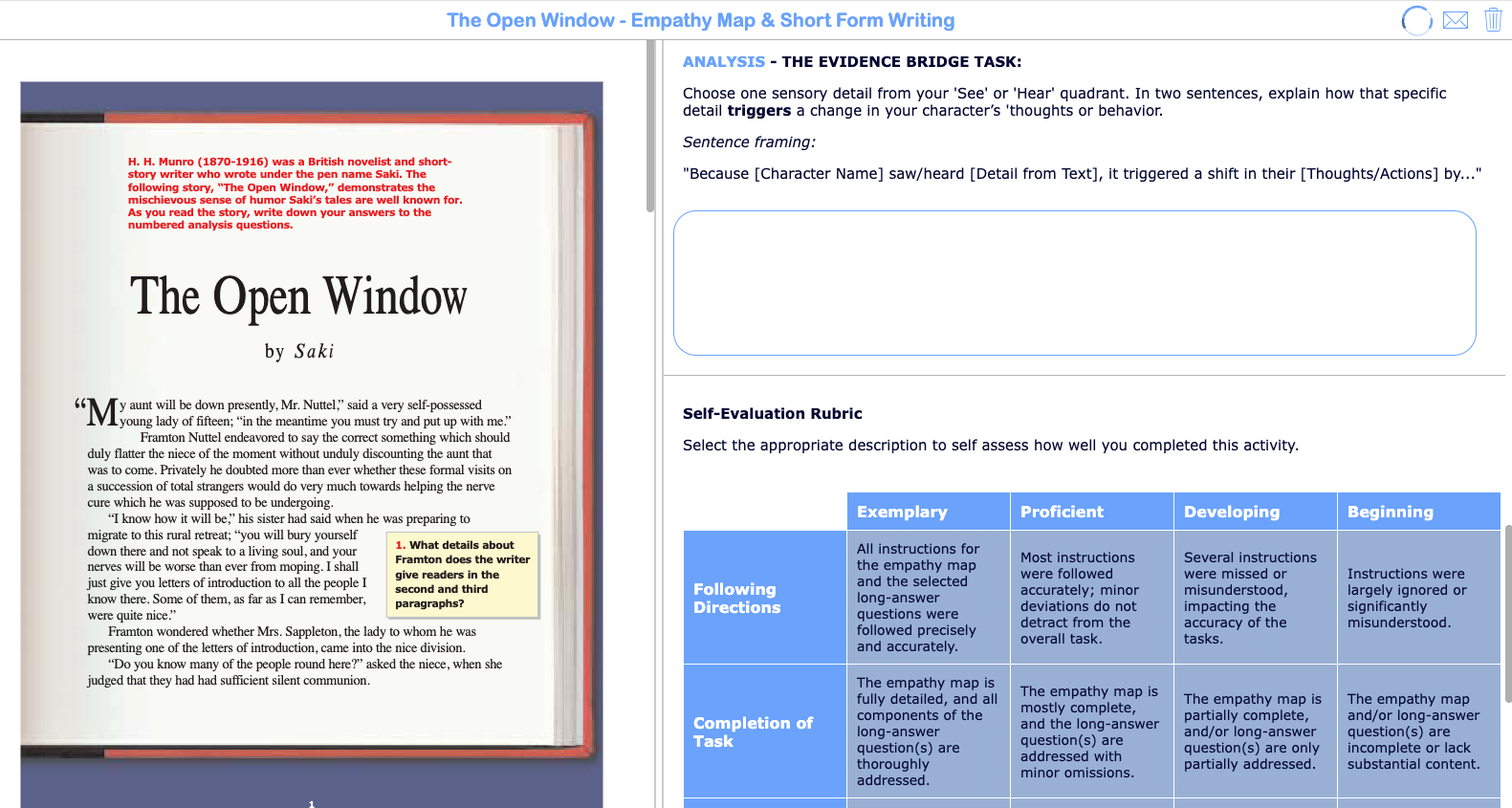
Empathy mapping helps students track what a single character or perspective thinks, feels, says, and does. Each map focuses on one character, requiring close reading and careful attention to both explicit details and inferred meaning. The Empathy Map graphic organizer surfaces evidence and interpretation at the same time. Students begin to notice gaps between what is said and what is actually meant.
In the empathy mapping activity below made with BookWidgets, students complete the annotate picture question by typing in their textual evidence and notes in each box. If you want to ensure that students are not copy/pasting response from AI, you can enable the copy/paste restrictions in the general settings of the widget editor.

This structure becomes even more powerful when used iteratively as a pre-writing strategy for literary analysis and character-based writing assignments. Students can create multiple empathy maps for different characters within the same text. In character-alike groups, students can compare how they interpreted the same character, often noticing differences in emphasis or inference. In mixed groups, they can examine how different characters experience the same events and respond to one another.
Short-form writing tasks extend that thinking:
- Write a brief internal monologue at a moment of high tension.
- Rewrite a line of dialogue to reveal the hidden subtext.
- Explain how a specific detail influences the character’s thinking or behavior.
- Describe how the character would respond if one key detail in the scene changed.
Because students are writing from their map, their responses are grounded, specific, and more difficult to generalize.

Ready-to-Use Empathy Mapping and Short Form Writing Activity
This ready-to-use activity uses "The Open Window" by Saki to model how empathy mapping can lead into short-form writing. The layout intentionally places the text (as a PDF) alongside the map and writing tasks, keeping everything in one space for easy navigation. This activity also includes a rubric that can be used for student self-assessment and teacher feedback. Teachers can duplicate this activity, swap in their own texts or curricular materials, and reuse the same text-agnostic prompts, making it simple to adapt while maintaining a consistent structure for students.
3. Journey Mapping for Writing: Tracking Character Development and Change
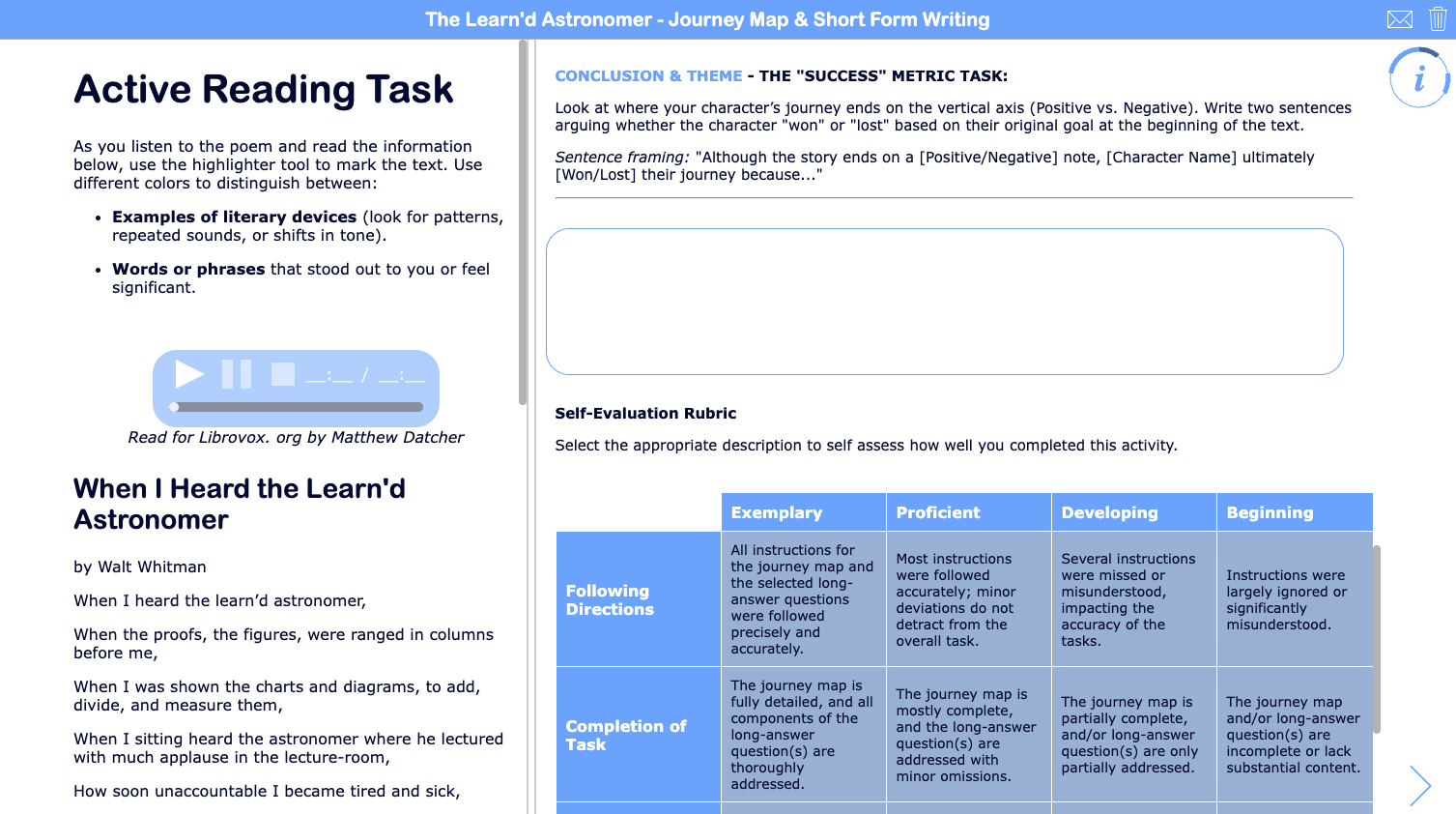
Journey mapping asks students to track a single character’s or narrator’s experience over time, focusing on emotional highs, lows, and turning points.
Students begin by identifying key moments in the text and placing them along a timeline from beginning to end. They then map each moment based on the character’s emotional state, creating a visual pattern of peaks, valleys, and shifts. As they build the map, students must decide which events matter most and how those events affect the character.
Unlike a traditional plot diagram, this structure centers interpretation. Students are not just identifying what happened, but evaluating where change occurs for a specific character and why it is significant.
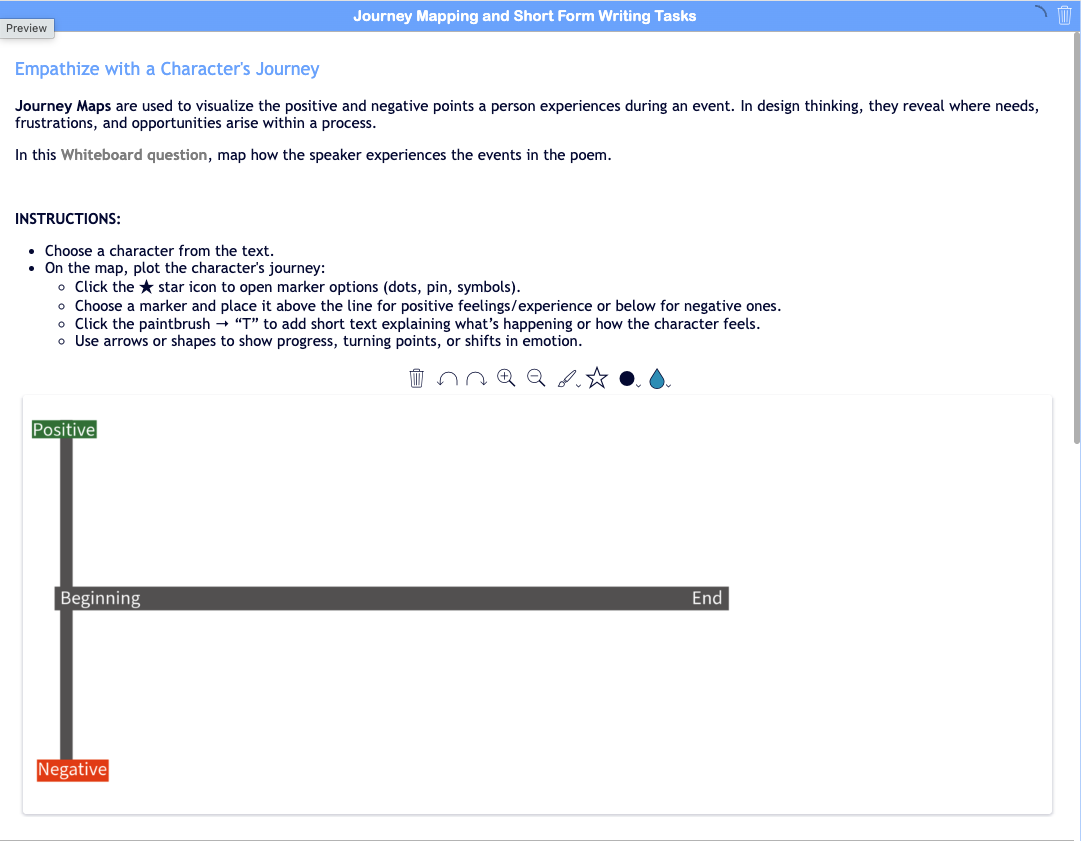
This pre-writing graphic organizer can be repeated across multiple characters within the same text. It can also be used in character-alike groups, where students map the same character and compare their interpretations. While the overall shape of the journey may be similar, students often differ in how strongly they rate key moments or which events they see as most significant.
When students compare journey maps—either within the same character or across different characters—patterns begin to emerge. One character’s lowest point may align with another’s moment of success, and the same event may carry different meaning depending on perspective.
Writing tasks build on those decisions:
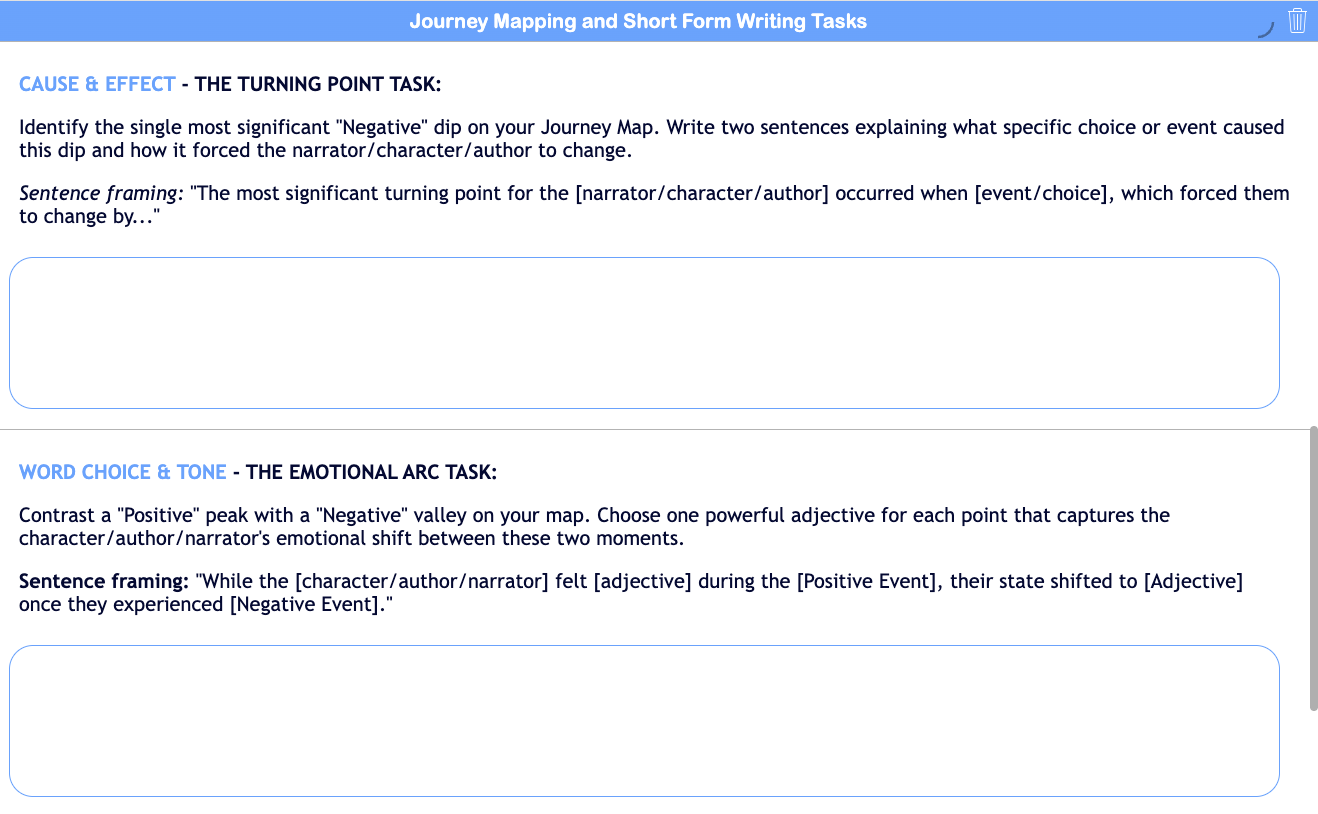
- Identify the most significant turning point and explain what caused it.
- Compare a high point and a low point using precise language.
- Argue whether the character ultimately succeeded or failed based on their original goal.
- Explain how the character’s thinking changes from beginning to end.
Pairing journey mapping with the above short-form writing tasks pushes students beyond summary into analysis and evaluation of character development.
Ready-to-Use Journey Mapping and Short Form Writing Activity
This ready-to-use activity features Walt Whitman’s "When I Heard the Learn’d Astronomer" to show how journey mapping and short-form writing can deepen students’ engagement with even very short texts. Students listen to an audio recording while reading the poem, creating a multi-modal experience that supports interpretation. They then map the speaker’s emotional shifts across the poem before choosing a short-form writing task to extend their thinking. This example demonstrates that meaningful writing does not require lengthy texts—poems and other short readings can be just as powerful when students are asked to trace change, make decisions about what matters, and write from their understanding.
4. Sketch & Tell: A Visual Thinking Strategy for Writing and Synthesis
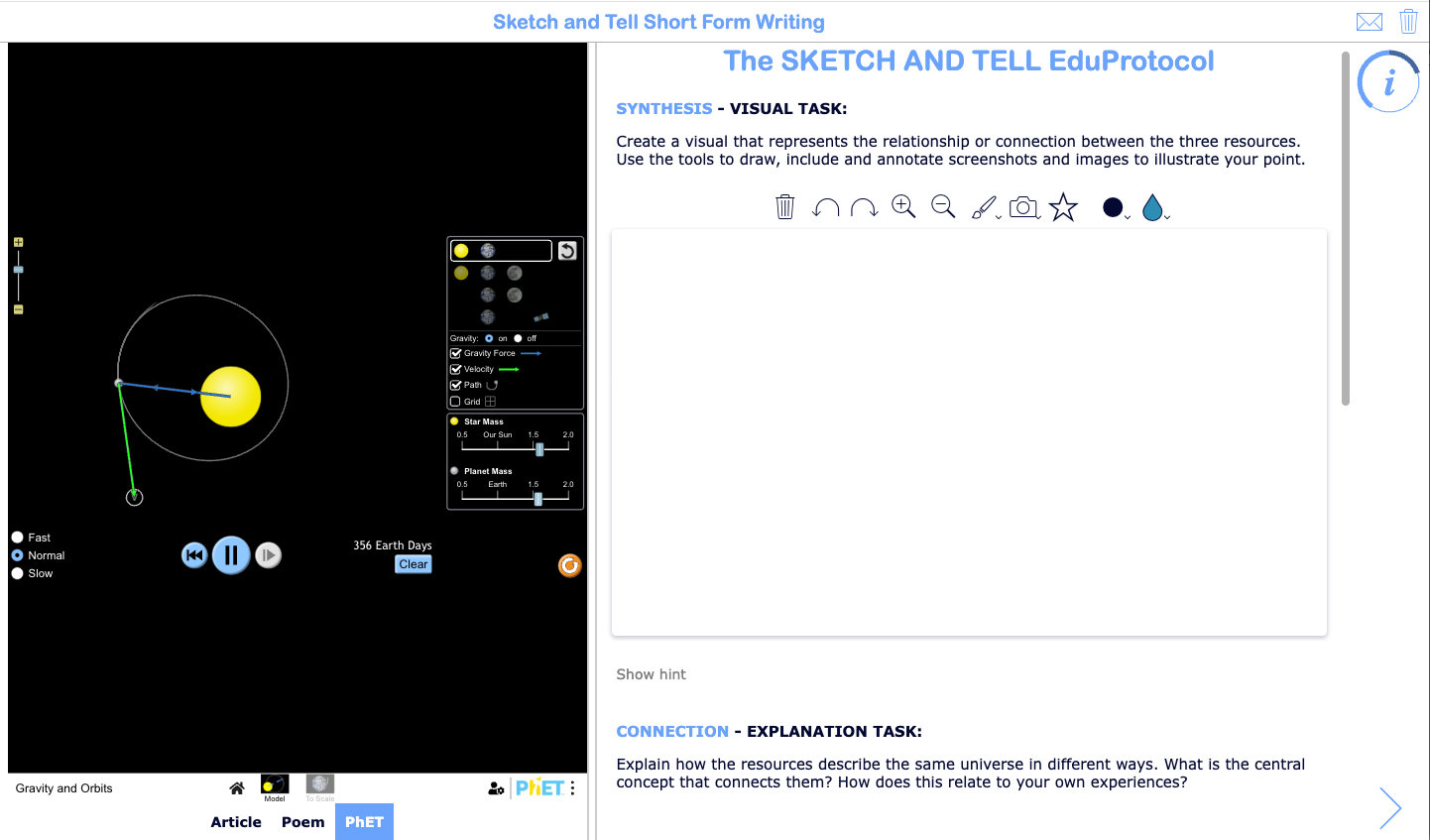
This structure is based on the Sketch & Tell EduProtocol, created by Jon Corippo and Marlena Heburn, where students create a visual representation of a concept and then explain their thinking in writing. It is a fast, repeatable routine that encourages both creativity and clarity.
Looking for more ways to get students thinking with EduProtocols? EduProtocols are simple, repeatable lesson structures designed to build student thinking and engagement through consistent routines. Check out these resources.

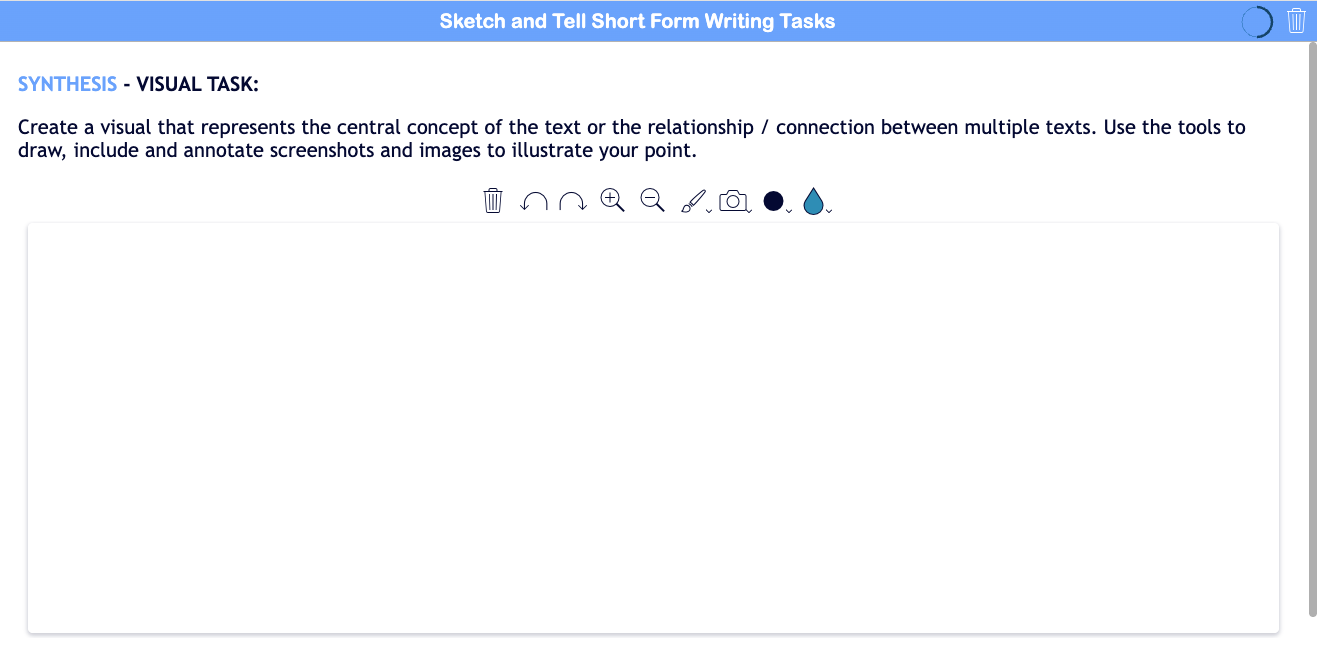
Students begin by creating a visual that represents the key concept or idea explored within one source or across multiple sources. The goal is not artistic quality, but conceptual clarity. The act of sketching helps students externalize their thinking and identify connections that may not be obvious through writing alone.
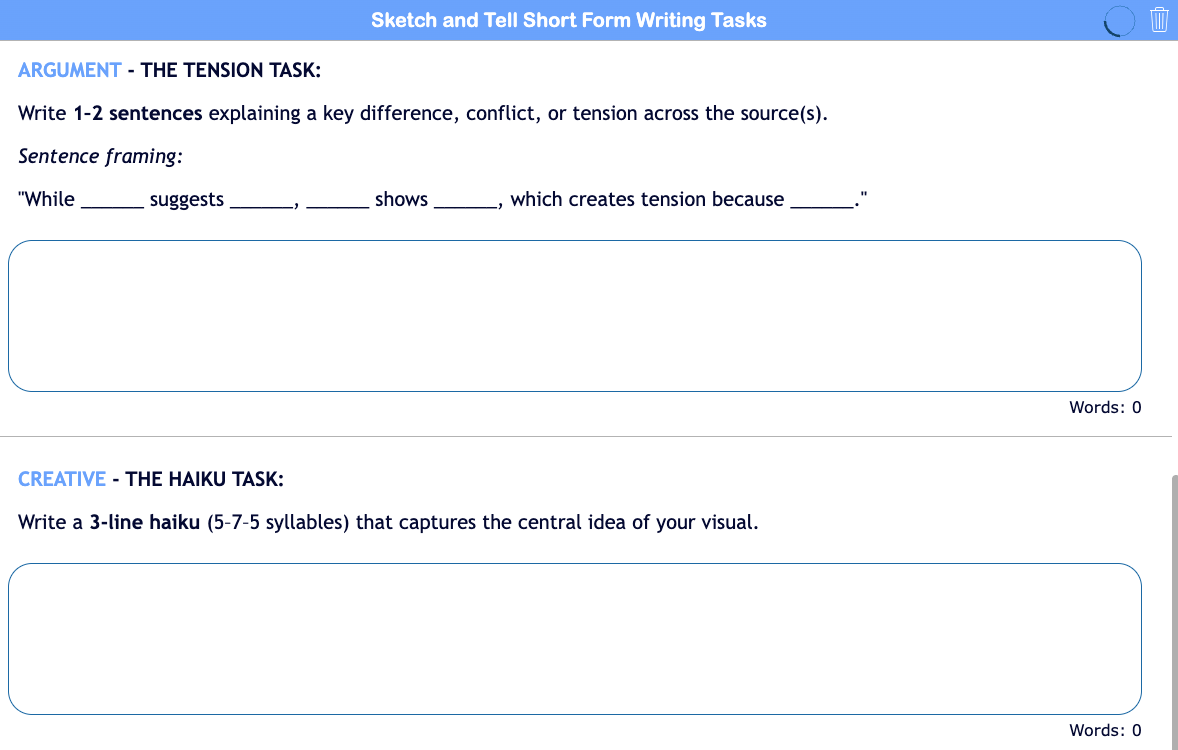
The “tell” phase moves that thinking into writing, but it does not have to stop at a single explanation. Additional short-form writing tasks can extend and deepen the synthesis in more creative and interpretive ways:
- Explain how the two sources represent the same idea in different ways.
- Identify the central concept that connects both sources.
- Write a “tension statement” that captures what one source emphasizes that the other leaves out.
- Compose a short metaphor or analogy that unifies both sources into a single idea.
- Write a three-line haiku that captures the central concept.
- Create a one-sentence claim that could serve as the thesis for a longer piece of writing.
- Write from the perspective of one source responding to the other.
- Describe how your understanding changed after engaging with both sources.
These types of short form writing prompts move students beyond explanation into interpretation, synthesis, and creative expression, while still grounding their thinking in the content.
This structure is especially effective after students have worked through more structured organizers. It provides space for synthesis, transfer, and deeper meaning-making, helping students move from analyzing ideas to connecting and communicating them with clarity.
Ready-to-Use Sketch and Tell Short Form Writing Activity
This ready-to-use activity uses the Sketch & Tell EduProtocol to guide students through a cross-curricular, multi-modal experience. Students engage with three resources—Walt Whitman's poem "When I Heard the Learn'd Astronomer", an article from Futurism titled "Evidence Grows That AI Chatbots Are Dunning-Kruger Machines", and a PhET simulation on Gravity and Orbits—then create a visual that represents the connections across them before extending their thinking through short-form writing. By bringing together literary, informational, and interactive sources in one space, this structure supports synthesis across disciplines and encourages students to move beyond individual texts to develop a unified understanding of a shared concept.
💡Check out this blog post, 6 Inspiring Lesson Plans for Teaching STEM with Interactive Simulations, for other ready-to-use activities featuring PhET simulations integrated in BookWidgets.
How to Assess Short-Form Writing and Provide Feedback Efficiently
One of the most common concerns with adding more writing is grading. The goal of short-form tasks is not to create more work, but to shift when and how feedback happens.
Because these formative writing responses are short and focused, they are faster to review and easier to compare across a class. Teachers can identify patterns, misconceptions, and gaps in understanding much earlier in the process, when feedback is more useful and actionable.
When structured through BookWidgets, the formative assessment process becomes even more efficient. Student responses are organized in a central reporting dashboard, allowing teachers to review work by question or by student. Instead of working through full essays one at a time, you can quickly scan responses collectively, identify trends, and respond strategically.
At a high level, BookWidgets supports multiple ways to give feedback:
- Add a summarizing comment for overall feedback
- Provide specific comments on individual responses
- Use marking and annotation tools directly on student work
- Confirm or refute a student's self-evaluation via an embedded rubric
- Use keywords for auto-scoring or as a checklist rubric
- Apply correction labels to quickly categorize responses
- Record audio feedback for a more personal and efficient response
Explore these resources and see the BookWidgets reporting dashboard in action. 👇


For the specific structures used in this post, a few features are especially useful for open-ended thinking:
- For open-ended questions, such as long answer, rich text paragraph, whiteboard, photo and audio response, you can attach a rubric for quick scoring of student work.
- In annotate picture questions, students make their thinking visible spatially, and teachers can quickly scan patterns across a class before diving into individual responses.
- In long-answer questions, you can also use keyword-based auto-scoring to flag key ideas while still reviewing responses for nuance and interpretation.
- You can include a rationale with an answer key or exemplar, giving students a model to compare their thinking against while still allowing for variation in responses.
💡 Looking for more ways to design and assess open-ended responses? This Open-Ended Questions guide explores how to use open-ended question types in BookWidgets to increase engagement while keeping feedback manageable.
This Scoring Open-Ended Questions with Rubrics guide provides an in-depth look at how to add rubrics and score student work.
With these activities, use feedback to feed forward. Instead of focusing only on what students did right or wrong, give them clear direction on what to refine, extend, or try next—before moving on to long-form writing tasks.
Long-form writing is still the goal. This process helps students arrive there with stronger thinking and greater confidence. Short-form reps build the thinking students need to succeed in long-form writing performance.

How to Use AI as a Thinking Partner in Student Writing
At some point, students will use AI. The question is not if, but how.
If students turn to AI before they have done any thinking, it becomes a shortcut. If they engage with AI tools after they have built ideas, the AI can become a thinking partner and transformative collaborator.
This is where the earlier work matters. Graphic organizers and short-form writing tasks give students something to bring into the interaction with AI. Instead of asking AI to generate an answer, they are asking it to respond to their thinking.
In this model, AI is not replacing the work. It is reacting to it.
What does this look like in practice?
After completing a short-form writing task, students can use AI to refine and extend their ideas:
Clarify thinking
“Here is my explanation of the narrator’s turning point. Where is my reasoning unclear or underdeveloped?”Test an interpretation
“Here is my claim about the character’s motivation. What is a possible counterargument based on the same text?”Deepen analysis
“I identified this moment as the most important shift. What other moments could also be considered significant, and why?”Strengthen evidence use
“Here is my response. What additional types of evidence could make this argument stronger?”Explore perspective
“How might another character interpret this same event differently?”Refine writing
“Rewrite this explanation to make the reasoning more precise, but keep my original idea intact.”
In each case, the student brings an initial idea, and AI helps extend, challenge, or clarify that thinking. The cognitive work remains with the student.
This shift also changes the role of AI prompting. Instead of asking AI “What is the answer?” students are learning to ask, “How can I improve or rethink what I’ve already started?”
When students build thinking first and use AI second, the tool becomes part of the learning process rather than a way around it.
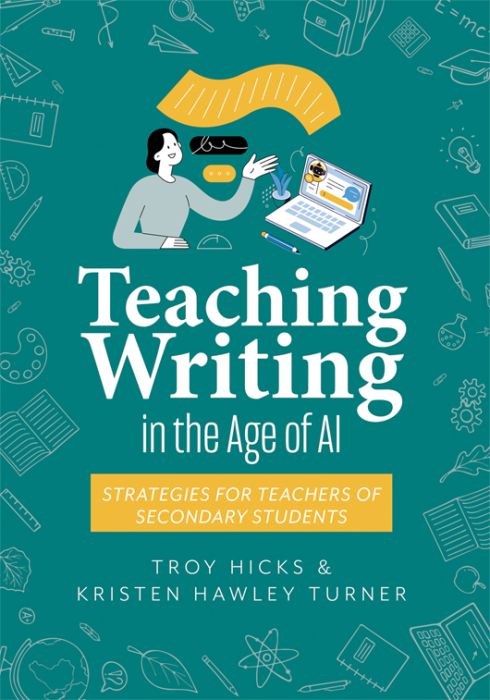
📚 Book Recommendation: Interested in exploring AI as a thinking partner for students? Check out Teaching Writing in the Age of AI: Strategies for Teachers of Secondary Students by Troy Hicks and Kristen Hawley Turner.
Teaching Writing in the Age of AI: Strategies for Teachers of Secondary Students by Troy Hicks and Kristen Hawley Turner
Frequently Asked Questions About Graphic Organizers, Writing Instruction, and AI
What graphic organizer is best for teaching writing?
The best graphic organizer depends on the type of thinking you want students to do before writing. Venn diagrams support comparison and synthesis, empathy maps help students analyze characters and perspectives, journey maps track growth and change over time, and Sketch & Tell activities encourage synthesis across multiple sources. The most effective organizer is the one that matches the thinking skill students need to practice.
How do graphic organizers improve student writing?
Graphic organizers help students generate ideas, organize evidence, identify patterns, and develop interpretations before they begin drafting. By making thinking visible, graphic organizers reduce cognitive overload and give students a stronger foundation for writing. They also provide teachers with opportunities for formative assessment and feedback earlier in the writing process.
What are AI-resistant writing activities?
AI-resistant writing activities require students to make decisions, interpret evidence, explain reasoning, and build ideas from their own thinking. Rather than asking students to simply produce an answer, these activities focus on the thinking process behind the answer. Graphic organizers and short-form writing tasks are effective AI-resistant strategies because they make student thinking visible before AI enters the workflow.
How can teachers use AI without encouraging cheating?
The key is to have students build thinking before using AI. Graphic organizers and short-form writing activities help students generate their own ideas first. Once students have developed an initial response, AI can be used as a thinking partner to refine reasoning, consider alternative perspectives, strengthen evidence, or improve clarity without replacing the student's original thinking.
Can graphic organizers be used across different subjects?
Yes. While graphic organizers are often associated with English Language Arts, they can be used in social studies, science, mathematics, world languages, career and technical education, and other subject areas. Any task that requires students to compare ideas, analyze perspectives, track change, or synthesize information can benefit from a structured thinking routine.
Are these BookWidgets graphic organizer templates ready to use?
Yes. All of the graphic organizers and short-form writing activities featured in this article are ready-to-use BookWidgets templates. Teachers can copy the activities to their own BookWidgets account, adapt them to their curriculum, and share them immediately with students.
Can I use these BookWidgets activities in Google Classroom or another LMS?
Yes. BookWidgets activities can be shared through Google Classroom, Microsoft Teams, Canvas, Moodle, Schoology, and many other learning management systems. Student responses are automatically collected in the BookWidgets reporting dashboard, making it easy to review work and provide feedback.
Final Thought: Designing Writing Tasks in the Age of AI
Students do not avoid thinking because they are unwilling. More often, they avoid it because the path into the writing process is unclear or feels out of reach.
When scaffolded writing instruction is structured to include visible thinking routines and manageable steps—through graphic organizers, short-form writing tasks, and timely formative feedback—students are more likely to begin, persist, and develop their ideas with confidence.
This approach does not lower expectations; it builds toward authentic assessment. By the time students reach long-form writing, they are no longer starting from scratch. They are working from a foundation of critical thinking they have already developed, tested, and refined.
AI in the classroom does not have to replace student thinking. When used as an AI thinking partner at the right point in the process, it can help extend and clarify student work. The goal is not to remove the tool, but to design learning experiences where students remain the primary thinkers, and AI becomes a collaborator in strengthening their original ideas.
In the end, the shift is simple but significant:
build thinking first, then build writing—and only then bring in AI.
Explore more with BookWidgets
Want to learn even more about creating and assessing engaging digital writing activities with BookWidgets?
✔️ If you're new to BookWidgets, start by checking out our Getting Started with BookWidgets blog post to help you get up and running quickly.
✔️ Sign up for upcoming free webinars and view recordings on the BookWidgets Teacher Academy Page.
✔️ Learn more about our special, limited-time pricing for groups of teachers for purchasing BookWidgets now without having to wait for the next school year or budget cycle.
✔️ Follow BookWidgets on BlueSky and LinkedIn and join our teacher community on Facebook!
✔️ And, be sure to connect with me, too, on BlueSky, Facebook, and LinkedIn!


