5 Ways to Encourage Students to Write Using Digital Tools
 Brenda Berg and Kate Baker —
Discover 5 practical ways to encourage students to write, plus digital writing tools that support prompts, drafting, feedback, revision, and student confidence.
Writing can feel exciting for some students and intimidating for others. Some students have ideas ready to pour onto the page, while others need support finding a topic, organizing their thoughts, or feeling confident enough to begin.
If you want to encourage students to write, start by making the writing process feel more approachable. Meaningful prompts, teacher modeling, time for practice, and clear feedback can help students build confidence one step at a time.
Digital writing tools can support this process by making writing more interactive, visible, and manageable for students across grade levels.
5 ways to encourage students to write
1. Use writing prompts to help students get started
One of the best ways to encourage students to write is to give them a clear, engaging starting point. Writing prompts can help students move past the blank page and focus their attention on one idea, image, question, or scenario.
Prompts work best when they leave room for student choice. Instead of telling students exactly what to write, give them a spark that invites their own thinking. This could be a photo, a sentence starter, a short video clip, a question, or a set of random words students must weave into a response.
With BookWidgets, teachers can use open-ended questions, image prompts, randomness widgets, and interactive activities to help students generate ideas and begin writing.
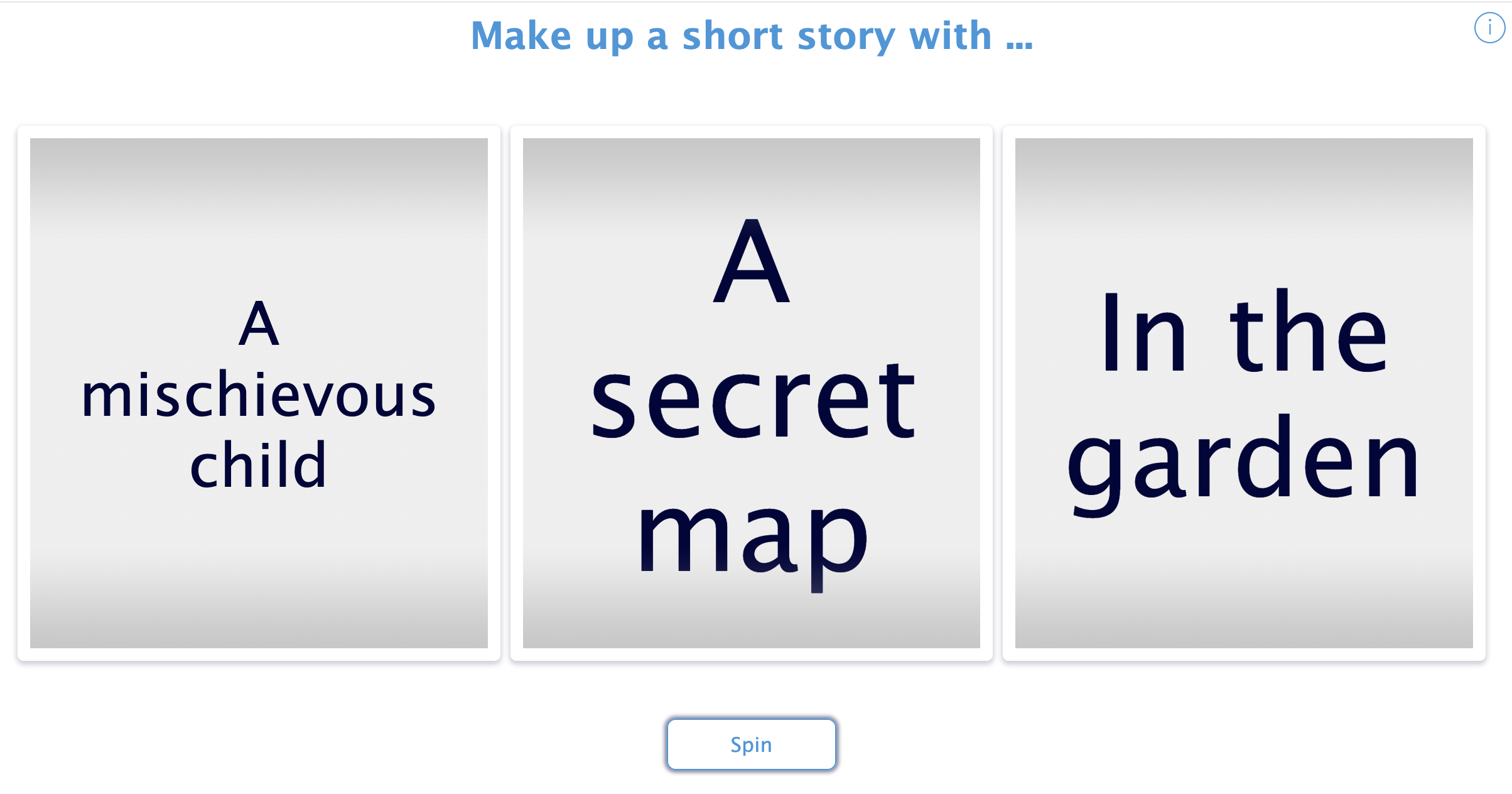
Try it with BookWidgets: Use this Write a Short Story About... randomness spinner to give students a playful starting point for creative writing.
Click to spin the randomness widget and generate a short story prompt
2. Model the writing process
Students benefit from seeing that writing does not happen perfectly the first time. When teachers write in front of students, they can model how writers brainstorm, draft, pause, rethink, revise, and make choices.
This also helps students understand that feedback is part of the writing process. When students see a teacher revise a sentence, change a word, or reorganize an idea, they begin to understand that writing improves through practice.
Modeling can be simple. Write a short response on the board, think aloud as you revise it, or ask students what they notice. This gives students language for talking about writing and helps them become more thoughtful readers of their own work.
3. Create a workshop environment
A writing workshop environment gives students time, structure, and support as they work through the writing process. Instead of assigning a topic and waiting for a final draft, teachers can build in time for brainstorming, drafting, peer feedback, teacher conferences, and revision.
This approach also allows students to work at different stages. Some may be generating ideas, while others are revising a draft or preparing to publish. Teachers can meet with individuals or small groups to provide targeted support.
Digital tools can support this process by helping students organize ideas, respond to feedback, and reflect on their progress. Teachers can also use rubrics, checklists, planning activities, and short reflection prompts to help students understand what they are working on and what they should improve next.
4. Give students authentic reasons to write and share
Students are often more motivated to write when they understand the purpose behind the task. Writing does not always need to be shared publicly, but students should know why they are writing and who their audience might be.
They might write to explain an idea, persuade a reader, reflect on learning, respond to literature, share a story, or teach others about a topic. They might write for classmates, families, younger students, community members, or themselves.
When writing has a clear purpose, students are more likely to think about voice, structure, word choice, and audience. They begin to see writing as communication, not just an assignment.
5. Make time for low-pressure writing practice
Not every piece of writing needs to become a polished final draft. Students also need time to write without the pressure of grades, presentations, or perfection.
Quick writes, journals, exit tickets, reflection prompts, and short creative responses can help students build writing fluency. These low-pressure routines give students space to explore ideas, experiment with language, and develop confidence over time.
Low-pressure writing can also help teachers see what students are thinking. A short response can reveal confusion, curiosity, opinions, or connections that might not appear in a multiple-choice question.
Digital writing tools to encourage student writing
The best digital writing tools are the ones that support your instructional goals. Some tools help students brainstorm ideas, some support drafting and revision, and others help students publish or share their work with an audience.
BookWidgets
 BookWidgets helps teachers create interactive writing activities, prompts, rubrics, reflections, and formative assessments. Students can respond to open-ended questions, analyze images, organize ideas, and demonstrate their understanding in writing.
BookWidgets is best for guided writing practice, prewriting, short responses, feedback, and reflection rather than extensive drafting. For longer essays or full writing projects, teachers may pair BookWidgets with tools like Google Docs or Microsoft Word Online so students can draft, revise, and collaborate in a dedicated writing space.
Open-ended questions are a simple way to make student thinking visible. Explore these open-ended question activities for student writing and engagement for more ways to support short written responses, reflections, and writing practice.
Rubrics can help students understand expectations before they write and reflect on feedback during revision. Learn more about creating digital rubrics for student evaluations.
Writing instruction can also connect to creative writing and literature. Explore these poetry classroom activities and interactive Shakespeare activities for more inspiration.
Google Docs or Microsoft Word
 Google Docs and Microsoft Word Online are familiar tools for drafting, revising, and collaborating. Students can write, comment, suggest edits, and respond to feedback in a shared digital space.
These tools work well for longer writing assignments, peer review, collaborative writing, and teacher conferences because students and teachers can see the writing process develop over time.
Book Creator
 Book Creator allows students to create multimedia books using text, images, audio, video, and drawings. It is a strong option when students are publishing stories, journals, research projects, portfolios, or class books.
Students can use Book Creator to combine writing with visuals and voice, making it especially useful for younger students, multilingual learners, and students who benefit from multiple ways to express their ideas.
Canva
 Canva can support visual writing projects such as storyboards, posters, comics, infographics, presentations, and digital publishing. Students can use templates to organize their ideas and communicate with both words and visuals.
This makes Canva useful for short-form writing, creative projects, persuasive writing, and assignments where design and audience awareness are part of the learning goal.
Adobe Express
 Adobe Express is a web-based design tool that allows users to create visual stories, webpages, graphics, and short videos without needing advanced design skills.
Teachers can have students create visual narratives, digital projects, or story-based webpages that combine images, text, and media. It works well for older students who are ready to think more intentionally about layout, audience, and visual communication.
BoomWriter
 BoomWriter is a classroom writing platform focused on student publishing, collaborative writing, and peer feedback. Students can contribute to class writing projects and participate in a voting process that helps them evaluate writing choices.
This can be useful when teachers want students to write for a real audience and see how their work contributes to a larger class project.
The Story Starter
 The Story Starter is a simple prompt generator that gives students a first line or story idea to build from. It can be useful for quick writes, creative writing warm-ups, or moments when students need help getting started.
Because it is simple and focused, teachers can use it without adding much setup time. Students can generate a prompt, write for a set amount of time, and then share or revise their responses.
Write About This
 Write About This is an iPad writing prompt app designed for elementary students. It includes image-based prompts and options for students to respond through writing and voice.
This can be a helpful option for younger students who benefit from visual prompts, choice, and a more guided writing experience.
Help students build confidence as writers
Encouraging students to write is not about making every student love every writing assignment. It is about helping students see that they have ideas worth developing and that writing is a process they can learn.
When teachers provide meaningful prompts, model the writing process, create time for practice, and offer clear feedback, students begin to build confidence. Digital tools can support that work by making writing more interactive, visible, and approachable.
Start small. Try one prompt, one routine, or one digital activity that helps students put their ideas into words. Over time, those small writing moments can help students grow into more confident, capable writers.
Discover more with BookWidgets
Want to create and assess engaging digital writing activities with BookWidgets?
✔️ New to BookWidgets? Start with our Getting Started with BookWidgets guide.
✔️ Sign up for upcoming free webinars or watch recordings on the BookWidgets Teacher Academy page.
✔️ Follow BookWidgets on BlueSky, LinkedIn, or join our teacher community on Facebook.


