
The Best Way to Grade Open-Ended Digital Assignments with Rubrics
 Lucie Renard —
Open-ended assignments often show the most meaningful student learning. A student’s written explanation, drawing, photo, or audio recording can reveal how they think, what they understand, and where they still need support. But these assignments can also be harder to grade than automatically scored questions.
How do you grade a science explanation fairly? How do you assess a student’s drawing, project photo, or speaking task consistently? How do you give useful feedback without spending hours writing the same comments again and again? That is where rubrics help. A scoring rubric gives teachers clear criteria for evaluating open-ended student work.
And now, BookWidgets makes this easier for open-ended digital assignments. Teachers can add a scoring rubric directly to selected open-ended question types: Long Answer, Rich Text Answer, Whiteboard, Photo, and Audio Recording.
When students submit their answers, teachers can review their work using the rubric that was added during widget configuration. This keeps the assessment criteria connected to the actual student response, making corrections clearer, faster, and more consistent.
Ready-to-use BookWidgets lesson ideas in this post
This post includes 10 practical rubric-based lesson ideas for open-ended digital assignments. I'm listing them here, but make sure to check each comprehensive lesson plan and ready-to-use widget activity below. I'll share some neat teacher tips and differentiation ideas for each open-ended assignment.
- Long Answer: Historical argument paragraph for middle school history
- Long Answer: Claim-evidence-reasoning response for high school biology
- Rich Text Paragraph: Literary analysis with quotations for secondary English
- Rich Text Paragraph: Multi-step math explanation for upper elementary math
- Whiteboard: Draw and label the water cycle for elementary science
- Whiteboard: Geometry proof sketch for high school math
- Photo: Art portfolio submission for middle school visual arts
- Photo: Real-world measurement investigation for elementary math
- Audio Recording: World language speaking practice for beginner learners
- Audio Recording: Reading fluency check for elementary literacy
You can find all these free lesson ideas, including the scoring rubrics, in this BookWidgets group. Teachers can use these ideas or start from scratch and create rubric-based BookWidgets activities that students complete digitally.
If you're just switching to digital evaluations, let me explain BookWidgets in 3 sentences:
- BookWidgets is an all-in-one interactive quiz maker for teachers that helps all teachers create interactive digital assignments and assessments (with a variety of 37 interactive question types.
- Teachers can share BookWidgets evaluations through their connected learning management systems, such as Google Classroom, Microsoft Teams, Canvas, Moodle, and many more, making digital activities easy to manage within their existing workflow.
- Student answers are collected and organized in a grading dashboard, where teachers can review work, give feedback, and evaluate performance efficiently.
What are rubrics, and why do they help with open-ended assignments?
A rubric is a scoring guide that explains how student work will be assessed. Instead of giving a single overall grade, the teacher evaluates specific criteria.
For example,
- a rubric for a written answer might include: accuracy; use of evidence; explanation; organization; vocabulary.
- a rubric for an audio recording might include: pronunciation; fluency; vocabulary use; task completion; clarity.
- a rubric for a drawing or uploaded project might include: completeness; correct labels; visual clarity; creativity; subject accuracy.
Rubrics are especially useful for open-ended digital assignments because students will submit variations of the same assignment. A rubric helps the teacher focus on the learning goal behind the response.
How BookWidgets supports rubric-based assessment + NEW!
In BookWidgets, you could already add a rubric question to your entire assignment. This question was visible for students, and they could scale themselves for the task as well. A good setup for both transparency about the scoring criteria and a self-evaluation task for students.
With rubric support for Long Answer, Rich Text Paragraph, Whiteboard, Photo, and Audio Recording questions, teachers can now assess more open-ended student work directly inside their digital activities.
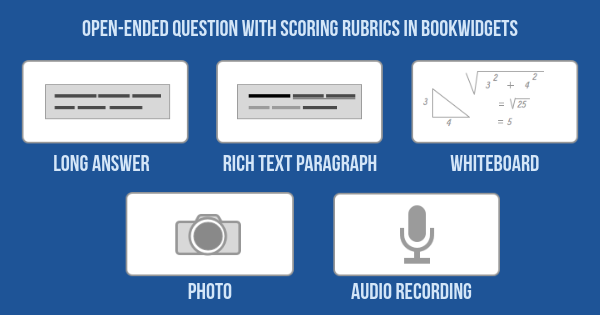
That means students can complete meaningful tasks such as:
- writing an argument;
- explaining a math strategy;
- drawing a science model;
- uploading a photo of a project;
- recording a spoken answer;
- reading aloud;
- reflecting on their learning.
Teachers can then review the submitted work using the scoring rubric attached to that specific question. This supports digital formative assessment, project-based learning, language practice, feedback, and skill-based grading.
These question types are ideal when students need to explain, create, draw, upload, speak, reflect, or show their thinking in a way that cannot be graded automatically.
During widget configuration, teachers can attach a rubric to the question by opening the 'scoring and correction' panel below the question. Later, when students submit the widget, teachers can review the students’ work using the attached rubric.
This makes BookWidgets useful not only for automatically graded activities, but also for open-ended assessment, high-stakes exams, project work, speaking tasks, written responses, creative work, and formative feedback.
How to set up a rubric-based digital assignment in BookWidgets
Besides adding a rubric question, teachers can now attach a scoring rubric to open-ended questions - not visible for the students, but a huge help with reviewing student answers afterward. Follow this 3-step plan when creating an open-ended assignment with a scoring rubric.
Step 1: Choose the right open-ended question type
Start with the learning goal. What do students need to show?
- Choose Long Answer when students need to write a paragraph, explanation, reflection, argument, or extended response.
- Choose Rich Text Answer when students need more formatting options, such as headings, bullet points, tables, emphasized text, quotations, or structured written work.
- Choose Whiteboard when students need to draw, annotate, label, sketch, solve visually, or show their thinking in a diagram.
- Choose Photo when students need to submit work from the physical world, such as a notebook page, project, model, artwork, measurement task, or experiment result.
- Choose Audio Recording when students need to speak, explain orally, read aloud, practice pronunciation, reflect verbally, or demonstrate fluency.
A strong rubric works best with a clear task.
Instead of writing: Explain your answer, write: Write one paragraph explaining your answer. Include a clear claim, two pieces of evidence from the text, and one sentence explaining how your evidence supports your claim.
Instead of writing: Upload your project, write: Upload one clear photo of your completed bridge model. Make sure the full bridge, the materials, and the weight-test setup are visible.
The more specific the task, the easier it is to create a useful rubric.
Step 2: Add the scoring rubric in the scoring and correction options
While configuring the question, go to the scoring and correction options at the bottom of the question configuration and choose: add your rubric. Have you never created a rubric in BookWidgets before? Check this video about the rubric question type. The setup for a scoring rubric is the same.
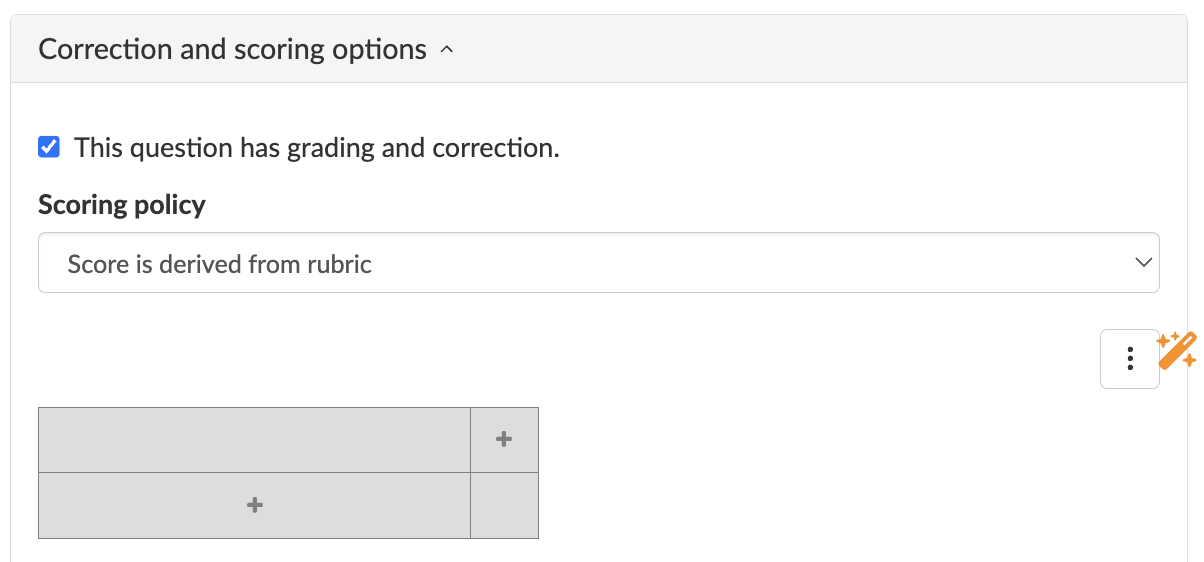
Build your rubric from scratch, or if you're already a BookWidgets pilot school testing out our AI prototype, click the magic wand to let the AI do the work for you. You can also enable the AI assistant and just ask "Add a scoring rubric to this question". The AI will read the instructions and understand the question set up. This way, it'll create the perfect scoring rubric in just a few seconds!
💡 Tip! Once you have a rubric for your open-ended assignments, you can export it to import again, later, in another open-ended BookWidgets question.
For most classroom assignments, keep the rubric short. Three to five criteria are usually enough. A practical classroom rubric often uses 3 or 4 performance levels. Here's an example of a configured scoring rubric in BookWidgets. Use fewer levels for short checks and more detailed levels for larger assignments.
Step 3: Review student work with the attached rubric
After students submit the widget, open their work in the BookWidgets reporting dashboard. The rubric attached to the question is available while you review the student response.
This keeps the scoring criteria close to the answer, so you do not need to switch between separate documents, spreadsheets, or printed rubrics.
There are two important steps to take here:
- Add feedback comments, correction labels, and audio feedback to the student's answers to provide personalized feedback. This type of feedback is very powerful for your students' learning journey. Check out this video about using annotation tools for the whiteboard and photo question in BookWidgets.
- Score the question by checking the right criteria performance levels in the rubric. This is where it gets interesting, as it goes beyond checking the criteria levels. You can also add comments to specific criteria and explain why you picked that level. The real magic lies in synchronizing your selection in the rubric with the total score on that question. Wondering how you can review a BookWidgets scoring rubric? Here's a quick video that will guide you through.
Use rubric results to plan next steps. Rubrics can do more than support grading. They can help you decide what to teach next.
For example:
- If many students score low on “use of evidence,” plan a mini-lesson on choosing strong evidence.
- If students struggle with “visual clarity,” show examples of clear diagrams.
- If audio responses are hesitant, add a short speaking practice activity.
- If students understand the answer but cannot explain their reasoning, create a follow-up exit ticket focused on explanation.
10 rubric-based digital lesson ideas for teachers
Below are 10 lesson ideas using the BookWidgets question types that now support scoring rubrics. Each idea includes a lesson card, some example tasks, a ready-made BookWidgets lesson with a scoring rubric, a teacher tip, and a differentiation idea.
1. Historical argument paragraph
| Icon | Area | Explanation |
|---|---|---|
| 🎓 | Subject & Grade | History, grades 7–8 |
| 🎯 | Learning goal | Students explain the most important cause of a historical event. |
| ❓ | BookWidgets question type | Long Answer |
| ⏱️ | Time needed | 20–30 minutes |
| 💡 | Activity idea | Ask students to write a short argument paragraph answering a historical question. |
Example tasks:
- “What was the most important cause of the American Revolution?”
- “Which factor contributed most to the fall of the Roman Empire?”
- “Was geography or leadership more important to the success of Ancient Egypt?”
Students should include a claim, two pieces of evidence, and reasoning that connects the evidence to the claim.
BookWidgets ready-made lesson:
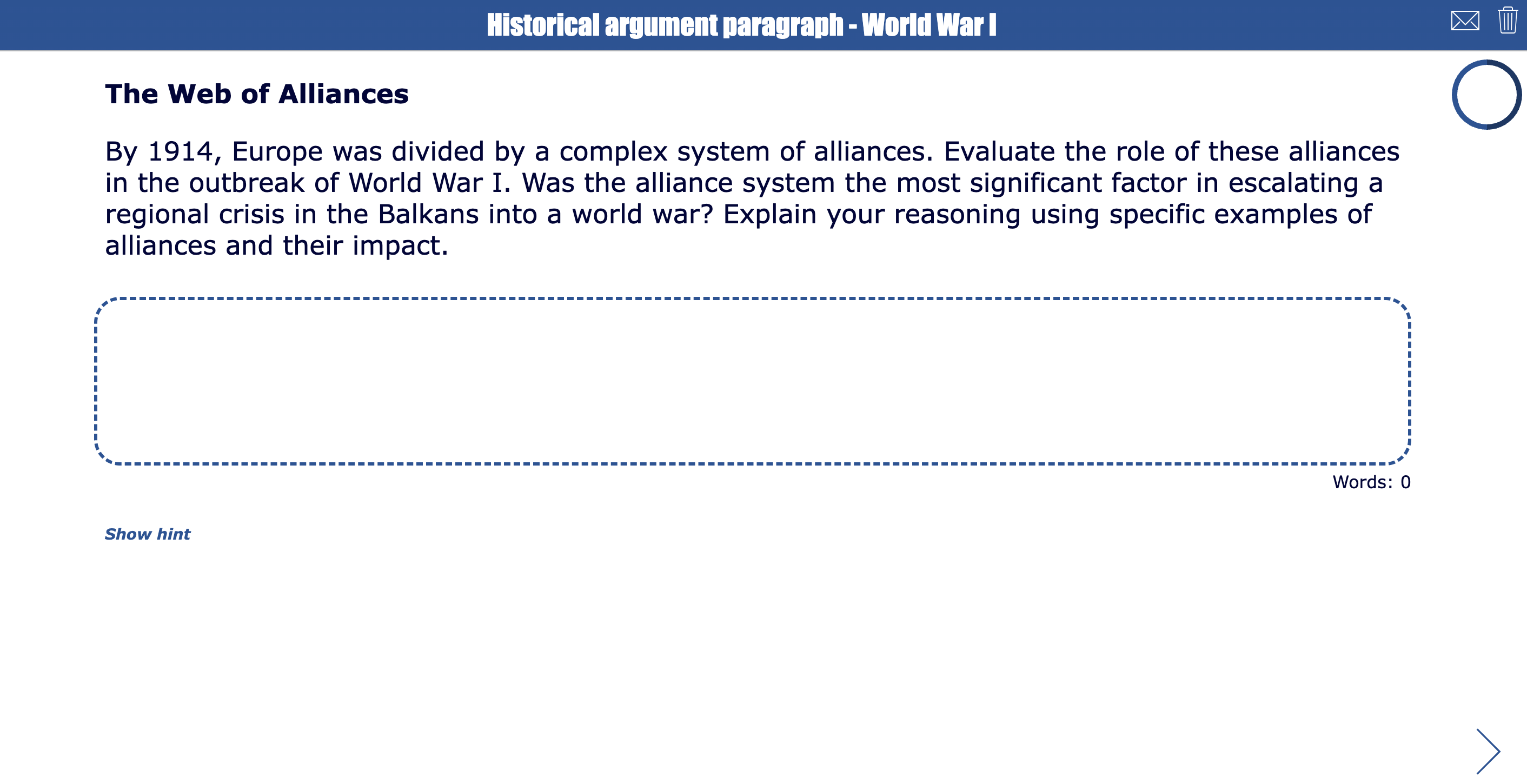
Matching scoring rubric for this open-ended question:
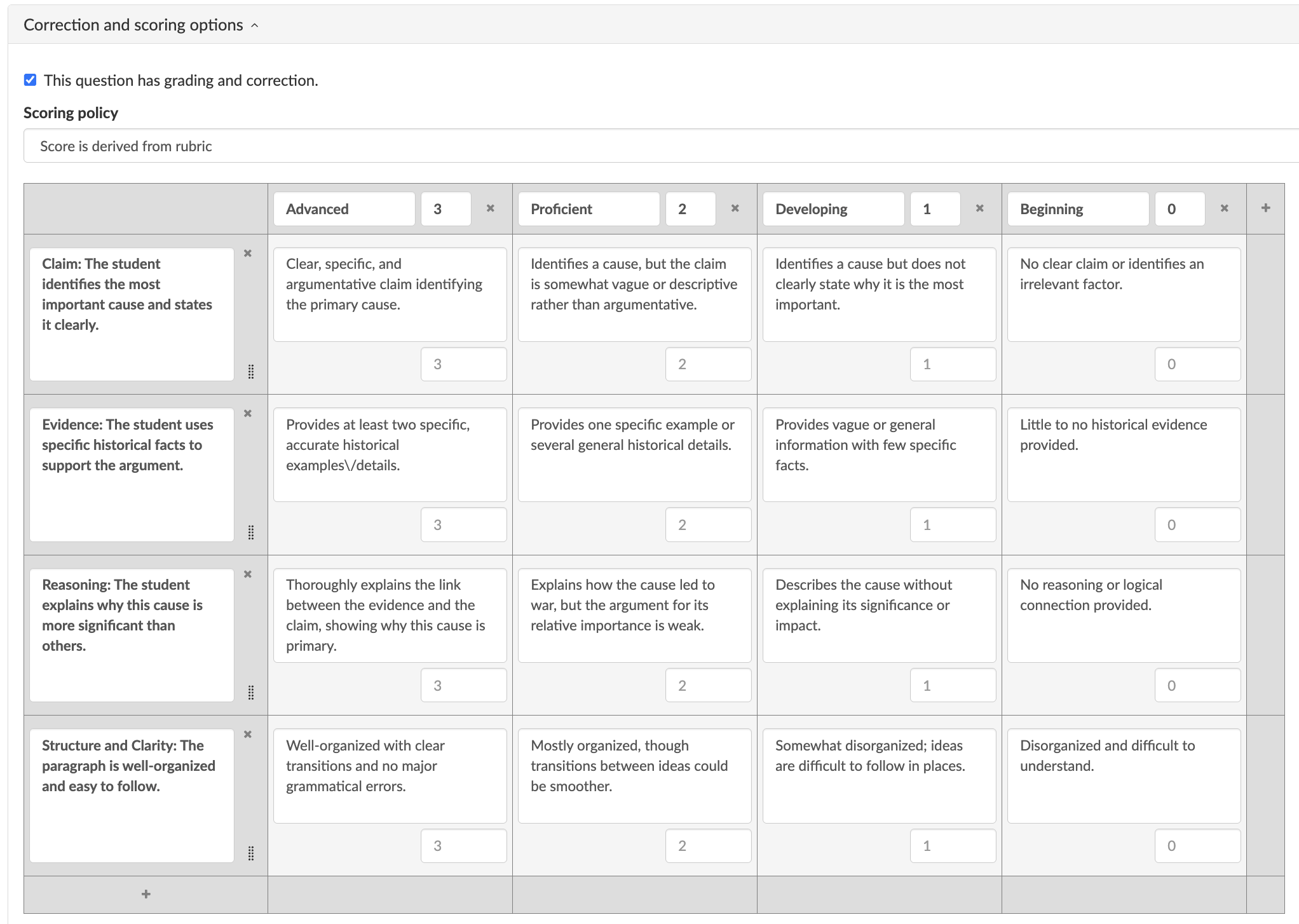
Why it works: A Long Answer question gives students room to build an argument. The rubric helps you assess reasoning and evidence, not just the final answer.
Teacher tip: Add 5 different questions and enable the random question selection. This way, students can practice writing arguments about historical events, AND when you assign homework, not every student will have the same assignment!
Differentiation idea: Give struggling students a word bank table in the instructions. Ask advanced students to include a counterargument.
2. Scientific claim-evidence-reasoning response
| Icon | Area | Explanation |
|---|---|---|
| 🎓 | Subject & Grade | Biology, grades 9–10 |
| 🎯 | Learning goal | Students explain a scientific concept using claim, evidence, and reasoning |
| ❓ | BookWidgets question type | Long Answer |
| ⏱️ | Time needed | 20–30 minutes |
| 💡 | Activity idea | After a lesson on photosynthesis, genetics, ecosystems, or cell structure, ask students to answer a scientific question using CER. |
Example task: A plant kept near a window grew faster than a plant kept in a dark cabinet. Write a claim explaining why this happened. Use evidence from what you learned about photosynthesis and explain your reasoning.
BookWidgets ready-made lesson:

Matching scoring rubric for this open-ended question:

Why it works: The rubric helps separate scientific understanding from writing skills. You can quickly see whether the student needs help with the concept, the evidence, or the reasoning.
Teacher tip: Use the rubric results to group students by need: claim writing, evidence selection, or reasoning.
Differentiation idea: Provide a CER organizer as an additional resource for students who need structure. Challenge advanced students to include a second piece of evidence.
3. Literary analysis with quotations
| Icon | Area | Explanation |
|---|---|---|
| 🎓 | Subject & Grade | English language arts, grades 9–10 |
| 🎯 | Learning goal | Students analyze how an author develops a theme |
| ❓ | BookWidgets question type | Rich Text Answer |
| ⏱️ | Time needed | 30–40 minutes |
| 💡 | Activity idea | Ask students to write a short literary analysis response using paragraphs, quotations, and formatting. |
Example task: How does the author develop the theme of courage in this chapter? Use at least two quotations from the text and explain how each quotation supports your answer. Students can bold their claim, italicize quotations, or use paragraph breaks to organize their work.
BookWidgets ready-made lesson:

Matching scoring rubric for this open-ended question:
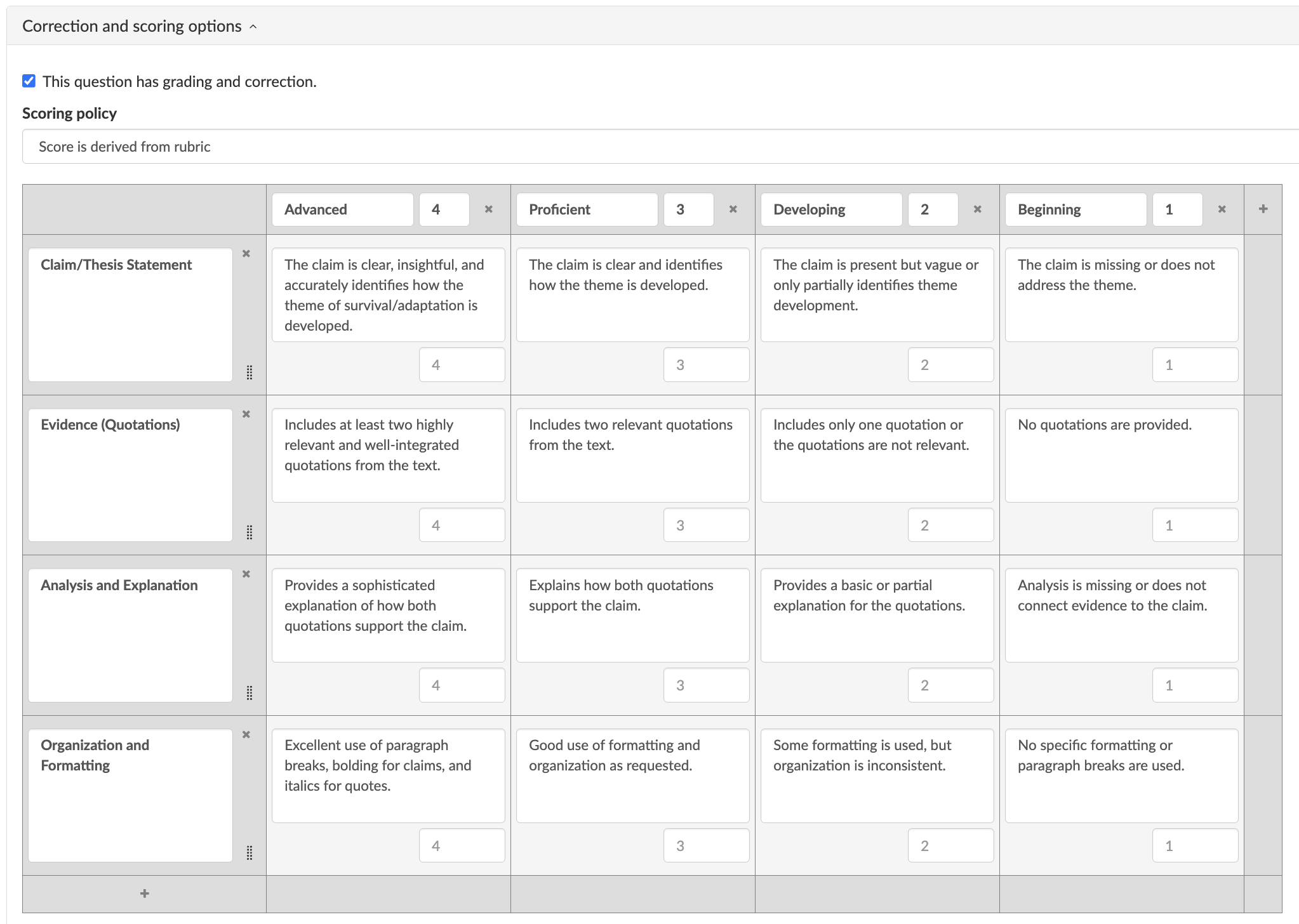
Why it works: Rich Text Answer is useful when students need to format and organize a more developed response. The rubric helps you evaluate both the analysis and the communication.
Teacher tip: Ask students to bold the claim and italicize each quotation. This makes the response easier to review.
Differentiation idea: Give students quotation starters. Ask advanced students to compare two themes or analyze character development.
4. Multi-step math explanation
| Icon | Area | Explanation |
|---|---|---|
| 🎓 | Subject & Grade | Math, grades 5–6 |
| 🎯 | Learning goal | Students solve a word problem and explain their reasoning. |
| ❓ | BookWidgets question type | Rich Text Answer |
| ⏱️ | Time needed | 15–25 minutes |
| 💡 | Activity idea | Give students a multi-step word problem involving fractions, decimals, area, ratios, or operations. |
Example task: Solve the problem and explain your thinking. Use numbers, words, and clear steps so another student could follow your solution. Students can use formatting to list steps and highlight their final answer.
BookWidgets ready-made lesson:
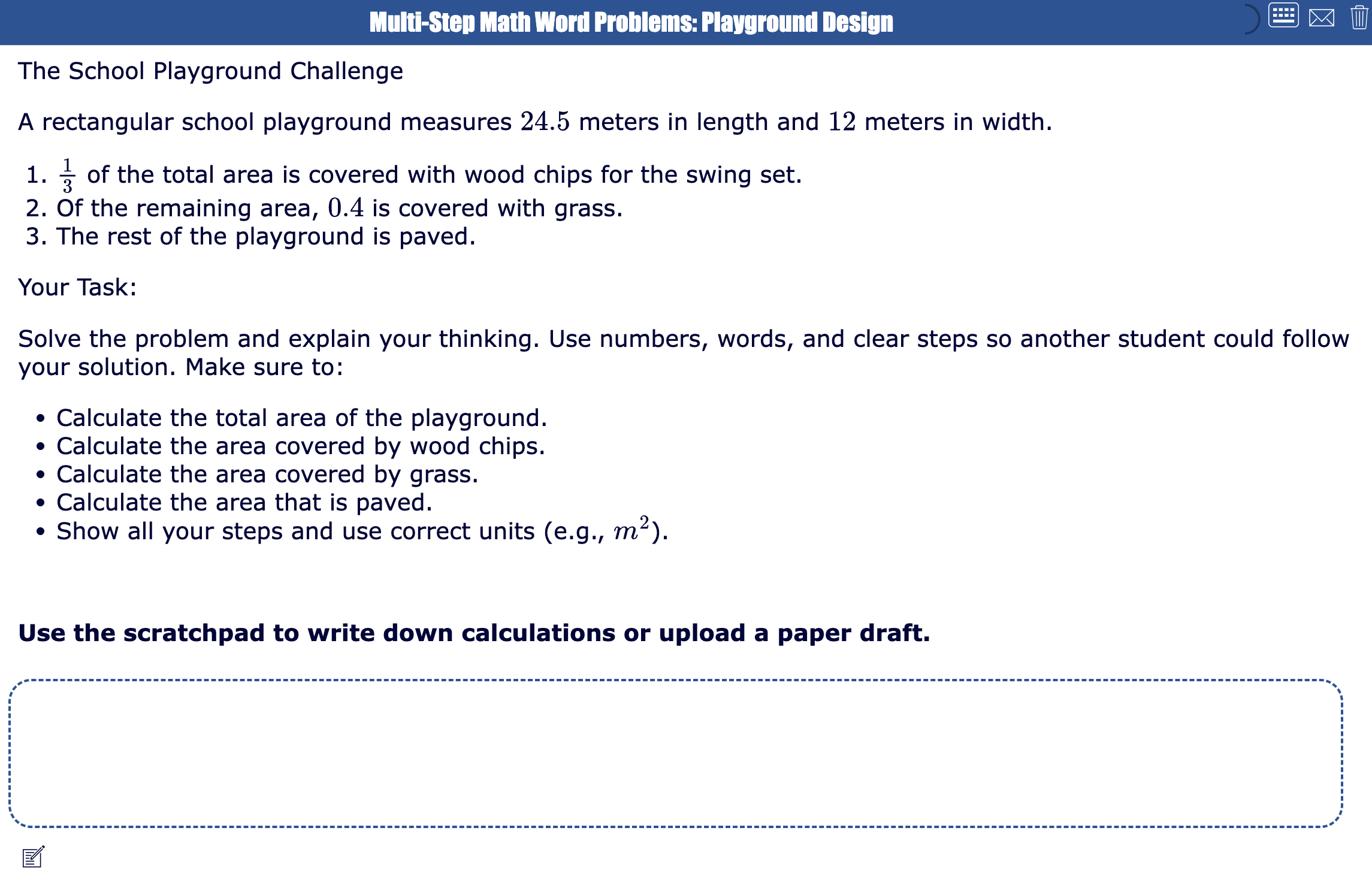
Matching scoring rubric for this open-ended question:
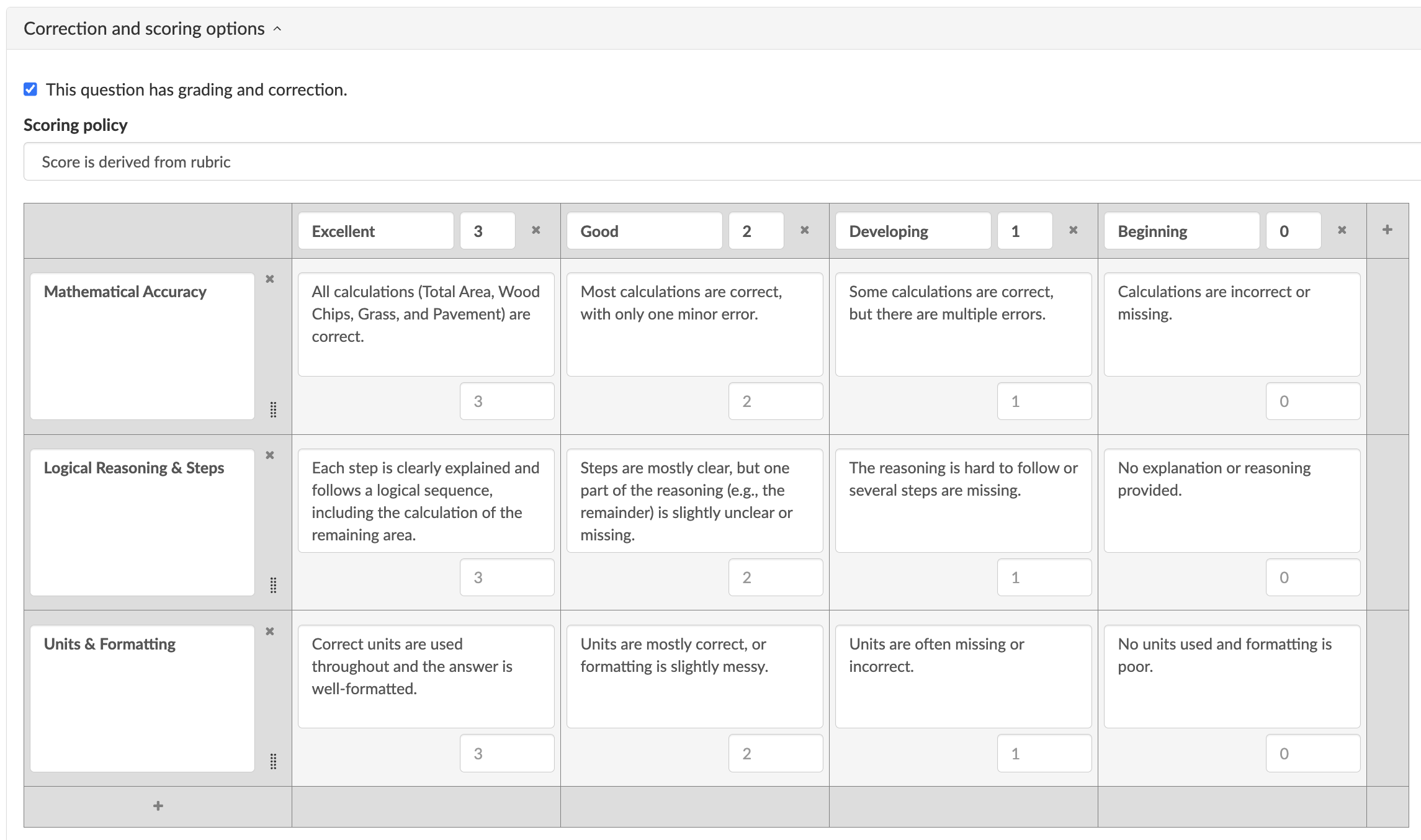
Why it works: This activity helps you assess the process, not only the final answer. The rubric shows whether students understand the math or simply guessed correctly.
Teacher tip: Enable the on-screen keyboard in the general options and add mathematical symbols your students might need to use in their reasoning. Also include a scratchpad if you want your students to be able to draw or upload reasoning on paper. Include the use of the scratchpad in the rubric if needed.
Differentiation idea: Give students a checklist: equation, solution, check, explanation. Ask advanced students to solve the problem in two ways.
5. Draw and label the water cycle
| Icon | Area | Explanation |
|---|---|---|
| 🎓 | Subject & Grade | Science, grades 4–6 |
| 🎯 | Learning goal | Students draw and label the main stages of the water cycle. |
| ❓ | BookWidgets question type | Whiteboard |
| ⏱️ | Time needed | 30 minutes |
| 💡 | Activity idea | Ask students to use the Whiteboard question to draw a water cycle diagram. They should include the sun, clouds, precipitation, bodies of water, and arrows showing movement. Students' labels: evaporation, condensation, precipitation, and collection. |
BookWidgets ready-made lesson:
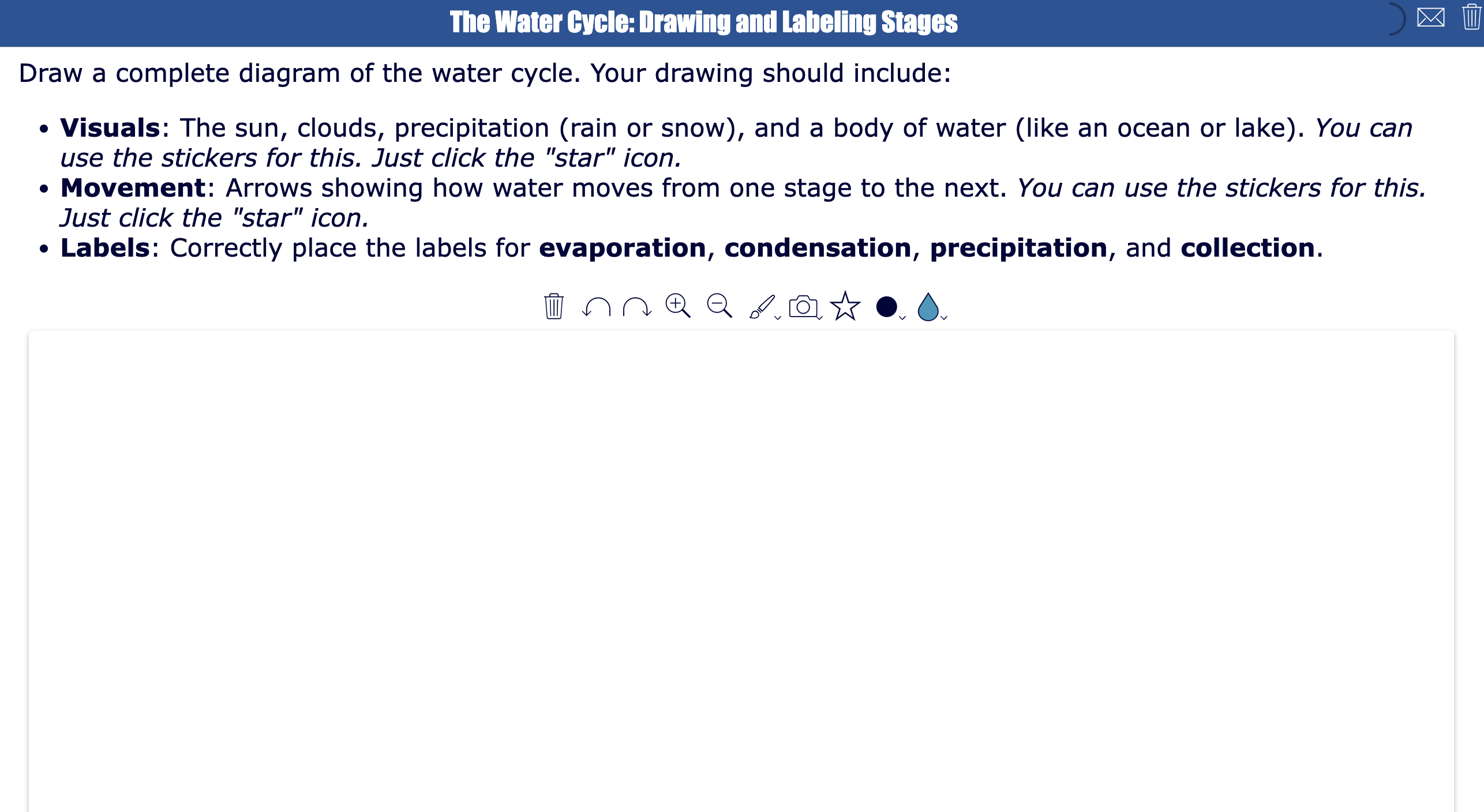
Matching scoring rubric for this open-ended question:
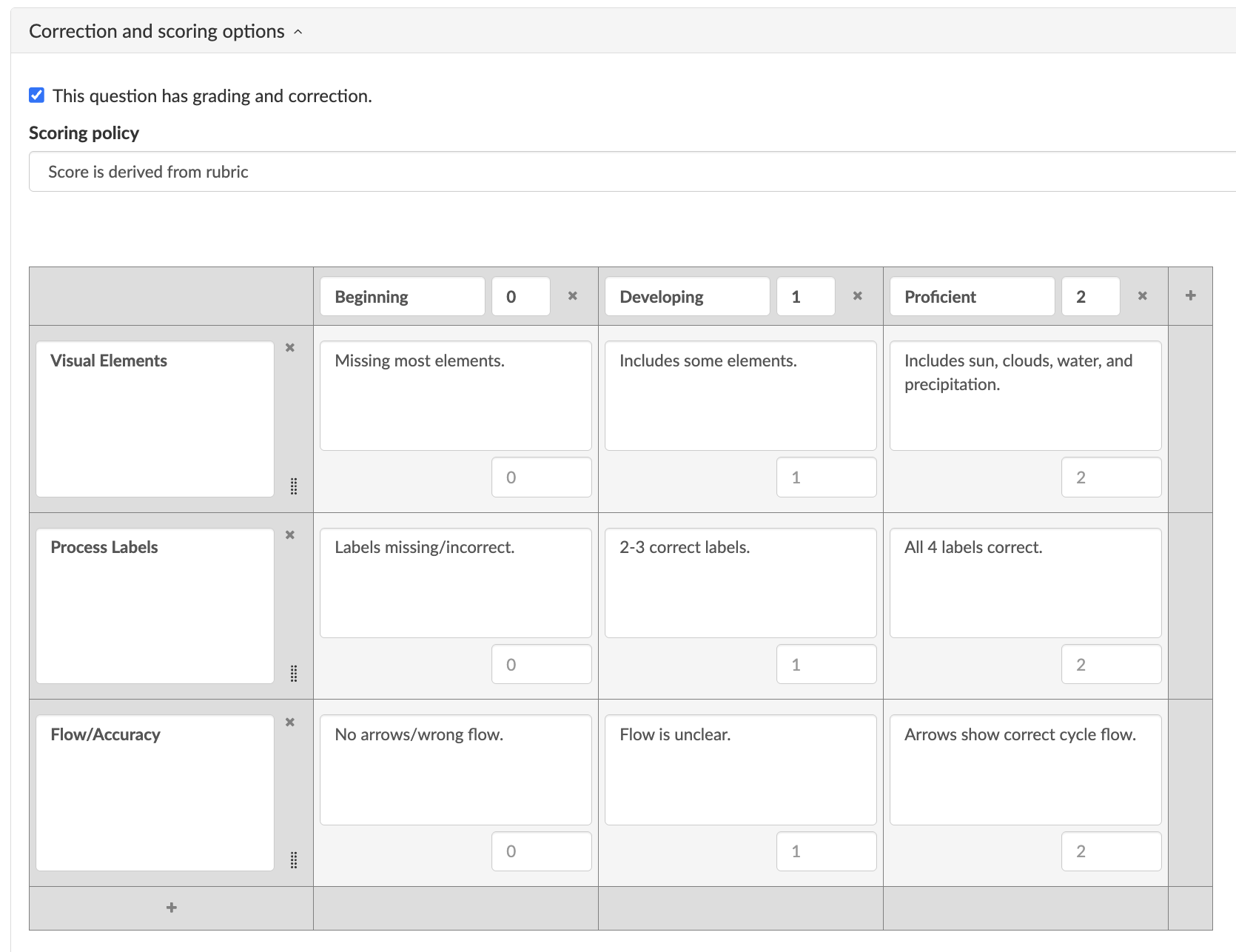
Why it works: A Whiteboard question lets students show their understanding visually. The rubric helps you assess both content accuracy and diagram clarity.
Teacher tip: Add sticker elements to the whiteboard that students can use. It can be the sun, mountains, sea, rain, clouds, arrows, and more!
Differentiation idea: Give younger students a partially completed diagram. Ask advanced students to add runoff, groundwater, or transpiration.
6. Geometry proof sketch
| Icon | Area | Explanation |
|---|---|---|
| 🎓 | Subject & Grade | Geometry, grades 9–10 |
| 🎯 | Learning goal | Students use a diagram to support a geometric proof. |
| ❓ | BookWidgets question type | Whiteboard |
| ⏱️ | Time needed | 20–35 minutes |
| 💡 | Activity idea | Ask students to draw and annotate a geometric figure. They can mark congruent sides, parallel lines, equal angles, triangle relationships, or transformations. |
Example task: Use the whiteboard to draw the figure, mark the given information, and explain why the two triangles are congruent.
BookWidgets ready-made lesson:
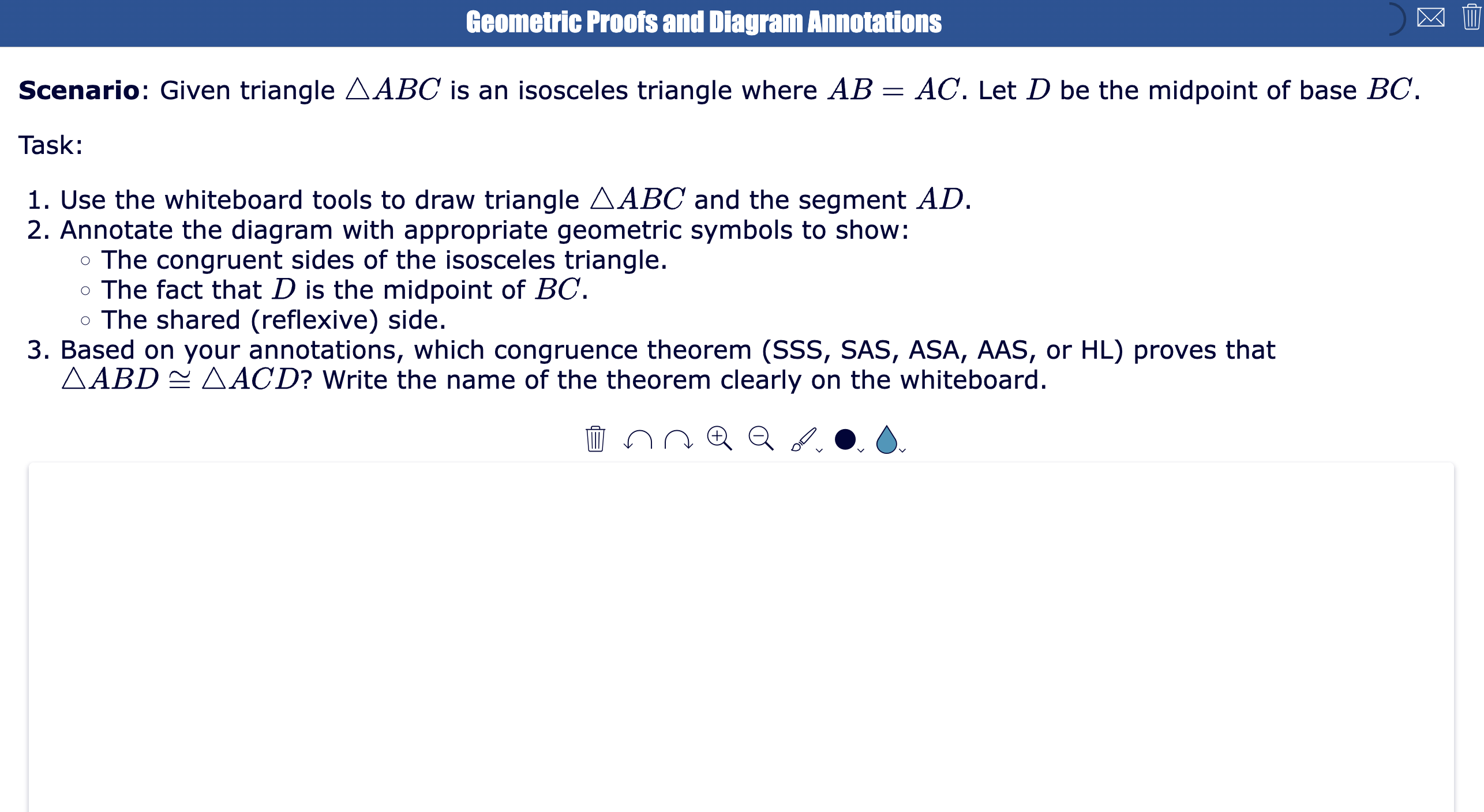
Matching scoring rubric for this open-ended question:
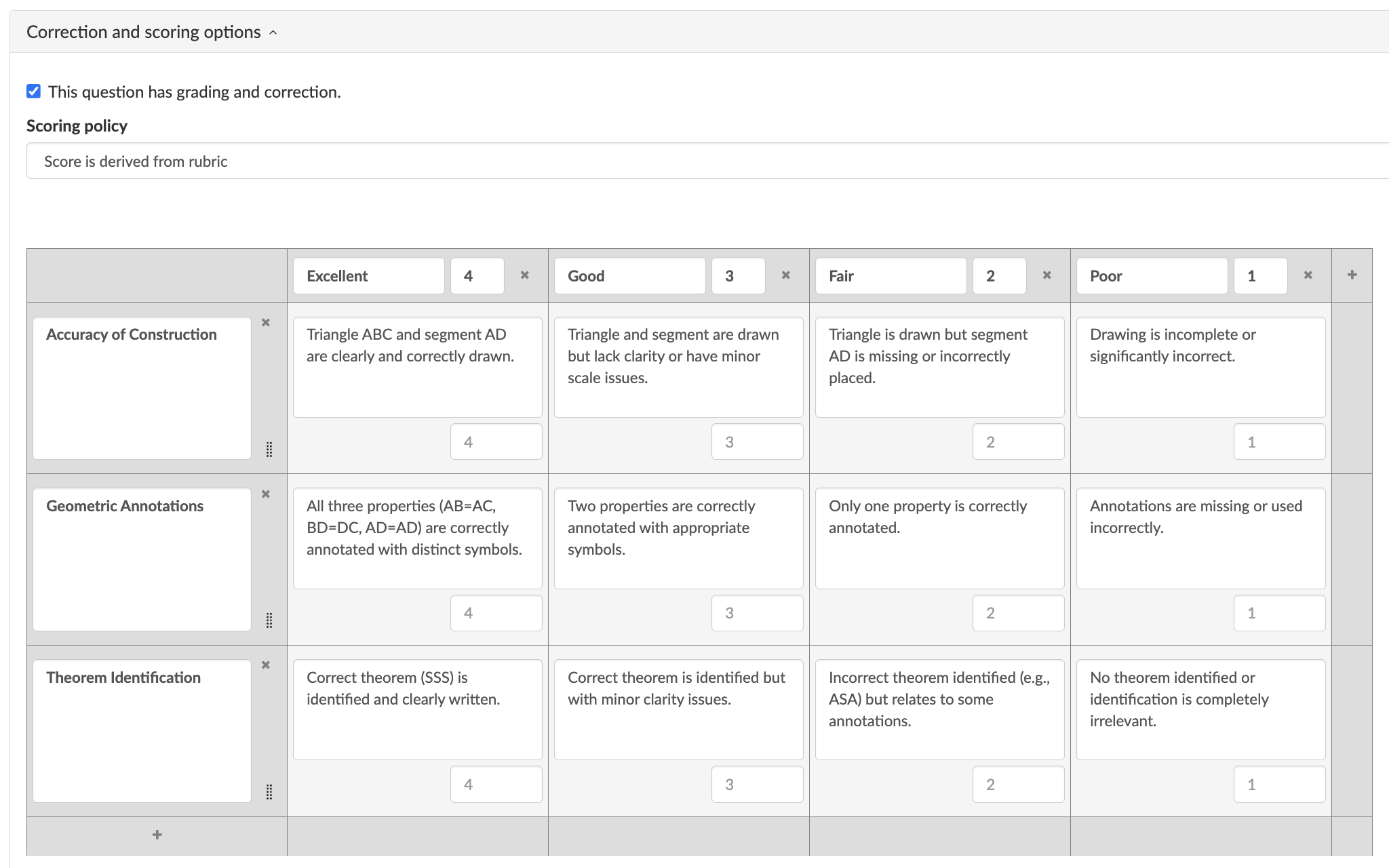
Why it works: Geometry often depends on visual reasoning. The Whiteboard question captures the student’s diagram and thinking in one place.
Teacher tip: Ask students to write the theorem directly on the drawing, such as SSS, SAS, ASA, or corresponding angles.
Differentiation idea: Provide a diagram template background for students who need support. Ask advanced students to add a short written proof after the sketch.
7. Art project submission
| Icon | Area | Explanation |
|---|---|---|
| 🎓 | Subject & Grade | Visual arts, grades 6–8 |
| 🎯 | Learning goal | Students submit and reflect on a completed artwork |
| ❓ | BookWidgets question type | Photo |
| ⏱️ | Time needed | 10 minutes for submission, plus project work time |
| 💡 | Activity idea | Students upload a clear photo of an artwork, such as a self-portrait, collage, sculpture, color wheel, perspective drawing, or mixed-media project. The instructions should remind students to photograph the full artwork in good lighting. |
BookWidgets ready-made lesson:
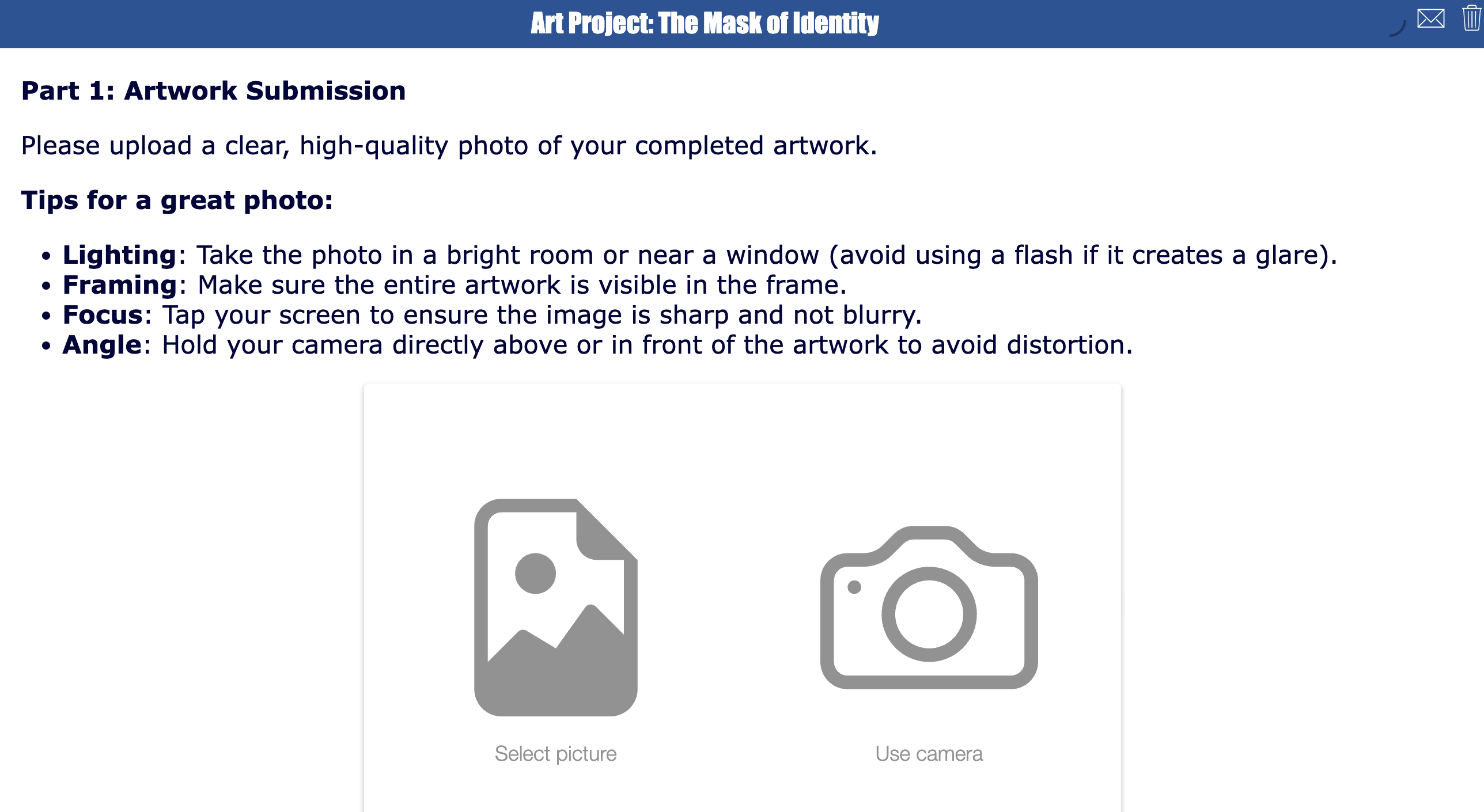
Matching scoring rubric for this open-ended question:

Why it works: A Photo question lets students submit physical work digitally. The rubric helps you evaluate creative work consistently.
Teacher tip: Ask students to take the photo against a plain background.
Differentiation idea: Let students add a short artist statement in a follow-up question. Ask advanced students to explain how they used contrast, composition, or symbolism.
8. Real-world measurement investigation
| Icon | Area | Explanation |
|---|---|---|
| 🎓 | Subject & Grade | Math, grades 3–4 |
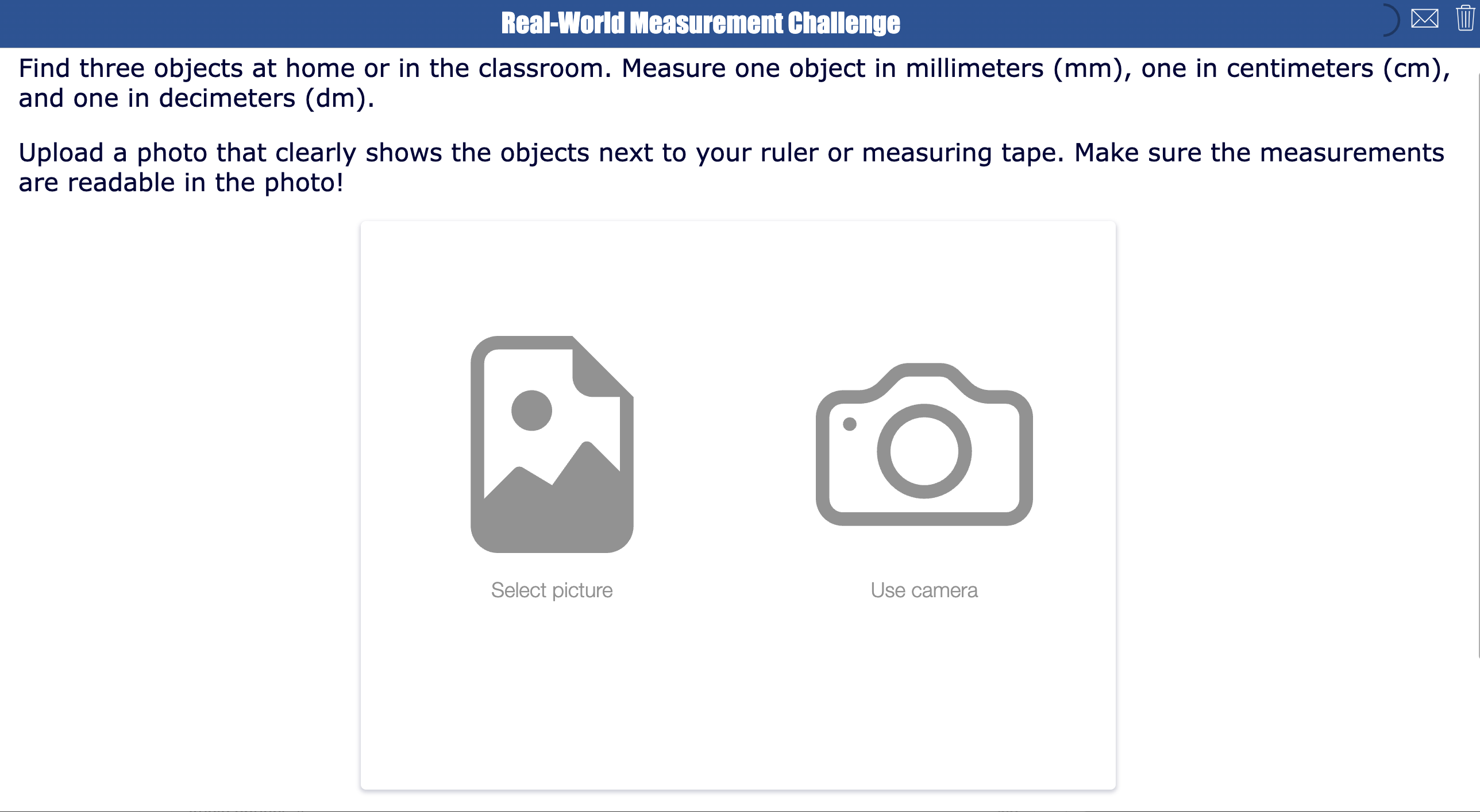
| 🎯 | Learning goal | Students measure real-world objects and show their measurement process. |
| ❓ | BookWidgets question type | Photo |
| ⏱️ | Time needed | 20–30 minutes |
| 💡 | Activity idea | Ask students to find three objects at home or in the classroom and measure them with a ruler or measuring tape. Students upload a photo showing one object next to the measuring tool. |
Example task: Measure one object in millimeters, one in centimeters, and one in decimeters. Upload a photo that clearly shows the objects and the ruler. Make sure the measurement is readable.
BookWidgets ready-made lesson:
Matching scoring rubric for this open-ended question:
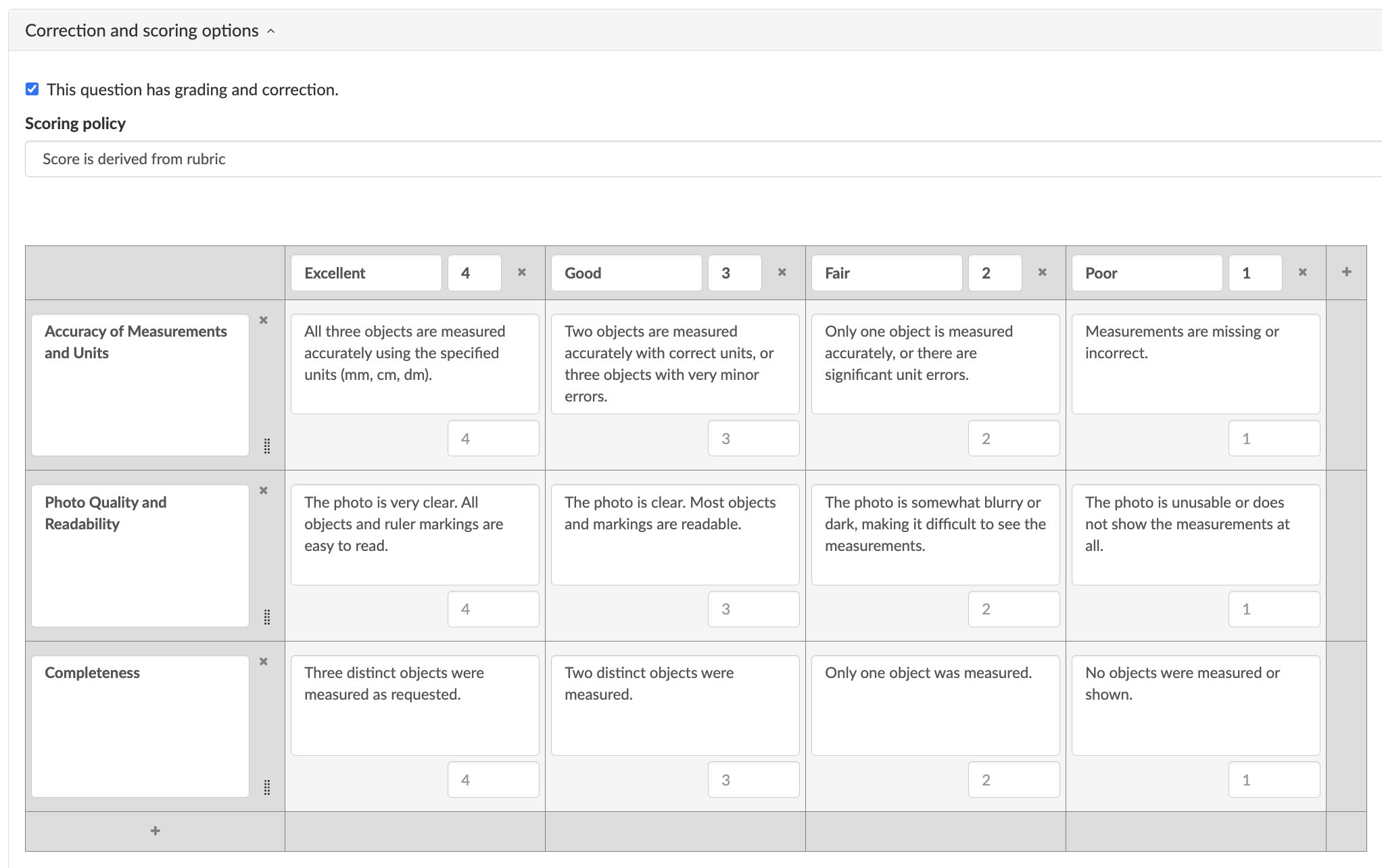
Why it works: This activity connects math to the real world. The photo helps you see whether students measured correctly, rather than just checking a typed number.
Teacher tip: Remind students to line up the object with zero on the ruler.
Differentiation idea: Ask advanced students to compare two objects and calculate the difference.
9. World language speaking practice
| Icon | Area | Explanation |
|---|---|---|
| 🎓 | Subject & Grade | World languages, grades 6–9, beginner level |
| 🎯 | Learning goal | Students speak in the target language using learned vocabulary and sentence structures. |
| ❓ | BookWidgets question type | Audio Recording |
| ⏱️ | Time needed | 10 minutes |
| 💡 | Activity idea | Ask students to record themselves answering a short speaking prompt. |
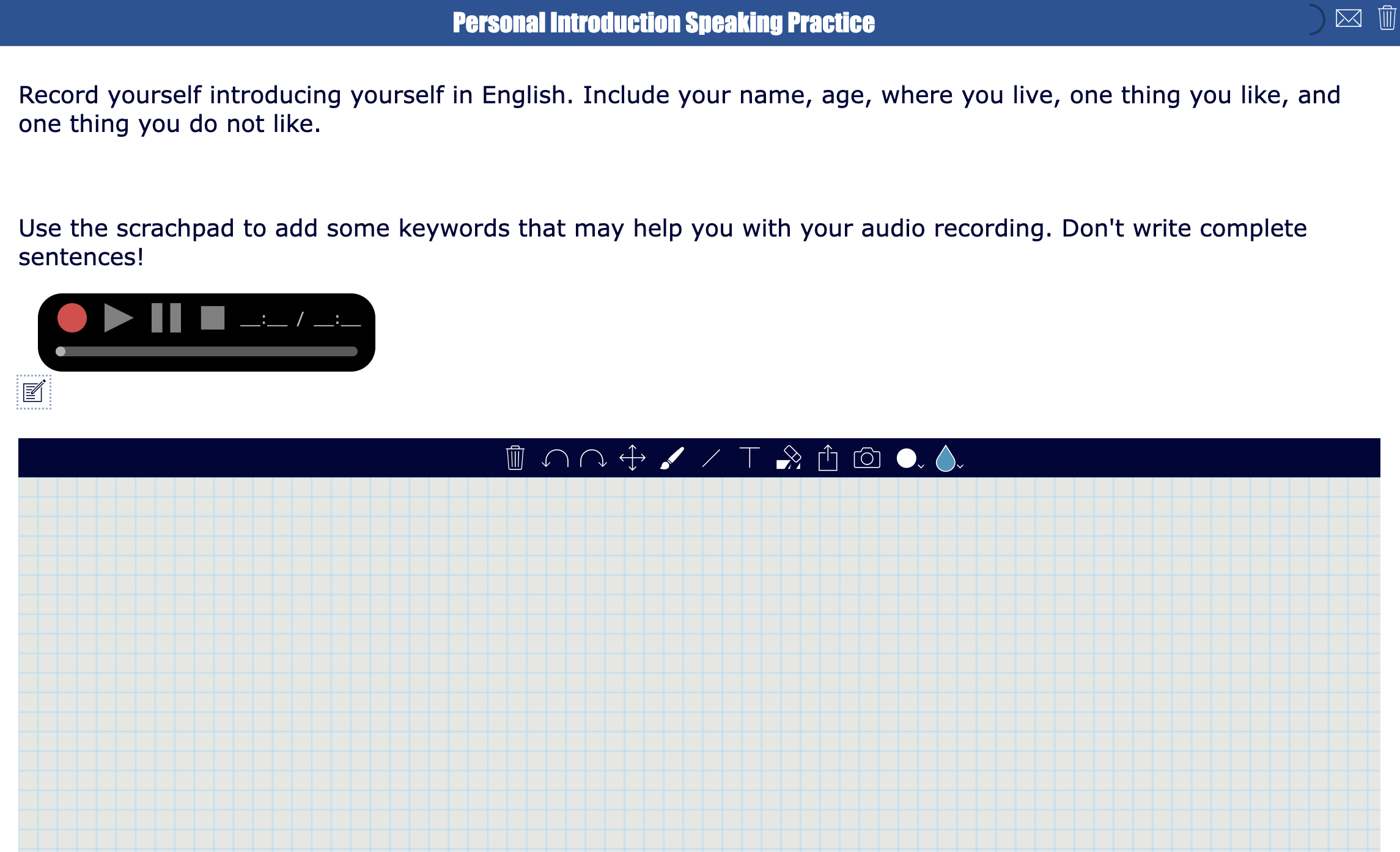
Example task: Record yourself introducing yourself in English. Include your name, age, where you live, one thing you like, and one thing you do not like.
BookWidgets ready-made lesson:
Matching scoring rubric for this open-ended question:
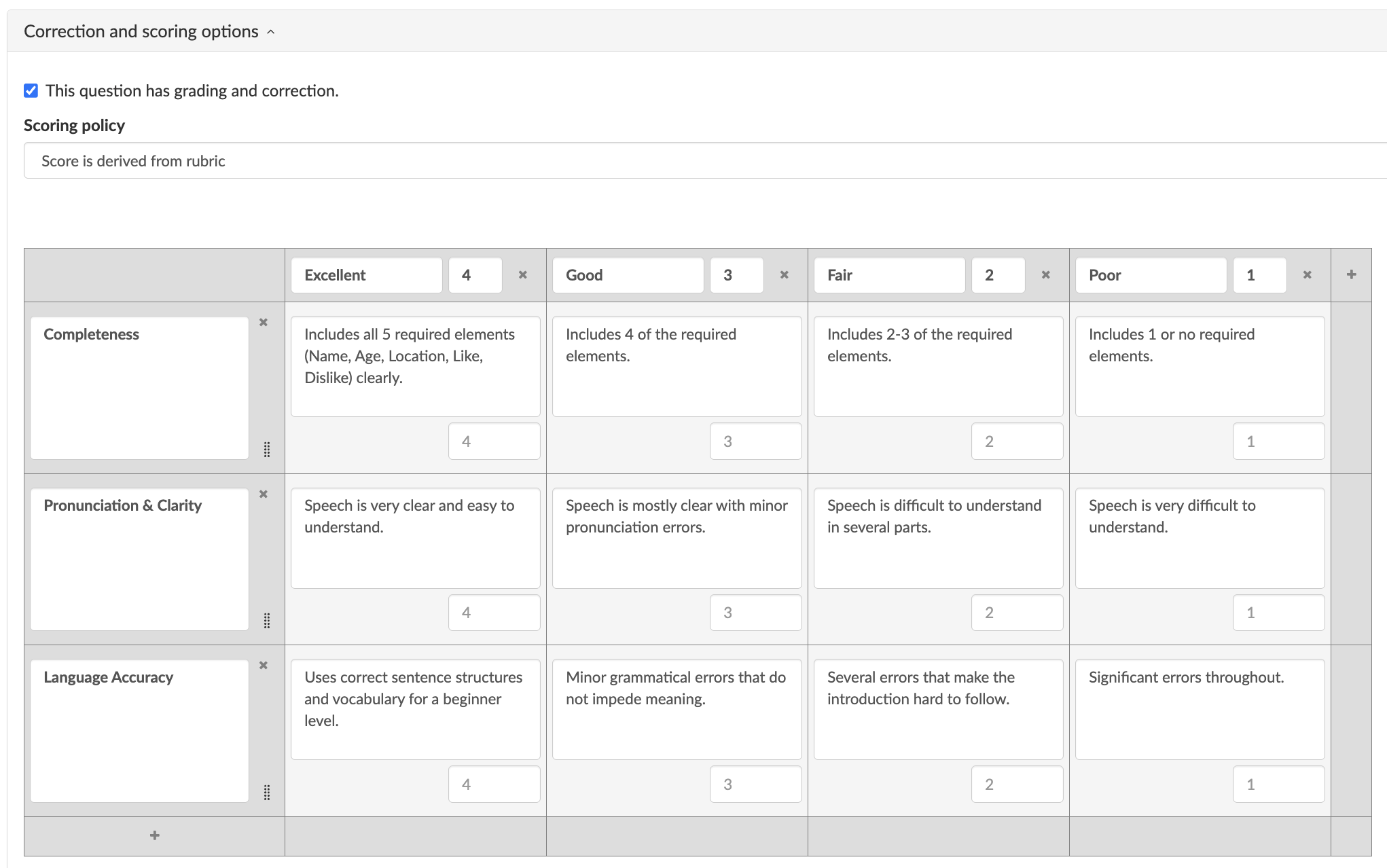
Why it works: Audio Recording questions give every student speaking practice, even in a large class. The rubric helps you assess oral language skills consistently.
Teacher tip: Include a scratchpad so students can write down some keywords before they start recording.
Differentiation idea: Provide sentence starters for beginners. Ask advanced students to add a reason using “because.”
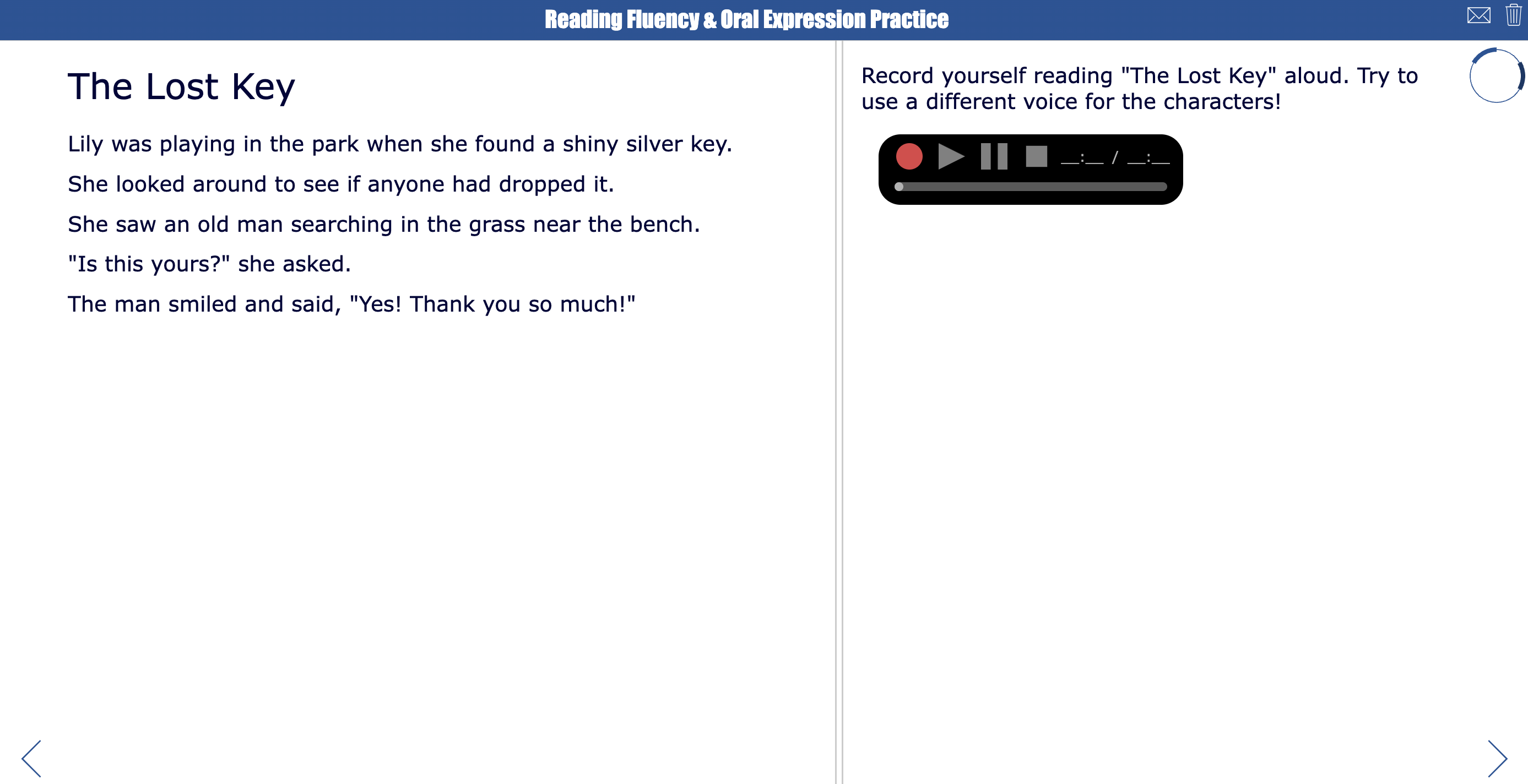
10. Reading fluency check
| Icon | Area | Explanation |
|---|---|---|
| 🎓 | Subject & Grade | Literacy, grades 2–4 |
| 🎯 | Learning goal | Students read a short passage aloud with accuracy, expression, and appropriate pace. |
| ❓ | BookWidgets question type | Audio Recording |
| ⏱️ | Time needed | 5–10 minutes per student |
| 💡 | Activity idea | Give students a short reading passage and ask them to record themselves reading it aloud. Review the recording later using the attached rubric. |
BookWidgets ready-made lesson:
Matching scoring rubric for this open-ended question:
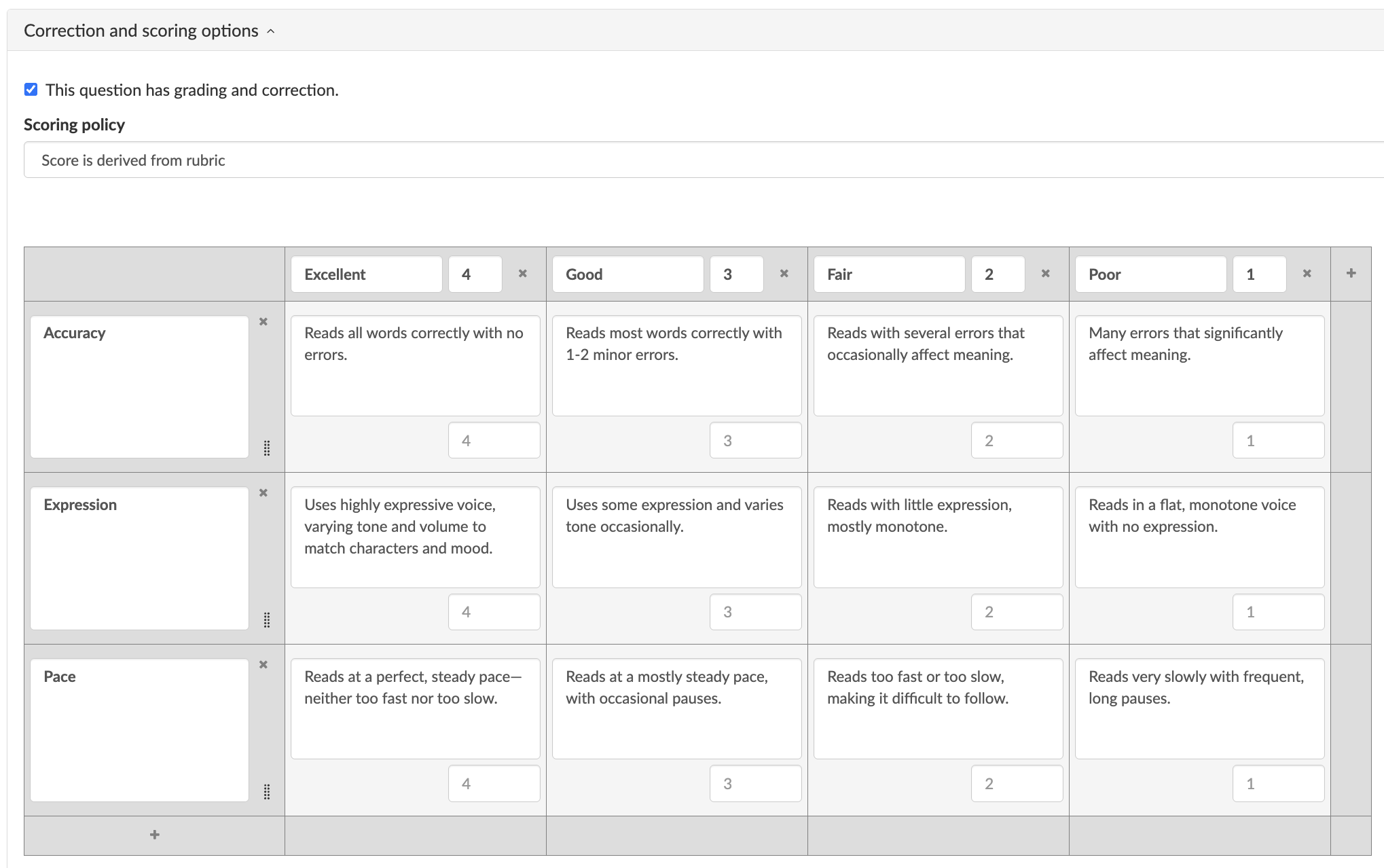
Why it works: This activity lets you collect reading fluency evidence from every student without needing to listen to each child individually during class. You can also assign it as homework so you have proof they actually practiced reading at home.
Teacher tip: Use the same rubric several times during the year to track growth. Add the reading passage as a resource and link each reading passage to a new audio recording question.
Differentiation idea: Add multiple reading passages with a different difficulty level. Go from easy to hard.
3 Simple rubric templates teachers can adapt for Open-Ended Assignments
Use these examples as a starting point when creating rubrics for BookWidgets questions.
1. General rubric for written answers
| Criteria | 4 - Strong | 3 - Good | 2 - Developing | 1 - Needs support |
|---|---|---|---|---|
| Content accuracy | The answer is accurate, complete, and clearly connected to the task. | The answer is mostly accurate, with only minor gaps or unclear details. | The answer is partly accurate, but important information is missing or unclear. | The answer is inaccurate, very incomplete, or does not answer the question. |
| Evidence or examples | The student uses strong, relevant evidence or examples to support the answer. | The student uses some relevant evidence or examples. | The evidence or examples are weak, limited, or only partly connected to the answer. | The student includes little or no evidence or examples. |
| Explanation and reasoning | The student clearly explains their thinking and connects ideas logically. | The student explains their thinking, but some parts could be more detailed. | The explanation is partly unclear or does not fully show the student’s reasoning. | The explanation is missing, very unclear, or does not show reasoning. |
| Organization and clarity | The response is well organized, easy to follow, and written clearly. | The response is mostly organized and understandable. | The response is somewhat difficult to follow. | The response is disorganized or hard to understand. |
2. General rubric for visual answers
| Criteria | 4 - Strong | 3 - Good | 2 - Developing | 1 - Needs support |
|---|---|---|---|---|
| Accuracy | The visual work is accurate, complete, and shows a strong understanding of the concept. | The visual work is mostly accurate, with only small errors or missing details. | The visual work is partly accurate, but some key parts are missing or incorrect. | The visual work is mostly inaccurate or does not show understanding. |
| Labels and details | All required labels, details, or annotations are included and correct. | Most required labels, details, or annotations are included and correct. | Some labels, details, or annotations are missing, unclear, or incorrect. | Labels, details, or annotations are mostly missing or incorrect. |
| Visual clarity | The drawing, diagram, photo, or visual submission is clear, readable, and easy to review. | The visual submission is mostly clear and understandable. | Some parts of the visual submission are unclear or difficult to read. | The visual submission is difficult to understand or review. |
| Task completion | All assignment requirements are included. | Most assignment requirements are included. | Some assignment requirements are included, but important parts are missing. | Few assignment requirements are included. |
3. General rubric for audio answers
| Criteria | 4 - Strong | 3 - Good | 2 - Developing | 1 - Needs support |
|---|---|---|---|---|
| Task completion | The recording includes all required information and fully answers the prompt. | The recording includes most of the required information and mostly answers the prompt. | The recording includes some required information, but important parts are missing. | The recording is incomplete or does not answer the prompt. |
| Clarity | The student is easy to understand throughout the recording. | The student is mostly easy to understand. | The student is sometimes difficult to understand. | The student is very difficult to understand. |
| Accuracy | The student uses accurate content, vocabulary, pronunciation, or language structures for the task. | The student is mostly accurate, with minor errors that do not block meaning. | Several errors affect meaning or make parts of the response unclear. | Errors make the meaning difficult to understand. |
| Fluency and confidence | The student speaks smoothly and confidently, with natural pacing. | The student speaks with some pauses, but the response is still easy to follow. | The student pauses often or sounds unsure, which makes the response harder to follow. | The student is very hesitant, stops often, or does not complete the response. |
Final Thoughts
Open-ended digital assignments help students show deeper thinking. They can explain, draw, speak, create, upload, and reflect in ways that go beyond automatically graded questions. But open-ended work needs clear assessment criteria. That is why rubrics are so valuable.
With BookWidgets, teachers can now add scoring rubrics to Long Answer, Rich Text Answer, Whiteboard, Photo, and Audio Recording questions. When students submit their work, teachers can review each response using the rubric connected to that question. Start small. Choose one open-ended question in your next digital assignment, add 3 or 4 rubric criteria, and share the expectations with students before they begin.
Then reuse and adapt that rubric in future BookWidgets activities to make grading more consistent, feedback more focused, and open-ended digital assignments easier to manage.
Get started with BookWidgets and create your first digital assignments with randomly selected questions! Be sure to let us know how your first activity went in our Teaching with BookWidgets Facebook group!
And me? I'm Lucie from BookWidgets. Come say hi on LinkedIn 👋
Happy widgeting! 🚀


