Correction Labels for Teachers: How to Create Reusable Feedback Sets
 Lucie Renard —
Grading student work takes time, especially when you want to give feedback that is clear, helpful, and personal. When students make similar mistakes, teachers often end up writing the same comments again and again: spelling mistake, check your formula, add evidence, explain your answer, wrong unit, and so on.
That is where correction labels can help.
Correction labels are short feedback codes teachers can add to student work. Instead of typing a full explanation every time, you can mark an answer with a label such as SP for spelling, GR for grammar, CE for calculation error, or Ev for missing evidence. Students quickly see what needs improvement, and teachers save valuable grading time.
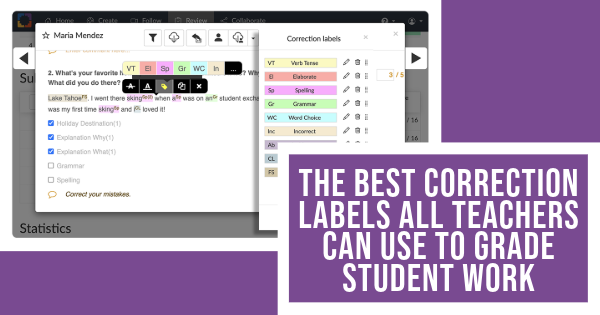
With BookWidgets, correction labels become even more useful. In the BookWidgets reporting dashboard, teachers can add correction labels directly to student answers while reviewing digital assignments. And now, teachers can also create correction label sets. This means you can prepare one label set for language assignments, another one for math, another one for science, or even different sets for different classes or grading routines.
This article shows how correction labels work and how teachers can use them while reviewing student work in BookWidgets first. After that, you’ll find ready-to-copy correction label ideas for language, math, history, science, and geography teachers.
Working with correction labels in BookWidgets
Correction labels or feedback tags are already used by teachers when grading paper assignments. If you want to keep grading student work on paper, this blog post will definitely give you all the tips you need, including some ready-to-use correction label sets and inspiration. Of course, I'm all about using BookWidgets to create and review my digital assignments. As it happens, correction labels are a huge benefit and a time saver for teachers here. On top of that, they are always a big help for your students too.
If you're just switching to digital evaluations, let me explain BookWidgets in 3 sentences:
- BookWidgets is an all-in-one interactive quiz maker for teachers that helps all teachers create interactive digital assignments and assessments (with a variety of 37 interactive question types.
- Teachers can share BookWidgets evaluations through their connected learning management systems, such as Google Classroom, Microsoft Teams, Canvas, Moodle, and many more, making digital activities easy to manage within their existing workflow.
- Student answers are collected and organized in a grading dashboard, where teachers can review work, give feedback (optionally use correction labels!), and evaluate performance efficiently.
In the BookWidgets reporting dashboard, when reviewing digital student work, you'll be able to create and use correction labels. For example, when correcting a writing assignment, you can highlight a word or sentence and add a label such as:
SP = Spelling mistake GR = Grammar mistake P = Punctuation issue VT = Verb tense issue
For a math assignment, you might use a completely different set:
CE = Calculation error UM = Unit missing or wrong SM = Step missing IF = Incorrect formula
Students see the correction labels as focused feedback. Teachers can also add extra comments when a label needs more explanation.
This makes correction labels especially useful for digital assignments, where teachers want to give quick, consistent, and actionable feedback without having to type the same comment repeatedly.
Step-by-step setup in BookWidgets
In the BookWidgets reporting dashboard, when you open a student’s answer, you can mark a word, sentence, or part of the answer and add a correction label. You can also add an extra comment if the label alone is not enough. When students receive their corrected work, they can see which labels were used and what they need to improve.
Where to find your correction labels in BookWidgets and how to configure them.
- Open the BookWidgets assignment results in the reporting dashboard.
- Open a student’s submitted answer.
- Select the word, sentence, or answer part you want to comment on.
- Choose the correction label option.
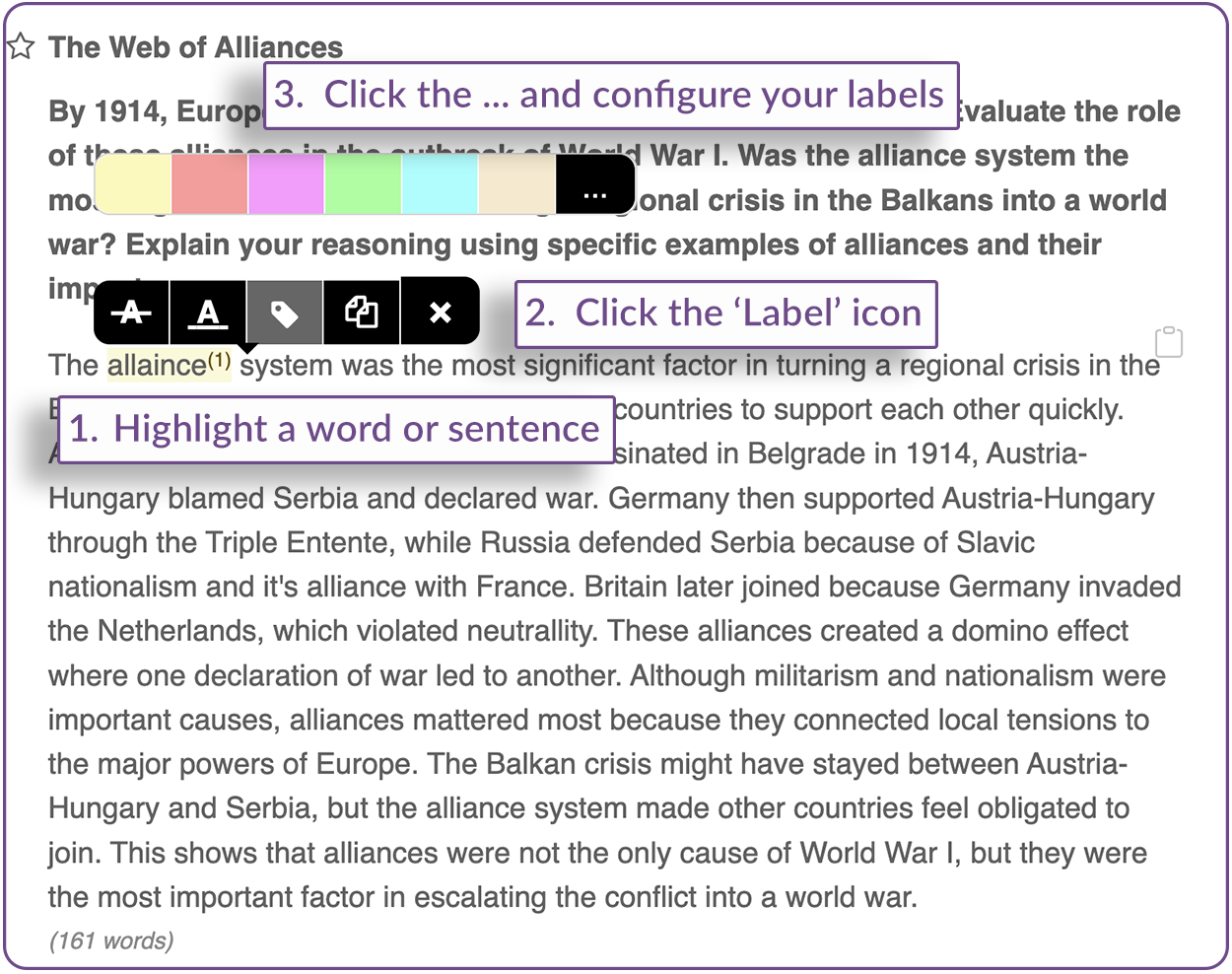
- Select an existing label or configure your labels by clicking the 3 dots: ...
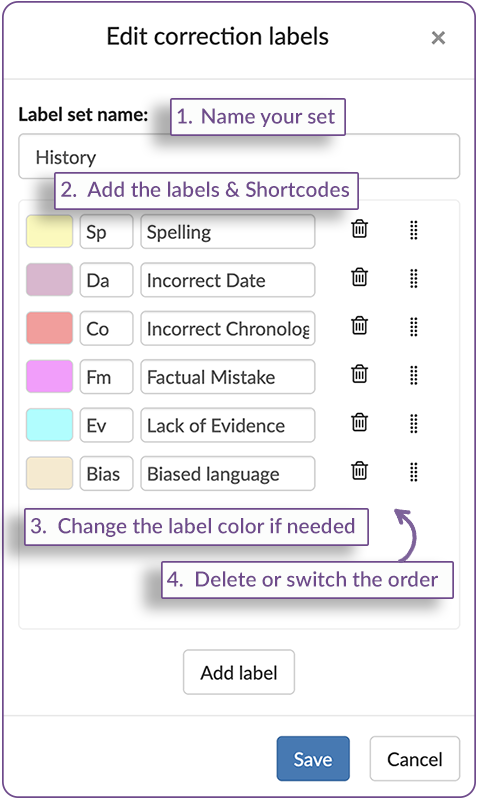
- Optional: Add an extra written comment when students need more explanation.
- Continue grading the assignment using the same labels for similar feedback.
A good correction label includes:
- a short code;
- a clear label name;
- optional extra comments when needed.
New! Correction label sets
Teachers can now create correction label sets in BookWidgets.
A correction label set is a saved group of feedback labels that belong together. Instead of using one long list of labels for every assignment, you can organize your labels by subject, school, course, class, or feedback goal.
For example, you could create:
- A Language feedback set with labels for spelling, grammar, punctuation, word choice, and sentence structure.
- A Math feedback set with labels for calculation errors, missing steps, wrong formulas, and unit mistakes.
- A Science lab report set with labels for hypothesis, method, data, variables, and conclusion.
- A History writing set with labels for evidence, chronology, source use, and historical accuracy.
- A General feedback set with labels such as “explain more,” “good reasoning,” “check instructions,” or “incomplete answer.”
This helps teachers keep their feedback organized. When you are grading a language assignment, you use your language label set. When you are grading a science report, you switch to your science label set.
Here are the biggest benefits of using correction label sets when reviewing digital student work. Correction label sets help teachers:
- grade faster without writing the same comments repeatedly;
- give students consistent feedback across assignments;
- switch between subject-specific feedback routines;
- keep language, math, science, history, or geography labels separate;
- reuse the same labels in future BookWidgets assignments;
- combine short feedback codes with personalized comments when needed.
This is especially helpful for teachers who teach multiple subjects or multiple grade levels. A language teacher might need different labels for beginner writing and advanced essay feedback. A STEM teacher might want one set for math exercises and another set for science lab reports. A primary school teacher needs feedback sets for a variety of subjects.
Creating and switching between correction label sets in BookWidgets
With correction label sets, teachers can organize feedback labels before or during grading.
To create new label sets or switch between feedback label sets, teachers need to:
- navigate to the label configuration by selecting a word or sentence > Click the label icon > Click the 3 dots: ... ;
- click the 'Switch' icon in the upper right corner,
- select another correction label set, or create a new one.
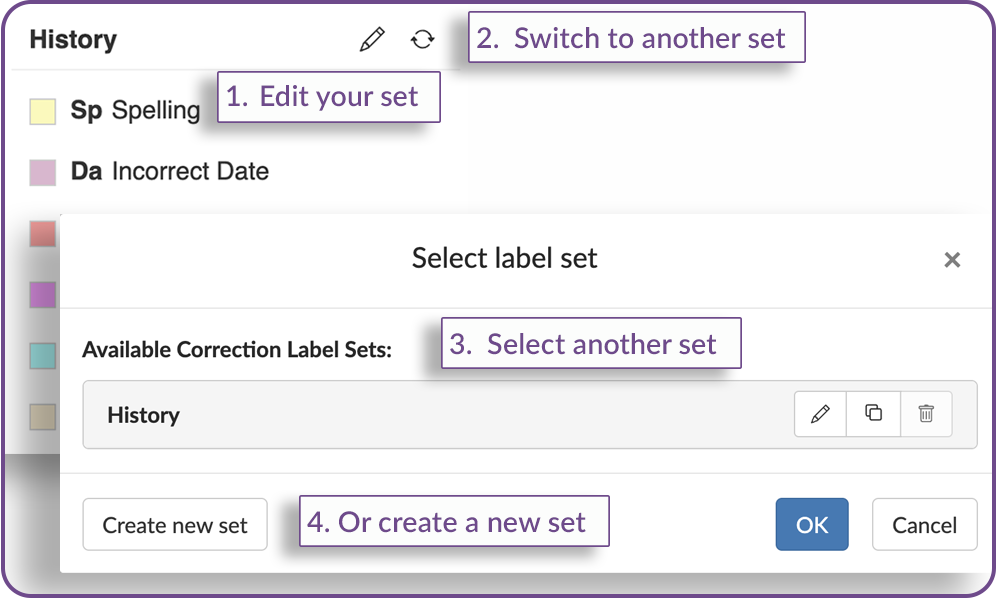
Correction label sets in action - Video
Check out this quick video below, showcasing the use of these correction labels in the BookWidgets reporting dashboard. The example shows me providing feedback on a student's writing for a history assignment.
As you can do much more in the reporting dashboard than just adding labels, I urge you to check our free 1-hour webinar recording and learn all about the digital review process within your digital BookWidgets assignments.
The best correction labels for various courses
I know that every teacher teaches differently. Providing feedback by adding labels to student work is a good example of the differences in teaching and reviewing styles between teachers. That's why you might have some more correction or feedback labels to add to this list. Feel free to reach out with suggestions! I'll list correction labels teachers can use across different subjects, including Math, Science, Languages, History, and Geography. Click your course to jump to the correction labels list.
Correction labels for language courses
For languages, there are many possible feedback codes or correction labels. Some of my suggestions are listed below. Make sure to read the last part of this post to learn how to use them efficiently when grading student work digitally.
| Label | Code | Explanation | Example of Error (and solution) |
|---|---|---|---|
| Spelling | SP | Incorrect spelling of a word | micelaneous (instead of "miscellaneous") |
| Grammar | GR | Grammar rule is not followed | Their dancing (instead of "They are dancing") |
| Wording | Wrd | Poor word choice or unclear expression | A big amount of people |
| Capital Letter | CL | Missing or unnecessary capitalization | i am here (instead of "I am here") |
| Source Mention | Src | Missing reference or citation | No source listed |
| Punctuation | P | Incorrect or missing punctuation | Lets eat grandma (instead of "let's eat, grandma") |
| Verb Tense | VT | Incorrect verb tense | He run yesterday (instead of "He ran yesterday") |
| Subject-Verb Agreement | SVA | Subject and verb do not agree in number | The dogs barks (instead of "the dog barks") |
| Pronoun Usage | PU | Incorrect pronoun used or unclear reference | Bob and Jim went to his car (instead of "Bob and Jim went to their car") |
| Run-on Sentence | RS | Two or more independent clauses improperly joined | I went to the store I bought milk (instead of "I went to the store and bought milk") |
| Fragmented Sentence | FS | Incomplete sentence | Because he was late. (instead of "I missed the bus, because he was late") |
| Redundancy | Rd | Unnecessary repetition | The small tiny kitten |
| Article Usage | AU | Incorrect or missing articles | She is teacher (instead of "She is a teacher) |
| Incorrect Preposition | IP | Wrong preposition used | Interested on (instead of "Interested in") |
| Passive Voice | PV | Use of passive voice instead of active voice | The book was read by him (instead of "He read the book" |
| Idiomatic Expression | IE | Incorrect use of idiomatic expressions | "Kick the bucket" (for death) |
| Tense Consistency | TC | Inconsistent use of verb tenses | He goes to the store and bought milk (instead of "He goes to the store and buys milk) |
| Ambiguity | Amb | Unclear or ambiguous wording | Our product is good (instead of "Our product is of high quality") |
| Coherence | Coh | Lack of logical flow and connections | First, I went to the market. The sky is blue. |
| Paragraph Structure | PS | Poor organization within a paragraph | Randomly arranged sentences |
| Relevance | Rel | Information is not relevant to the topic | Off-topic details |
| Logical Flow | LF | Disjointed or illogical progression of ideas | Random points without connection |
| Clarity | Clr | Lack of clarity in writing | Vague or confusing statements |
| Quotation Marks | QM | Incorrect use of quotation marks | "She said, "hello." (instead of "She said, "hello."") |
| Conjunction Error | CE | Incorrect or missing conjunctions | I want to go but I have no money (instead of "I want to go because I have no money") |
| Subject Clarity | SC | Unclear or ambiguous subject reference | They were late because he missed the bus |
| Transitional Phrase | TP | Missing or incorrect transitional phrases | First, I went to the store. I bought groceries (instead of "First, I went to the store to buy groceries. Then, ...") |
| Formal Language | FL | Use of informal language where formal is required | Gonna (instead of "Going to") |
| Translation Error | TE | Translation mistakes | Translating "pig" to "paard" in Dutch (instead of "varken") |
| Incorrect Meaning | Me | Misunderstanding or misinterpreting the meaning of a word or phrase | Using the word "sympathy" to mean "empathy" |
Correction labels for math courses
I did dig the internet a bit and asked math teachers to see what feedback labels might be of use for math courses. Make sure to read the last part of this post to learn how to use them efficiently when grading student work digitally.
| Label | Code | Explanation | Example of Error (and solution) |
|---|---|---|---|
| Incorrect Calculation | IC | Calculation steps contain errors | 2 + 2 = 5 |
| Incorrect Formula | IF | Wrong formula used to solve a problem | Area = 2πr² |
| Step Missing | SM | A step in the solution process is omitted | Jumping from step 1 to 3 |
| Incorrect Answer | A | Final answer is incorrect | The answer is 45 (instead of 40) |
| Unit Missing/Wrong | UM | Incorrect or missing units in the answer | 20 (instead of 20 m) |
| Misplaced Decimal | MD | Decimal point is in the wrong position | 3.14 written as 31.4 |
| Poorly Structured Work | PSW | Work is disorganized, making it hard to follow | Steps in random order |
| Incorrect Graph | IG | Errors in plotting or interpreting graphs | Plotting points incorrectly |
| Misinterpreted Data | MD | Data is misunderstood or incorrectly analyzed | Misreading bar graph values |
| Incorrect Operation | IO | Wrong operation used in calculations | Using addition instead of subtraction |
| Calculation Error | CE | Arithmetic mistake in calculations | 7 × 6 = 44 (instead of 42) |
| Incorrect Assumption | IA | Wrong assumption made during calculations | Assuming all angles in a triangle are right angles |
| Incorrect Method | IM | Wrong method used to solve a problem | Using long division instead of synthetic division |
| Logical Error | LE | Error in logical reasoning or proof | Incorrect conclusion in a proof |
| Misinterpreted Symbols | MS | Misuse or misunderstanding of mathematical symbols | Using 'x' for multiplication (instead of '×') |
| Order of Operations | OO | Incorrect order of operations (PEMDAS/BODMAS) | 2 + 3 × 4 =20 (instead of 14) |
| Incorrect Simplification | IS | Errors in simplifying expressions or equations | Simplifying 2(x + 3) as 2x + 6 |
| Range Error | RE | Mistakes in determining the range of a function | Incorrect range in a graph |
| Dimension Error | DE | Error in dimensional analysis | Adding meters and liters |
| Proof Error | PE | Mistakes in mathematical proof or derivation | Incorrect steps in geometric proof |
| Incorrect Definition | Def | Mistakes in recalling theory or definitions | Incorrectly stating the Pythagorean Theorem |
💡 Tip: When using BookWidgets for your digital math & science assignments, you and your students can easily use mathematical symbols and formulas. The assignments support LaTeX, and students get a pop-up with a range of math symbols without being limited by their keyboard.
Correction labels for history teachers
Take a look at the correction labels history teachers can use. Some of the labels overlap a bit or might mean the same thing. It's up to you to choose your most used set of feedback labels. Make sure to jump to the last part of this post to learn how to use them efficiently when grading student work digitally.
| Label | Code | Explanation | Example of Error (and solution) |
|---|---|---|---|
| Incorrect Date | D | Wrong date mentioned | The Declaration of Independence in 1775 (instead of 1776) |
| Lack of Evidence | Ev | Insufficient evidence or support | Claiming Napoleon was French without citing sources |
| Historical Inaccuracy | HI | Incorrect historical information | Claiming Columbus discovered America in 1492 (ignoring indigenous people) |
| Missing Key Details | MKD | Important details are missing | Not mentioning key figures in a historical event |
| Biased Language | B | Language shows bias or lack of neutrality | Describing a historical figure as "tyrannical" without evidence |
| Citation Needed | Ci | Missing proper citation for sources | Not providing sources for historical facts |
| Contextual Error | Co | Incorrect or incomplete context provided | Misrepresenting the causes or motives behind a historical event |
| Primary Source Error | PSE | Misuse or misunderstanding of primary sources | Using a secondary source as if it were primary |
| Chronological Error | CE | Events are out of chronological order | Listing the American Revolution after the Civil War |
| Misidentified Figures | MF | Incorrectly identifying historical figures | Confusing George Washington with Thomas Jefferson |
| Incorrect Attribution | At | Incorrectly attributing actions or events to individuals | Attributing the Monroe Doctrine to John Adams |
| Overgeneralization | OG | Making broad statements not supported by evidence | Claiming all historical figures of a period acted the same way |
| Revisionist Error | RE | Incorrectly revising or rewriting historical facts | Altering the narrative of events to fit a modern agenda |
| Incorrect Event Relationship | IER | Misrepresenting relationships between events | Linking the fall of the Roman Empire directly to the rise of the Middle Ages |
| Inaccurate Quotation | IQ | Incorrectly quoting historical documents or speeches | Misquoting a famous speech or document |
| Errors in Historical Interpretation | EHI | Mistakes in analyzing or explaining historical events | Misinterpreting the significance of the Treaty of Versailles |
| Misrepresented Impact | MI | Incorrectly describing the impact of historical events | Overestimating or underestimating the impact of an event on subsequent history |
| Incomplete Analysis | IA | Missing critical analysis or detail in historical analysis | Not discussing the long-term effects of the Industrial Revolution |
| Faulty Causation | FC | Incorrectly identifying causes of historical events | Claiming a single factor was the sole cause of a complex event |
Correction labels for science teachers
Take a look at the correction labels science teachers can use. It's up to you to choose your most used set of feedback labels. Make sure to jump to the last part of this post to learn how to use them efficiently when grading student work digitally.
| Label | Code | Explanation | Example of Error (and solution) |
|---|---|---|---|
| Incorrect Hypothesis | IH | Hypothesis does not match the experiment's observations | Hypothesizing that plants grow better in darkness |
| Misinterpretation | MI | Incorrect interpretation of data or results | Concluding that a higher temperature always increases the reaction rate, ignoring other variables |
| Data Error | DE | Errors in recorded or presented data | Recording a temperature as 1000°C (instead of 100°C) |
| Missing Explanation | ME | Lack of explanation for results or procedures | Just stating results without describing why they occurred |
| Wrong Conclusion | WC | Incorrect conclusion drawn from data | Concluding that a plant's growth is due to the color of the pot without considering soil type |
| Experiment Error | EE | Errors in the experimental procedure | Using incorrect measurements or uncalibrated instruments |
| Inconsistent Results | IR | Results are not consistent with expected outcomes | Different results for identical experiments due to uncontrolled variables |
| Methodological Error | ME | Errors in the methodology used in the experiment | Using a faulty method to test a hypothesis |
| Calculation Mistake | CM | Errors in mathematical calculations related to experiments | Incorrectly calculating the concentration of a solution |
| Mislabeling Data | MD | Incorrect labeling of data or results | Labeling a control group as experimental |
| Overgeneralization | OG | Drawing broad conclusions from limited data | Claiming a treatment works for all organisms based on results from a single species |
| Incorrect Variables | IV | Incorrectly identifying or controlling variables | Failing to control for temperature in an experiment on enzyme activity |
| Lack of Controls | LC | Missing controls in an experiment | Not using a control group in a drug efficacy test |
| Sampling Error | SE | Errors in sampling methods or sample size | Using too small a sample size for statistical significance |
| Data Analysis Error | DA | Mistakes in analyzing experimental data | Using the wrong statistical test to analyze results |
| Experimental Bias | EB | Bias introduced during the experiment | Researcher inadvertently influencing results through expectations |
| Incorrect Definition | Def | Mistakes in recalling theory or definitions | Misstating Newton's First Law |
Correction labels for Geography teachers
Take a look at the correction labels geography teachers can use. It's up to you to choose your most used set of feedback labels. Make sure to jump to the last part of this post to learn how to use them efficiently when grading student work digitally.
| Label | Code | Explanation | Example of Error (and solution) |
|---|---|---|---|
| Incorrect Location | Loc | Incorrect location or coordinates given | Placing Paris in Spain |
| Map Error | Map | Errors in map features or details | Incorrectly labeling a river |
| Misidentified Feature | MF | Misidentification of geographical features | Labeling a mountain as a hill |
| Scale Inaccuracy | Sca | Errors in map scale or representation | Misrepresenting distances on a map |
| Poor Labeling | La | Labels on maps or diagrams are unclear | Missing labels or incorrect labeling |
| Missing Legend | Leg | Missing legend or key on a map | Map without a legend for symbols |
| Incorrect Boundaries | Bou | Errors in showing political or physical boundaries | Incorrectly marking country borders |
| Faulty Map Projection | MP | Errors due to incorrect map projection | Distortion of landmasses on a map |
| Climate Zone Error | CZE | Incorrectly identifying climate zones | Placing tropical climate zones in temperate regions |
| Incorrect Elevation | IE | Errors in showing elevation or topography | Misrepresenting the elevation of a mountain |
| Incorrect Land Use | ILU | Errors in depicting land use types | Showing urban areas as agricultural land |
| Inaccurate Data | Data | Errors in statistics or data | Misreporting the population of a city |
| Incorrect Definition | Def | Mistakes in recalling theory or definitions | Defining "continental drift" as the movement of continents due to wind |
Best practices for using correction labels
Here are a few more tips and best practices when using feedback labels when grading student work.
Start with a small label set: Avoid creating 30 labels right away. Start with the 8 to 12 feedback labels you use most often. You can always add more later.
Use different sets for different subjects: Correction label sets are most useful when they are specific. A language feedback set should not be mixed with lab report feedback or math calculation feedback.
Make labels understandable for students: A code like GR is useful, but only if students know what it means. Add a short explanation that tells students what to check.
Combine labels with comments: Some feedback needs more than a label. Use the label for the feedback category and add a short comment when the student needs extra guidance.
Reuse your sets across assignments: Once you have created a strong correction label set, reuse it in future BookWidgets assignments. This keeps your feedback consistent and saves time throughout the school year.
Wrap up
Using clear, concise correction labels is a powerful way for teachers to give students specific, actionable feedback. By adopting subject-specific codes like "SP" for spelling mistakes in Language classes or "ID" for inaccurate diagrams in Biology, educators can streamline the grading process while helping students pinpoint their areas for improvement. These labels make it easier to quickly identify common mistakes, offer targeted feedback, and improve students' understanding across various subjects.
Incorporating these correction labels into your grading workflow can significantly enhance classroom learning outcomes. They foster clarity, reduce grading time, and provide consistent feedback that students can easily grasp and apply. Whether you're teaching Math, History, Art, or Science, leveraging these labels will ultimately support student growth and improve overall academic performance. It even makes more sense to streamline these feedback labels into digital assignments.
Just getting started with creating digital assignments with BookWidgets?
✔️ Watch a 1-hour BookWidgets webinar course for beginners
✔️ Follow BookWidgets on X / Twitter, LinkedIn, Instagram, and join our teacher community on Facebook!
✔️ And, be sure to connect with me, Lucie, on LinkedIn! 👋


