
Your Guide to Making the Most of Bett London 2026 and Exploring the City
 Chelsey Both —
With Bett London 2026 taking place from January 21 to 23, 2026, the world’s leading education technology conference returns to London. Bett London brings together thousands of educators, school leaders, innovators, and edtech companies from around the globe, offering a unique opportunity to explore the latest developments in educational technology and gain insight into the global edtech landscape.
In this blog post, I’ll share more about Bett London 2026 and offer practical tips:
- Why You Should Visit Bett London 2026
- Making the Most of Your Visit
- EdTech Companies at Bett London 2026
- Sightseeing in London

Why You Should Visit Bett London 2026
Bett London 2026 is one of the world’s leading education technology conferences, bringing together hundreds of edtech companies, innovators, and education professionals from around the globe. On the exhibition floor, you’ll discover a wide range of educational technology tools, from classroom-ready solutions to emerging innovations designed to support teaching, learning, and assessment across all educational levels.
Beyond the exhibition halls, Bett London offers valuable insight into the wider edtech landscape. Through keynote sessions, expert-led talks, and workshops, the event explores current challenges in education and showcases how technology is being used to address them. Whether you want to stay up to date with the latest education technology trends, find practical inspiration for your classroom or school, or better understand the future of digital learning, Bett London 2026 is a must-visit event for teachers, school leaders, and education professionals shaping the future of education.
Not convinced yet? Check out the 2025 aftermovie to get a glimpse of the tools, talks, and creativity on display.

Making the Most of Your Visit
Visiting Bett London can feel overwhelming. With so many exhibitors, sessions, and activities, having a simple plan can help you navigate the event with confidence. Whether you’re preparing in advance or already on the exhibition floor, these four steps will help you get the most out of your visit.
1️⃣ Prepare your booth shortlist in advance
Before arriving at Bett London, it’s helpful to already identify which stands you’d like to visit. This gives you direction and helps you use your time more efficiently once you’re on the exhibition floor. You can do this by:
- browsing the official exhibitors list
- checking featured edtech companies later in this blog post
- using the Bett Connect app
Having a shortlist doesn’t mean you need to stick to it rigidly, but it provides a strong starting point.
Tip 💡: Here’s a shortlist template made with BookWidgets to track the booths you want to visit and why. Once filled in, download or print your shortlist, or share it by email. Bring it to Bett London to take notes and keep track of the booths you’ve visited.
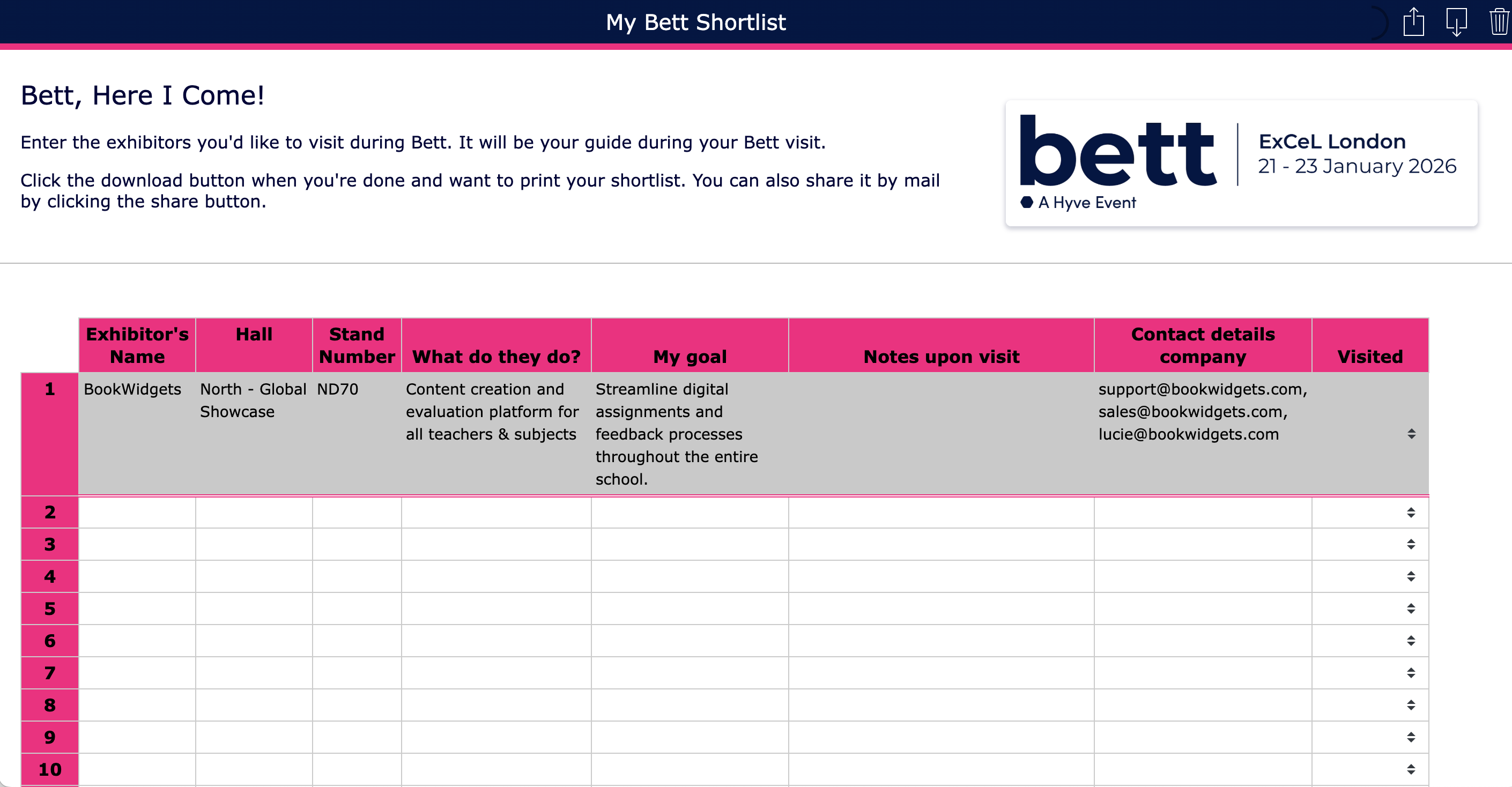
Click to open
2️⃣ Explore the exhibition floor
Once you arrive, start by walking through the different zones to get an overall sense of the event. Observe how tools are being used in real classroom contexts, notice what catches your attention, and get familiar with the layout. While exploring, you’ll likely discover booths that weren’t on your original shortlist but still spark your interest. Make a mental note or bookmark them in the app for later.
3️⃣ Visit booths strategically
With a clear overview of the exhibition, focus on the booths you selected in advance as well as those you discovered while exploring the floor. Take the time to ask questions, watch demonstrations if available, and gather practical ideas you can take back to your school or professional practice. These more focused booth visits often provide the most valuable insights.
4️⃣ Choose sessions wisely
Alongside the exhibition floor, Bett London offers a wide range of talks and sessions. With limited time, focusing on quality over quantity can make a big difference. Check the schedule in advance and select one or two sessions that align with your interests or professional role, so you leave the event with clear takeaways and new ideas.

EdTech Companies at Bett London 2026
Visit the BENE Lounge (Hall & stand number: Global Showcase ND70)
1. BookWidgets

🤔 What? Content creation and evaluation tool for teachers
👩🏫 For who? Teachers from all educational levels and subjects
👀 Why should you visit? Join the fun at our booth and take part in our spin-the-wheel giveaway! You could win 1 year of BookWidgets, 6 months, or 3 months, plus fun prizes like T-shirts, socks, and pens. And of course, don’t forget to stop by to say hi to our team!
BookWidgets helps teachers create interactive lessons and assignments with ease. Using a wide range of question types, educators can design engaging exercises that support both learning and assessment.
The platform integrates smoothly with popular learning management systems (LMS) such as Google Classroom, Microsoft Teams, Moodle, itslearning, and more. These integrations make it easy to follow student progress in real time, allowing teachers to provide guidance or feedback when it’s needed.
Teachers worldwide use BookWidgets for both formative and summative assessments. The grading dashboard simplifies the review process, making it easy to evaluate student work and provide meaningful feedback.
At our booth, you can explore what the platform offers, discover ready-made lesson ideas, and see features like exam links and question pages that help structure longer assignments. Our team will also be available to answer questions and help you understand how BookWidgets can enhance teaching and learning in your classroom.
2. Smart Symbols

🤔 What? Digital classroom planning and observation tool for preschool and primary education
👩🏫 For who? Preschool and primary school teachers
Smart Symbols helps teachers streamline classroom activities and lesson planning, track time and observations, and monitor pupil goals all in one app. It supports digital choice boards, reflection conversations, and real-time insights that reduce administrative work and make learning more visible.
Designed with educators and specialists, Smart Symbols provides teachers with a coherent overview of classroom engagement and student development while minimizing administrative load.
3. Brightbook

🤔 What? Authoring tool for creating interactive digital course material for active and hybrid learning
👩🏫 For who? Schools and teachers committed to active and hybrid education
Brightbook enables teachers to design interactive and visually rich course materials that fit their students’ learning needs. The platform supports the creation of digital courses for both classroom instruction and self-study, helping educators deliver more flexible, student-centered learning without extra workload.
4. Codecosmos

🤔 What? Interactive platform for learning coding and computational thinking
👩🏫 For who? Primary and lower secondary schools introducing coding, STEM, and digital skills
Codecosmos helps students build foundational digital skills through hands-on coding activities. Instead of focusing on memorizing syntax, learners solve challenges, create projects, and develop computational thinking in a playful and structured way.
The platform offers ready-to-use materials for educators, making it easier to integrate coding into the curriculum even without deep programming expertise. Students can progress at their own pace, while teachers gain insights into learning progress and engagement.
5. Eummena

🤔 What? Edtech expertise and Moodle support services for schools and education organizations
👩🏫 For who? Schools, universities, training providers, and institutions using Moodle or exploring digital learning platforms
Eummena is a European edtech partner that helps institutions deploy, improve, and customize Moodle environments. They provide certified hosting, installation, integration, theming, and professional training for teachers and administrators.
Alongside technical support, Eummena brings expertise in digital learning, skills development, and open educational technologies, helping schools adopt innovative practices and strengthen their digital learning capabilities.
6. Ergo XR

🤔 What? Mixed Reality (XR) training tool for safe ergonomic practice and movement skills
👩🏫 For who? Training providers, vocational educators, and learners developing physical skills in ergonomics and manual handling
Ergo XR is an immersive Mixed Reality platform that helps users practise safe lifting, handling, and other physically demanding movements. With motion tracking and real‑time feedback, learners can develop their skills at their own pace in a virtual environment that replicates real-world tasks without risk of injury.
The platform supports learners and workers in fields where physical skills and ergonomics are essential, such as construction, logistics, healthcare, and technical trades. By offering a safe space to build confidence and refine movement accuracy, Ergoo XR improves both learning outcomes and workplace wellbeing.
7. Linguineo

🤔 What? AI-powered language learning platform
👩🏫 For who? Students, teachers, and professionals looking for engaging ways to practice speaking and writing in a new language
Linguineo helps students learn a new language through conversational AI, allowing them to practice speaking and writing by interacting with virtual characters. This approach makes language learning fun, engaging, and practical.
The platform’s unique chatbot technology and speech recognition provide tailored feedback, helping learners gradually improve their vocabulary, grammar, and pronunciation. Linguineo’s technology is also used in custom projects designed to meet the specific needs of schools and other clients.
8. EduFace

🤔 What? AI-powered feedback and grading tool for written assignments
👩🏫 For who? Teachers who want to save time and provide detailed, actionable feedback on student writing
EduFace is an AI-feedback and grading platform that helps teachers assess written assignments more efficiently. The AI provides comments directly on students’ work and gives a quick evaluation per assessment criterion (excellent, good, satisfactory, or needs improvement), with a short explanation of why that judgement was given.
This allows teachers to quickly see where each student is in their development and provide targeted support, saving time while maintaining quality feedback. Teachers can also try EduFace for free and experience both the feedback and grading features themselves.
9. Traintool BV

🤔 What? Digital platform for practising conversation skills
👩🏫 For who? Teachers and students looking to improve communication skills in a practical, interactive way
TrainTool lets students practice realistic conversation scenarios independently using video role-playing exercises. With over 500,000 students already using the platform, it provides a safe and repeatable environment to improve skills without needing constant in-person practice.
The platform offers instant personalised feedback through AI coach Alix, peer feedback from classmates, or teacher feedback. Educators also get clear insights into students’ progress, using baseline and final measurements to track development over time.
10. Picoo BV

🤔 What? Outdoor interactive game console that combines movement with learning
👩🏫 For who? Teachers looking to make learning more active and engaging without extra screen time
Picoo is an outdoor interactive game console that brings learning to life through movement. Subjects such as mathematics, language, and topography are turned into educational games where students run, collaborate, and discover together, transforming abstract concepts into concrete experiences.
The system is highly versatile and can be used during lessons as physically active learning, as a short energiser between activities, during recess, in the schoolyard, or in gym class. Because the controllers automatically form teams and guide the gameplay, teachers can easily integrate Picoo into their day with minimal extra preparation.
11. Ans

🤔 What? All-in-one assessment platform for paper-based and digital exams
👩🏫 For who? Teachers looking to simplify grading and assessment processes
Ans is a comprehensive solution that makes assessing students easy, whether you use paper-based exams, digital tests, or a combination of both. The platform streamlines grading, providing clear overviews and reducing the time teachers spend on evaluation.
With Ans, educators can manage assessments more efficiently, gain better insights into student performance, and focus on providing meaningful feedback to support learning.
12. Examurai

🤔 What? Platform for grading exams from teacher-uploaded materials and tracking student progress.
👩🏫 For who? Teachers and school teams who want to save time on grading and focus on supporting student learning
Examurai helps teachers reclaim the hours spent grading tests by automating assessment and feedback. This allows educators to spend more time guiding, motivating, and inspiring their students.
By providing clear insights into student performance and progress, Examurai supports both teaching and learning, helping schools streamline assessments while keeping the focus where it matters most: on student growth.
13. EduZone

🤔 What? AI-powered platform for creating and delivering exams and assessments
👩🏫 For who? Teachers and school teams looking to streamline assessment creation and administration
EduZone helps educators simplify the process of designing questions and delivering exams using AI technology. The platform saves teachers time while maintaining flexibility and control over assessments.
By using advanced AI tools, EduZone supports more efficient workflows, enabling teachers to focus on guiding students and improving learning outcomes. Their innovative approach aims to enhance both teaching and assessment practices in classrooms worldwide.
Join Canopy for a Breakfast Event

📍 Location The Crowne Plaza London Docklands
🤔 What? Google for Education Professional Development Partner
👩🏫 For who? Teachers working with Google for Education across the globe
Canopy is a Google for Education professional development partner, helping educators use technology effectively in the classroom to enhance teaching and learning.
Based in the United Kingdom, Canopy supports schools worldwide with programs such as Google Certified Trainer Bootcamps, ChromeOS Administrator Fast Track sessions, and workshops on Practice Sets, as well as tailored training for individual school needs.
Alongside their training initiatives, Canopy also publishes its own magazine. Previous editions are available to download here.
They are hosting a free breakfast event during Bett. The breakfast will take place on Thursday, 22 January, from 8:00 AM to 10:00 AM at the Crowne Plaza London Docklands, just a short walk from the ExCeL center, where Bett is held. If you’d like to join Canopy for this energising start to the day, you can register via this link.

Sightseeing in London
If you’re traveling to Bett London, why not make the most of your time by exploring some top things to do in London? Even with a busy schedule, there are plenty of interesting sights and activities to enjoy. The area surrounding ExCeL London in the London Docklands offers a few highlights, from modern architecture to riverside walks, but the rest of the city also has many attractions and landmarks worth discovering.
Here are a few ideas to inspire your London sightseeing during your visit, with activities located within easy reach of ExCeL London by public transport.
1. Canary Wharf
Within easy reach of ExCeL London, Canary Wharf is a hip and photogenic part of the city. Known as a financial district, it’s full of impressive modern skyscrapers, but it also offers pleasant riverside walks, lively restaurants, and cafés. It’s a great spot to soak up modern London vibes, enjoy a bite to eat, and capture some striking photos.

2. Emirates Air Line Cable Car
For a unique perspective of London, hop on the Emirates Air Line Cable Car. This cable car crosses the Thames between Greenwich and the Royal Docks, offering stunning views of the Docklands, Canary Wharf, and the city skyline. It’s a fun and quick way to see the area from above while traveling near ExCeL London.
3. Greenwhich
Greenwich is a historic district in southeast London, known for its strong maritime heritage and relaxed atmosphere. It’s home to the Royal Observatory, where you can stand on the Prime Meridian, marking the line between the eastern and western hemispheres. Visitors can also enjoy a walk through Greenwich Park, explore local markets, or take a break at one of the many local pubs. With its mix of history, green spaces, and riverside views, Greenwich is a great place to slow down and explore after a busy day in London.
4. Museum of London Docklands
Located in the heart of the Docklands, the Museum of London Docklands tells the story of London’s history as a global port and trading city. Through interactive exhibits and historical artifacts, you’ll learn how the docks shaped the city and its communities over time. It’s an interesting and accessible stop if you want to better understand the area around ExCeL London while adding a cultural touch to your visit.
Wrap Up
I can’t wait to step into Bett London for the very first time. Experiencing the latest in edtech and seeing the future of educational technology up close is something I’m looking forward to. Exploring a bit of London along the way will make the whole experience even more exciting!
If you’re interested in staying up to date about BookWidgets, I invite you to join our Facebook Teacher Community. A fun community with teachers all over the world. Or follow us on Instagram, LinkedIn or BlueSky where we also make sure to keep you up to date.
And if you’d like to stay connected, feel free to follow me, Chelsey, on LinkedIn as well! 👋


