
3 Smart Valentine’s Day Classroom Game Versions for Engagement and Learning
 Kate Baker —
Discover a ready-to-use Valentine’s Day classroom game created with BookWidgets that reviews content and boosts student engagement, formative assessment, and classroom community through game-based learning.
Valentine’s Day is one of those school days when student energy runs high and attention can be harder to hold. When you want a Valentine’s Day classroom activity that keeps students engaged without adding extra prep or grading, it helps to lean into that excitement instead of fighting it.
Smart at Heart is a ready-to-use digital dice review game created with BookWidgets, designed specifically for Valentine’s Day. The game is available in three classroom-ready versions, each focused on reinforcing content and skills while building classroom community through purposeful play. A flexible template is also included so teachers can easily create their own customized version. This activity works well for teachers looking for a Valentine’s Day review game that balances structure, flexibility, and student voice.
What You’ll Find in This Post
- What the Smart at Heart digital dice review game is and how it works
- How to play the Smart at Heart digital dice classroom game
- Facilitating the Smart at Heart Review Game in Your Classroom
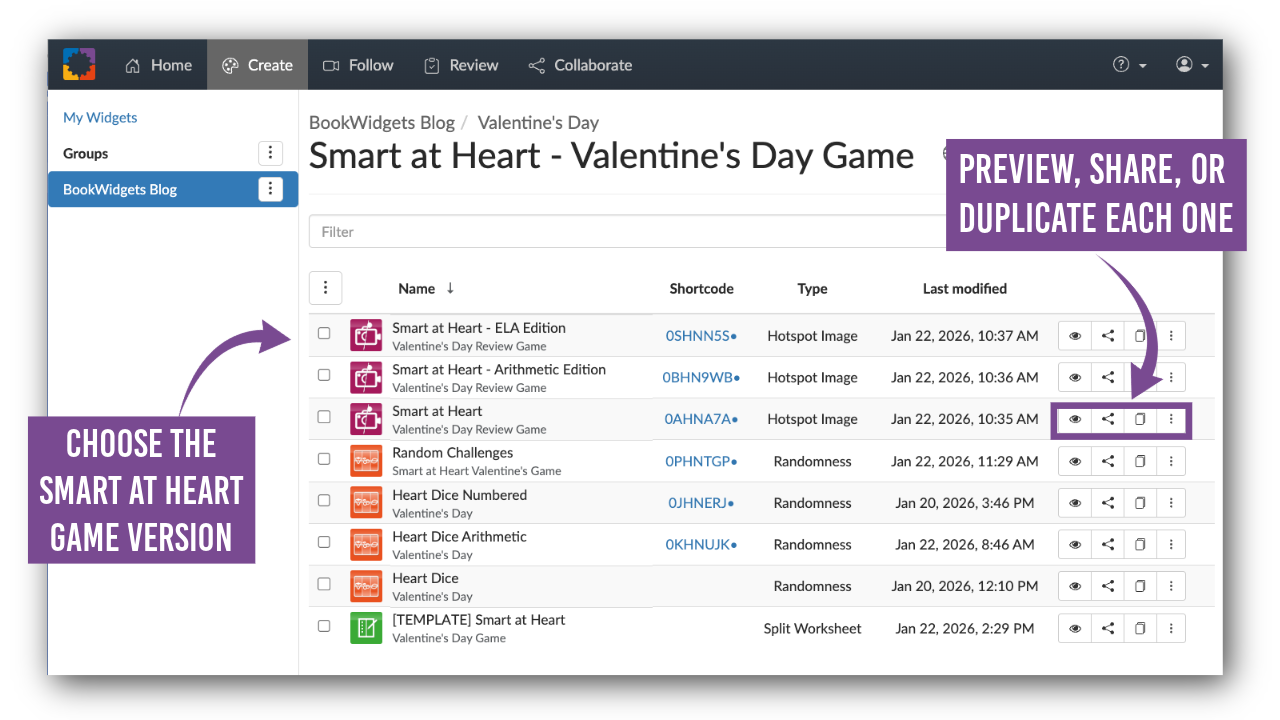
- 3 Ready-to-Use Smart at Heart Game Versions for Valentine’s Day
- How to share the Smart at Heart review game with students
- Create your own custom digital dice game with BookWidgets
Before we begin: All of the Valentine’s Day classroom games in this post were created with BookWidgets, an all-in-one platform that integrates with your LMS for creating interactive lessons, assessing student learning, and providing instant feedback.
You can make a free copy of each activity directly from this post, or browse the full collection of Valentine's Day learning activities here:
Valentine’s Day Activities and Games Collection
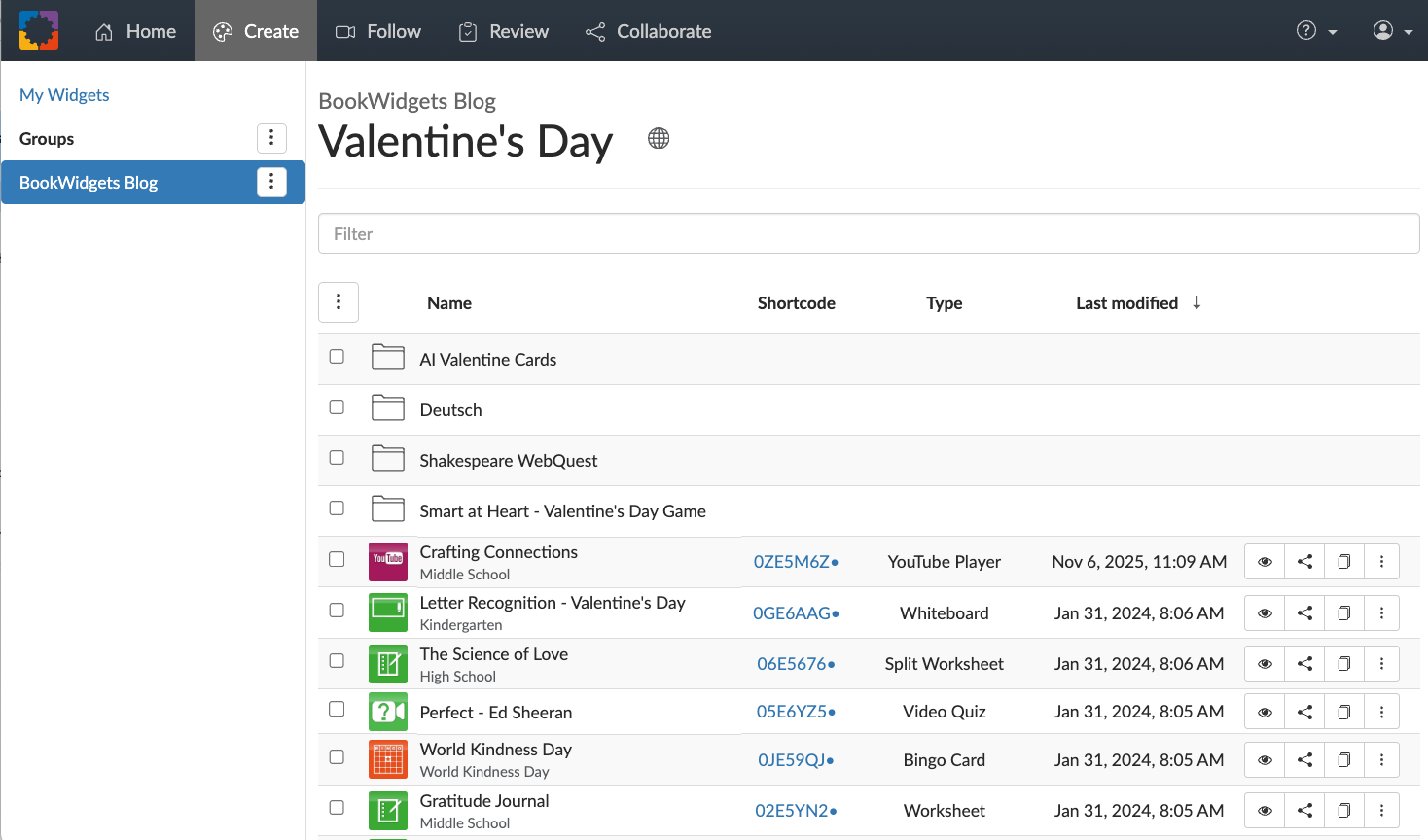
Click to open the folder and explore all Valentine’s Day classroom activities and games.

What the Smart at Heart Digital Dice Review Game Is and How It Works
Smart at Heart is a Valentine’s Day classroom review game that combines a visual game board, digital dice, and collaborative tasks. Students practice skills, explain their thinking, and engage in discussion while teachers gather real-time formative assessment through observation and conversation. Smart at Heart functions as a content or skill review game, allowing teachers to reinforce previously taught concepts while channeling the high energy of Valentine’s Day.
The game board is built using a Hotspot Image widget, with interactive elements layered directly onto the image. Students can play using one shared device, such as a Chromebook, tablet, or interactive display, making it ideal for whole-class or small-group use. Because the game is web-based, an internet connection is required.
The digital dice and random challenges are powered by Randomness widgets, which introduce variation without changing learning goals. There is nothing to submit or grade. Instead, teachers circulate, listen, and observe, using the activity as a low-stakes formative assessment. This Valentine’s Day classroom game works across elementary, middle, and high school settings, depending on how tasks are customized.

How to Play the Smart at Heart Digital Dice Classroom Game
Step 1: Spin the Digital Dice
Students take turns clicking the heart icon to spin the digital dice. Each spin generates a number from 1–6.
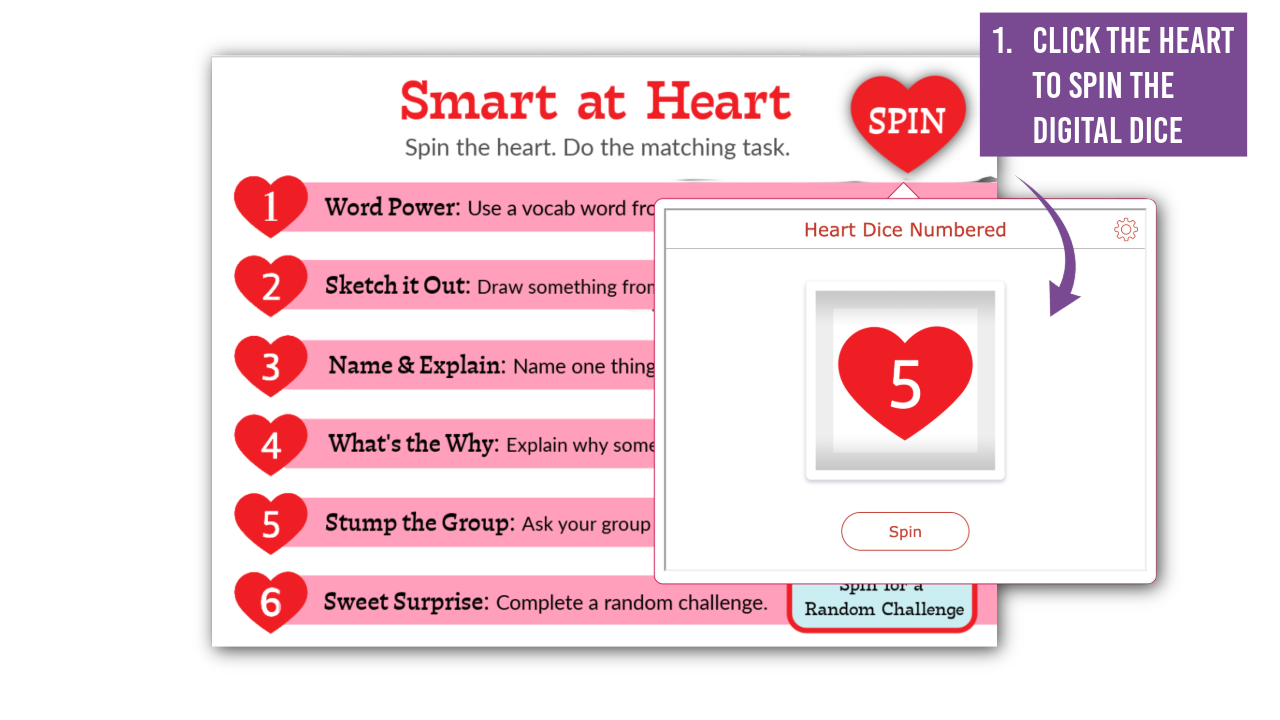
Step 2: Complete the Matching Task
Each number corresponds to a task listed on the game board. Prompts encourage explanation, discussion, drawing, or problem-solving, depending on the version used.

Step 3: Roll a Six for a Random Challenge
If a student rolls a six, they click the “Spin for a Random Challenge” button to activate a second Randomness widget. These short challenges add energy while keeping the activity light and inclusive.


Facilitating the Smart at Heart Review Game in Your Classroom
Once students understand how the review game works, teachers can choose a facilitation approach that fits their class size, routines, and level of independence. Students learn to manage excitement and frustration, listen actively to peers, and contribute ideas respectfully. As students take turns spinning the dice and responding to prompts, teachers can listen for understanding, misconceptions, and strategy use in real time.
For smaller classes (10–15 students), the game works well as a whole-class activity. Teachers can display the game on an interactive panel and call students up one at a time to spin and complete a task, maintaining structure while giving each student a moment in the spotlight.
For larger classes, students can work in groups of four to six. Teachers set a timer for 10–12 minutes, then rotate groups and reset the timer for another round. Switching groups encourages flexibility and adaptability, while collaborative tasks reinforce shared responsibility and collective success.
To close the activity, bring the class together for a whole-class debrief, regardless of facilitation style. Students can reflect on:
- How they approached the tasks
- How their group/class worked together
- What they learned about the content or themselves
This reflection reinforces both academic learning and social emotional learning skills, including self-management, collaboration, adaptability, and respectful communication. As students take turns, respond to prompts, and work with different classmates, they practice self-management, social awareness, and relationship skills in an authentic context. By reflecting on both the experience and the content, students make connections between how they learn, how they work with others, and how their thinking develops over time.

3 Ready-to-Use Smart at Heart Game Versions for Valentine’s Day
The Smart at Heart game includes three classroom-ready versions that teachers can use without prep or grading on Valentine's Day. Each version is designed to reinforce content and skills while keeping students actively engaged through structured play.
All versions support formative assessment and skill reinforcement through game-based learning, while also strengthening classroom community and social emotional learning skills. The game structure remains the same, while the prompts adjust to match different subjects and instructional goals.
General Classroom Dice Game (All Grades and Subjects)
The general version of Smart at Heart works across any grade level or subject area. Tasks are skills-based and collaborative, making it easy to connect the game to current learning without needing specific content knowledge. For emerging readers, audio support is built in. Students can click on the numbered hearts to hear each task read aloud.

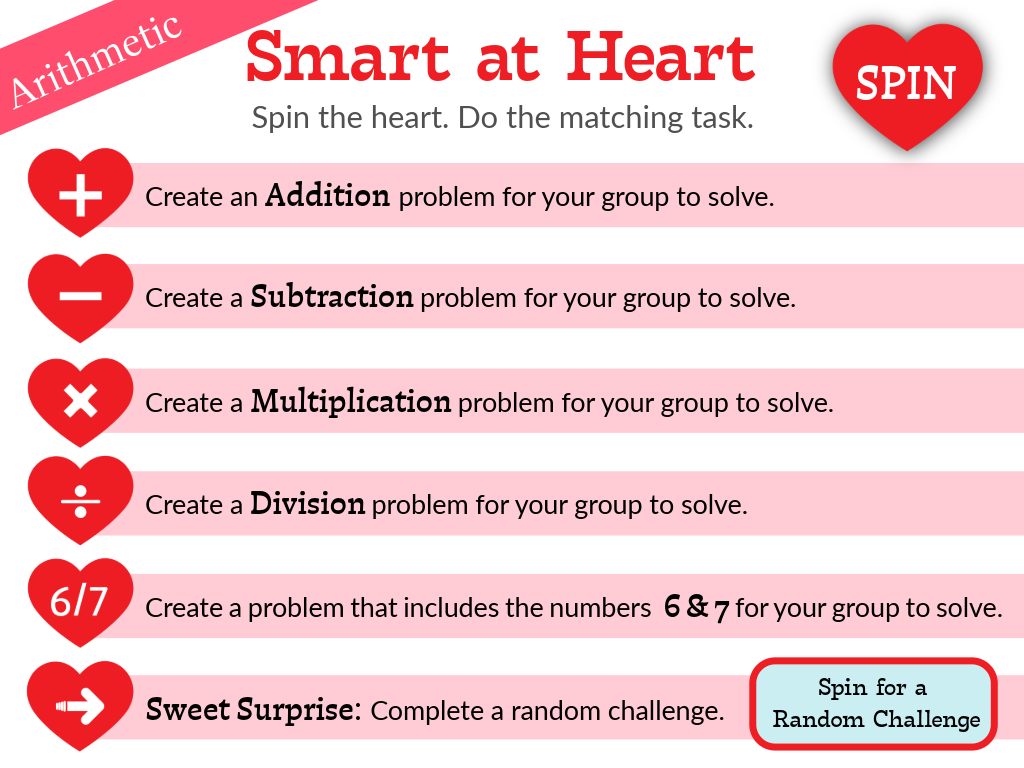
Arithmetic Dice Game for Upper Elementary
The arithmetic version of this Valentine's Day activity is designed for upper elementary students and focuses on building fluency and mathematical reasoning. Each dice roll prompts students to create an addition, subtraction, multiplication, or division problem for their group to solve. There is also a special “six-seven” challenge that adds an extra layer of thinking and discussion.
ELA Dice Game for Reading and Writing Practice
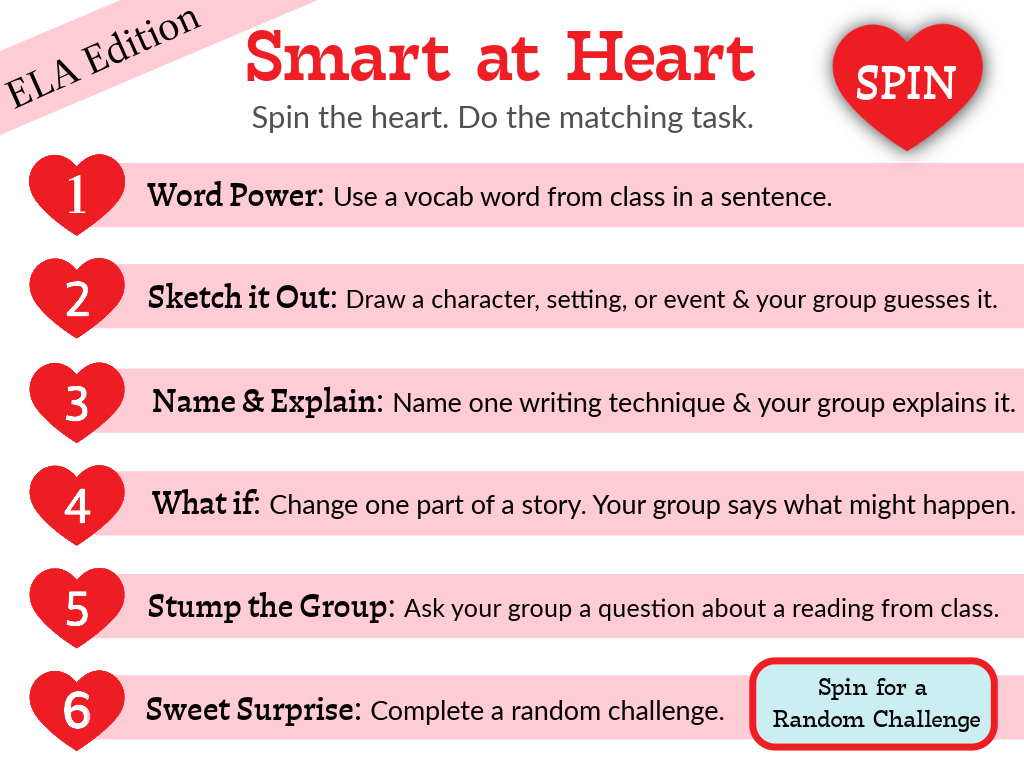
The ELA version of this classroom review game connects reading and writing skills directly to class content, making it adaptable for any grade level. Prompts encourage students to explain ideas, make connections, and respond thoughtfully, supporting both comprehension and written or verbal expression during review.

How to Share the Smart at Heart Review Game with Students
Teachers can immediately use Smart at Heart by sharing the student link in their LMS or projecting the game for whole-class play. No setup or grading is required. Students do not create or sign in to BookWidgets accounts. Teachers share activities with students, and all student responses are stored in the teacher’s account.
Simply navigate to the Smart at Heart folder in the BookWidgets Blog group and share the widget via link, QR code, or LMS integration.

Create Your Own Custom Digital Dice Game with BookWidgets
The Smart at Heart game design is intentionally flexible, making it easy for teachers to create a version that fits their content, grade level, and instructional goals.
Two Ways to Customize Your Digital Dice Game
Option 1: Design your own game board
This option gives you full creative control over the look and layout of the game.
- Create a custom background image using tools like Adobe Express or Canva, then upload it to a Hotspot Image widget and layer interactive elements on top.
- You can also duplicate my version, swap out the background image, and adjust the placement of the hotspots.
Ready to build your own interactive digital gameboards (not just use ready-made ones)?
Join our Create Interactive Digital Gameboards webinar to learn how to design classroom-ready gameboards with BookWidgets. You’ll see practical examples, learn simple design strategies, and leave with ideas you can use right away for game-based learning and formative assessment.
Option 2: Customize tasks using a Split Worksheet template
Use this editable template made with a Split Worksheet widget to customize tasks without designing visuals.

How to customize the review game template
Follow these steps to create your own version of the Valentine's Day review game:
1. Duplicate the review game template to your account
Start by duplicating this template to your BookWidgets account. This will also duplicate the connected Randomness spinners, allowing you to customize those if needed.

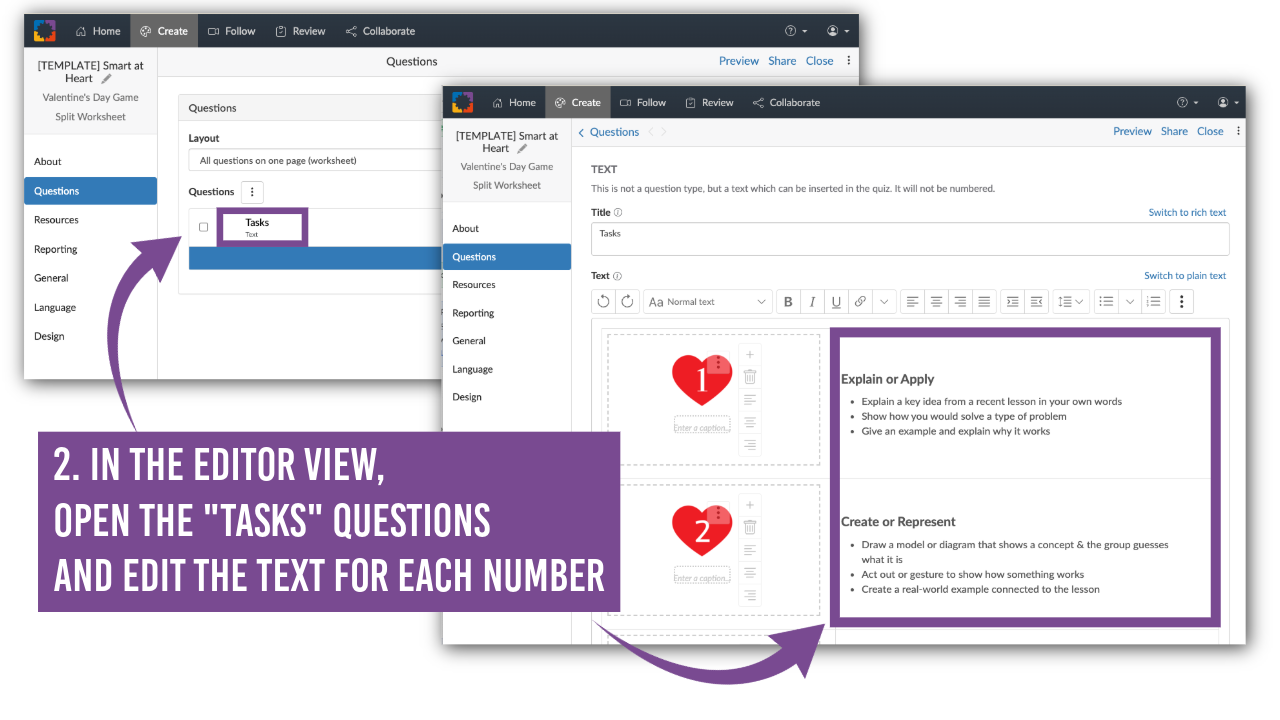
2. Edit the tasks in the editor view
Next, open the widget in editor view. Navigate to the “Tasks” question and edit the text next to each numbered heart.
This is where you can:
- Align prompts to your current unit
- Adjust the level of rigor
- Differentiate for grade level or learning needs
The structure of the Valentine's Day review game stays the same. Only the tasks change. Once saved, your customized version is ready to share with students or to project for whole-class play.
Wrap up: Bringing Purposeful Play into Any Classroom
Seasonal moments like Valentine’s Day offer a natural opportunity to shift classroom energy without sacrificing rigor. With a clear structure and intentional prompts, classroom games can support formative assessment, collaboration, and meaningful learning.
The Smart at Heart digital dice review game provides a flexible framework teachers can use as-is or customize to fit their content and students. By combining purposeful play with reflection, teachers help students strengthen academic understanding and the social emotional skills that support learning throughout the year.
Explore more with BookWidgets
Want to learn even more about creating and assessing engaging digital activities with BookWidgets?
✔️ If you're new to BookWidgets, start by checking out our Getting Started with BookWidgets blog post to help you get up and running quickly.
✔️ Sign up for upcoming free webinars and view recordings on the BookWidgets Teacher Academy Page.
✔️ Learn more about our special, limited-time pricing for groups of teachers for purchasing BookWidgets now without having to wait for the next school year or budget cycle.
✔️ Follow BookWidgets on BlueSky and LinkedIn and join our teacher community on Facebook!
✔️ And, be sure to connect with me, too, on BlueSky, Facebook, and LinkedIn!


