---
title: "How to Translate Interactive Lessons in Minutes with this AI Assistant"
description: "Translate interactive lessons in minutes with the BookWidgets AI Assistant. Learn how to adapt quizzes and games into any language for your students."
url: "https://www.bookwidgets.com/blog/2026/11/how-to-translate-interactive-lessons-in-minutes-with-this-ai-assistant"
language: "en"
author: "Lucie Renard"
published: "2026-11-25T08:09:12Z"
updated: "2026-11-25T08:38:18Z"
---
# How to Translate Interactive Lessons in Minutes with this AI Assistant
Found a great BookWidgets activity, but it's in the wrong language?
Instead of translating every question, answer option, instruction, resource, and feedback message manually, you can ask the **BookWidgets AI Assistant to translate the widget for you**.
In this post, we'll translate:
1. A **Quiz from the BookWidgets Blog group**.
2. An interactive **game widget**.
🎥 **1-minute video: Translate a widget with the BookWidgets AI Assistant**
New to BookWidgets? Learn more about it [here](#What).
## Translate Case Study 1: Translate a Quiz from the BookWidgets Blog Group
### The situation
You find this [Quiz about life in Ancient Egypt](https://www.bookwidgets.com/play/t:hg-XkpwRTbh9hCm1nhzxJV1eBwrxF7Iur-mcGAAQvApISkxUS0hG) in the BookWidgets Blog group that fits your lesson perfectly, except it's in English and your students need it in French. It has questions, student instructions, and several student resources.
| Step | Action | Prompt to use in the AI Assistant |
|---|---|---|
| **1** | Duplicate the Quiz into your own BookWidgets account. | When you get a Teacher link (*like the one I shared above*) to the widget, you can simply hit the button "Make a copy in my account". **OR**: navigate to the Collaboration tab within your BookWidgets account, search for interesting groups and widgets (💡 The [BookWidgets Blog Content Library](https://www.bookwidgets.com/a/widgets/groups/5497340846669824) contains over 3000 widgets). Duplicate the widget and place it in a folder so you can keep track and make changes. |
| **2** | Open the duplicated Quiz and launch the AI Assistant. | The AI Assistant can be opened in all widget types by clicking the magic wand in the upper-right corner of the widget. Click the help button to learn more about the [AI teacher guidelines](https://www.bookwidgets.com/ai-guidelines) and the actions the AI Assistant can take within the widget you're in. |
| **3** | Translate all student-facing content. | *"Translate this entire Quiz into French"*. Normally, this prompt suffices. But to ensure the AI Assistant understands your request, you can add this: *"Translate the title, instructions, questions, answer options, feedback, explanations, and student-facing resources. Keep the widget structure and settings unchanged."* |
In most cases, just the prompt above is enough. But, you can continue and add more elaborate instructions concerning the language translation.
| Step | Action | Prompt to use in the AI Assistant |
|---|---|---|
| **4** | Adapt the language to your students. ⚠️ **Wait before moving on!** We'll add some more instructions to our prompt.| *"The French translation is for 14-year-old students. Use clear, natural classroom language and keep subject-specific terminology accurate."* |
| **5** | Check terminology and proper nouns. | *"Review names, historical terms, technical vocabulary, abbreviations, and proper nouns. Identify anything where a literal translation may be inappropriate."* |
> 💡 **Teacher Tip**: For cost-conscious use, it's better to include all actions in 1 elaborate prompt. Learn more about how to use the BookWidgets AI Assistant more [cost-efficiently](https://www.bookwidgets.com/ai-credits).
### What did we translate? The result
Translation is also adaptation. A useful translation isn't always word-for-word.
Also consider:
- student age;
- language level;
- subject-specific terminology;
- and regional language preferences.
[](https://www.bookwidgets.com/play/t:wr04ZeIckt337IN5-XRT793rWw7byqgIHcgt9VG2r703SkxYUTdT)
[*Check out this Interactive History Quiz about the Ancient Life in Egypt*](https://www.bookwidgets.com/play/t:wr04ZeIckt337IN5-XRT793rWw7byqgIHcgt9VG2r703SkxYUTdT)
## Translate Case Study 2: Translate a Game Widget
### The situation
Imagine you have an English [Crossword widget for grade 5 - 6 primary school students about geography terminology](https://www.bookwidgets.com/play/t:0f6C_Ew5TuYQtkUEiwqRnzoN8kEac61ygDaH2Sw53zROSkw4UU5L) and want to reuse it with Dutch-speaking students.
Both the descriptions and answers may need to change.
| Step | Action | Prompt to use in the AI Assistant |
|---|---|---|
| **1** | Duplicate the game widget and open the AI Assistant. | When you get a Teacher link (*like the one I shared above*) to the widget, you can simply hit "copy". **OR**: Navigate to the Collaboration tab within your BookWidgets account, search for interesting groups and widgets (💡 The [BookWidgets Blog Content Library](https://www.bookwidgets.com/a/widgets/groups/5497340846669824) contains over 3000 widgets). Duplicate the widget and place it in a folder so you can keep track and make changes. |
| **2** | Translate the complete game.| *"Translate this Crossword widget into Dutch."* Normally, this prompt suffices. But, to sure the AI Assistant understands your request, you can add this: *"Translate the title, instructions, clues, answers, and all other student-facing text."* |
In most cases, just the prompt above is enough. But you can continue and add more elaborate instructions concerning the language translation.
| Step | Action | Prompt to use in the AI Assistant |
|---|---|---|
| **3** | Preserve the learning goal. ⚠️ **Wait before moving on!** We'll add some more instructions to our prompt.| *"Make sure the translated descriptions still test the same geography concepts. Rewrite a description when a literal translation sounds unnatural or gives away the answer."* |
| **4** | Check clue-answer combinations. ⚠️ **Wait before moving on!** We'll add some more instructions to our prompt. | *"Review every translated description and answer pair. Make sure each description clearly leads to the intended Dutch answer."* |
| **5** | Adapt terminology. | *"Use geography terminology appropriate for students aged 12 to 13. Keep essential subject vocabulary but simplify unnecessarily difficult wording."* |
### What did we translate? The result
Don't forget the small pieces of text
Also check:
- titles;
- instructions;
- feedback;
- explanations;
- hints;
- answer options;
- and resources.
[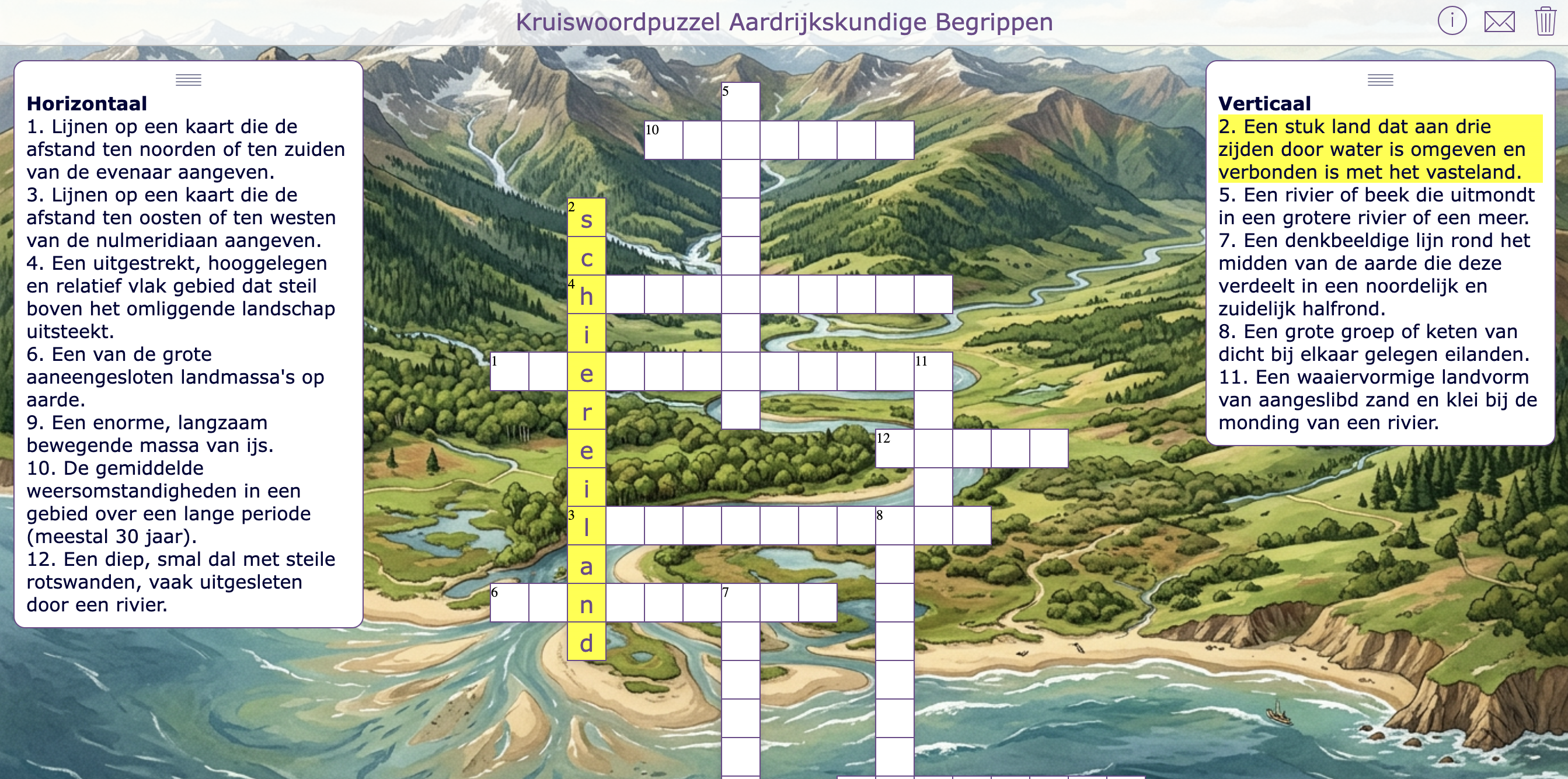](https://www.bookwidgets.com/play/t:TNVubLZB7-8olKF5Eg75INFIQ0dAjwE4E0ZQ3xs8ZEdLSk1HNEs0)
[*Open this Interactive Geography Terminology Crossword Primary School Students*](https://www.bookwidgets.com/play/t:TNVubLZB7-8olKF5Eg75INFIQ0dAjwE4E0ZQ3xs8ZEdLSk1HNEs0)
> 💡 **Teacher Tip**: You can also ask to add additional resources (or translate existing resources) for students in their language. For this Crossword widget, I could add this to the instructions for the AI Assistant: *"Include a theoretical resource text - in Dutch - mentioning all the terms 12-year-old students need to fill out."*. Resources can be added to any widget within BookWidgets.
## Why Translate Widgets with the AI Assistant?
A good interactive activity shouldn't become unusable just because it's written in another language.
You may want to reuse a widget created by a colleague, adapt an activity from the BookWidgets Blog group, or use the same lesson with students who need a different language version.
The BookWidgets AI Assistant makes it possible to **reuse existing interactive content without translating every individual element manually**.
You can use it to:
- **Translate complete widgets**, rather than copying questions and texts into an external translation tool one by one;
- **Translate questions, answer options, instructions, feedback, explanations, and resources** within the same activity;
- **Keep the existing widget structure and interactivity intact** while changing the language;
- **Adapt vocabulary to the age and language level of your students**;
- **Preserve subject-specific terminology** instead of relying only on literal translation;
- **Check whether translated answer options, clues, and feedback still make sense** in context;
- **Reuse more shared BookWidgets activities** across languages, schools, and classrooms;
- **Save substantial preparation time** when creating multilingual versions of the same lesson.
Translation with the AI Assistant is therefore not only about converting words. It helps you **reuse a complete interactive learning experience in another language while adapting it to the students who will actually use it**.
## Final Thoughts
Continue the [BookWidgets AI Assistant Series](https://www.bookwidgets.com/blog/sections/ai-assistant):
- **[Create activities from scratch with AI](https://www.bookwidgets.com/blog/2026/11/how-to-create-interactive-lessons-from-scratch-with-this-powerful-ai-assistant)**
- **[Ideate lesson plans with AI](https://www.bookwidgets.com/blog/2026/11/use-this-helpful-ai-assistant-to-ideate-and-brainstorm-smarter-lessons-and-activities)**
- **[Transform interactive lessons with AI](https://www.bookwidgets.com/blog/2026/11/how-to-transform-existing-lesson-materials-with-this-impressive-ai-assistant)**
- **[Differentiate widgets with AI](https://www.bookwidgets.com/blog/2026/11/how-to-differentiate-interactive-lesson-activities-with-this-clever-ai-assistant)**
BookWidgets didn't integrate AI simply because AI is everywhere. The BookWidgets AI Assistant is the result of an extensive development and testing process involving BookWidgets Certified Ambassadors, Trainers and Educators, educational stakeholders, UCLL Research & Expertise, and more than 100 test schools.
The goal of AI in BookWidgets isn't to make decisions for teachers. It's to give teachers a faster way to turn their own ideas, expertise, and lesson materials into engaging interactive learning experiences.
**You bring the lesson. You know your students. You make the final decisions. The BookWidgets AI Assistant helps you build it.**
And me? I'm Lucie from BookWidgets. Come say hi on [LinkedIn](https://www.linkedin.com/in/lucierenard/) 👋
Happy widgeting! 🚀
## What is BookWidgets?
If you just started using [BookWidgets](https://www.bookwidgets.com/), or this new possibility has you eager to learn more about BookWidgets, let me explain BookWidgets in 3 sentences:
1. BookWidgets is an **all-in-one interactive lesson builder for teachers** that helps **all teachers create interactive digital assignments and assessments** (with a variety of [37 interactive question types](https://www.bookwidgets.com/question-types).
1. Teachers can share BookWidgets activities through their connected learning management systems, such as Google Classroom, Microsoft Teams, Canvas, Moodle, and many more, making digital activities easy to manage within their existing workflow.
1. Student answers are collected and organized in a [**grading dashboard**](https://www.bookwidgets.com/blog/2021/01/the-best-way-to-review-digital-student-work-efficiently), where teachers can review work, give feedback, and evaluate performance efficiently.