---
title: "Get to Know The BookWidgets Ambassadors as They Reveal Their Favorite Classroom Activities"
description: "Every day, teachers around the world find innovative ways to make learning more meaningful and effective. Among them are our BookWidgets Ambassadors. We love..."
url: "https://www.bookwidgets.com/blog/2025/09/get-to-know-the-bookwidgets-ambassadors-as-they-reveal-their-favorite-classroom-activities"
language: "en"
author: "Chelsey Both"
published: "2025-09-30T08:30:35Z"
updated: "2025-11-03T07:12:35Z"
---
# Get to Know The BookWidgets Ambassadors as They Reveal Their Favorite Classroom Activities
Every day, teachers around the world find innovative ways to make learning more meaningful and effective. Among them are our BookWidgets Ambassadors. We love seeing how they are using and sharing BookWidgets to make an impact with their students and colleagues. Their stories showcase how these ambassadors are finding creative ways to engage students. ❤️
Today, we’re excited to highlight two ambassadors and share how they bring BookWidgets to life. This is the first post in our new series highlighting the stories of our BookWidgets Ambassadors.
In this blog, we will share the stories of:
* [Jodi Schendel from the United States](#Jodi Schendel)
* [Claudia Fisanotti from Italy](#Claudia Fisanotti)

## Meet Jodi Schendel: Adding Spark to Her Worksheets with BookWidgets
Meet Jodi Schendel, an American teacher who turns lessons into dynamic, hands-on experiences with BookWidgets. As a secondary German teacher, she uses BookWidgets with Google Classroom to create engaging activities while simplifying assignment and grading.
By turning plain worksheets into interactive activities with BookWidgets and Genially, Jodi added a spark to her teaching. Appsmashing brings energy and fun to practicing curriculum skills, something she really enjoys.
BookWidgets has transformed Jodi’s teaching by keeping everything streamlined and organized, making it easy to access and review all assignments and results. Instant feedback, like answers turning green when correct, keeps lessons engaging and makes introducing new concepts exciting. This makes BookWidgets more than just a tool for students. It has become a game changer for her organization, productivity, and peace of mind.
### Film-Based WebQuest Journey
Designed as an engaging Sophie Scholl WebQuest, the activity guides students through the movie *The Final Days*, making the experience both meaningful and educational. With tasks before, during, and after the movie, students stay involved as they answer questions and tackle a variety of challenges. The [WebQuest Widget](https://www.bookwidgets.com/widget-library/webquest) lets you create a complete digital lesson that students follow step by step, embedding multimedia and widgets in one organized space.
[](https://www.bookwidgets.com/play/vYFFQgV--iQAEKKozygAAA/9EPNM93/sophie-scholl?teacher_id=6440270991196160)
[*Click to open*](https://www.bookwidgets.com/play/vYFFQgV--iQAEKKozygAAA/9EPNM93/sophie-scholl?teacher_id=6440270991196160)
> **💡 Pro Tip!** Want to dive deeper into the WebQuest Widget and even create one yourself? Check out our webinar or this blog post about creating a digital lesson with a WebQuest. Discover the step-by-step guide and fresh ideas to get started yourself. 👇
> | [**Blog post**](https://www.bookwidgets.com/blog/2024/10/9-steps-for-teachers-to-create-the-ultimate-digital-lesson) | [**Ready to Stream Webinar**](https://youtu.be/X7Fni3veYi4?si=sgtPhmyV_rrJnE6P) |
|:--:|:--:|
| [](https://www.bookwidgets.com/blog/2024/10/9-steps-for-teachers-to-create-the-ultimate-digital-lesson) | [](https://youtu.be/X7Fni3veYi4?si=sgtPhmyV_rrJnE6P) |
### Hands-On German Verb Worksheet
The second activity Jodi shared with us is a worksheet on German irregular verbs. In the first exercise, students are given a verb and must fill in the table. The second exercise uses the *annotate picture question type*, where students interact directly with an image. By using an existing worksheet image and adding annotation boxes, she saves time while keeping the activity both interactive and visually clear for students.
[](https://www.bookwidgets.com/play/fblcMpjN-iQAEB7JwAgAAA/ECZXCEH/3rd-hour-irregu?teacher_id=6440270991196160)
[*Click to open*](https://www.bookwidgets.com/play/fblcMpjN-iQAEB7JwAgAAA/ECZXCEH/3rd-hour-irregu?teacher_id=6440270991196160)
### Combining BookWidgets & Genially for Engaging Lessons
The last activity that Jodi shared with us takes things a step further by combining tools. She embedded a [BookWidgets](https://www.bookwidgets.com/) widget directly within [Genially](https://genially.com/), showing how different platforms can work together seamlessly. This approach highlights the power of appsmashing. Combining BookWidgets with other tools, you can create richer, more dynamic activities that go beyond what a single platform can do.
[](https://view.genially.com/65411dba501806001162ff66)
[*Click to open*](https://view.genially.com/65411dba501806001162ff66)
### How to App Smash with BookWidgets
Rather than sticking to a single platform, app-smashing lets you combine the strengths of different tools to create richer, more dynamic learning experiences. By blending tools in this way, you can design activities that support different learning styles, spark creativity, and keep your lessons organized and easy to navigate.
BookWidgets’ [Split Worksheet](https://www.bookwidgets.com/widget-library/split-worksheet) and [Split Whiteboard](https://www.bookwidgets.com/widget-library/split-whiteboard) widgets make this especially easy. These widgets let you pair a digital activity with content on one side and questions or assignments on the other, creating a seamless, user-friendly experience. Students no longer have to jump between platforms or feel overwhelmed by too many tools. Everything they need is right in front of them, making learning smoother and more focused. Take a look at this [blog post](https://www.bookwidgets.com/blog/2022/02/combine-these-20-educational-tools-to-level-up-your-classroom) if you want to learn more about combining BookWidgets with other tools to level up your classroom.
If you want to learn how to app smash BookWidgets with Genially like Jodi, be sure to check out our [blog post](https://www.bookwidgets.com/blog/2023/09/app-smash-with-bookwidgets-and-genially-combine-the-best-of-two-edtech-tools) and [webinar](https://youtu.be/SGPuH5YWsWo?si=Ty9Yy1SHEdOXbPZd) for more details. Once you have the link to your Genially activity, you can easily embed it in the text pane of a Split Worksheet in BookWidgets. Here’s a sneak peek of how simple it is! 👇
[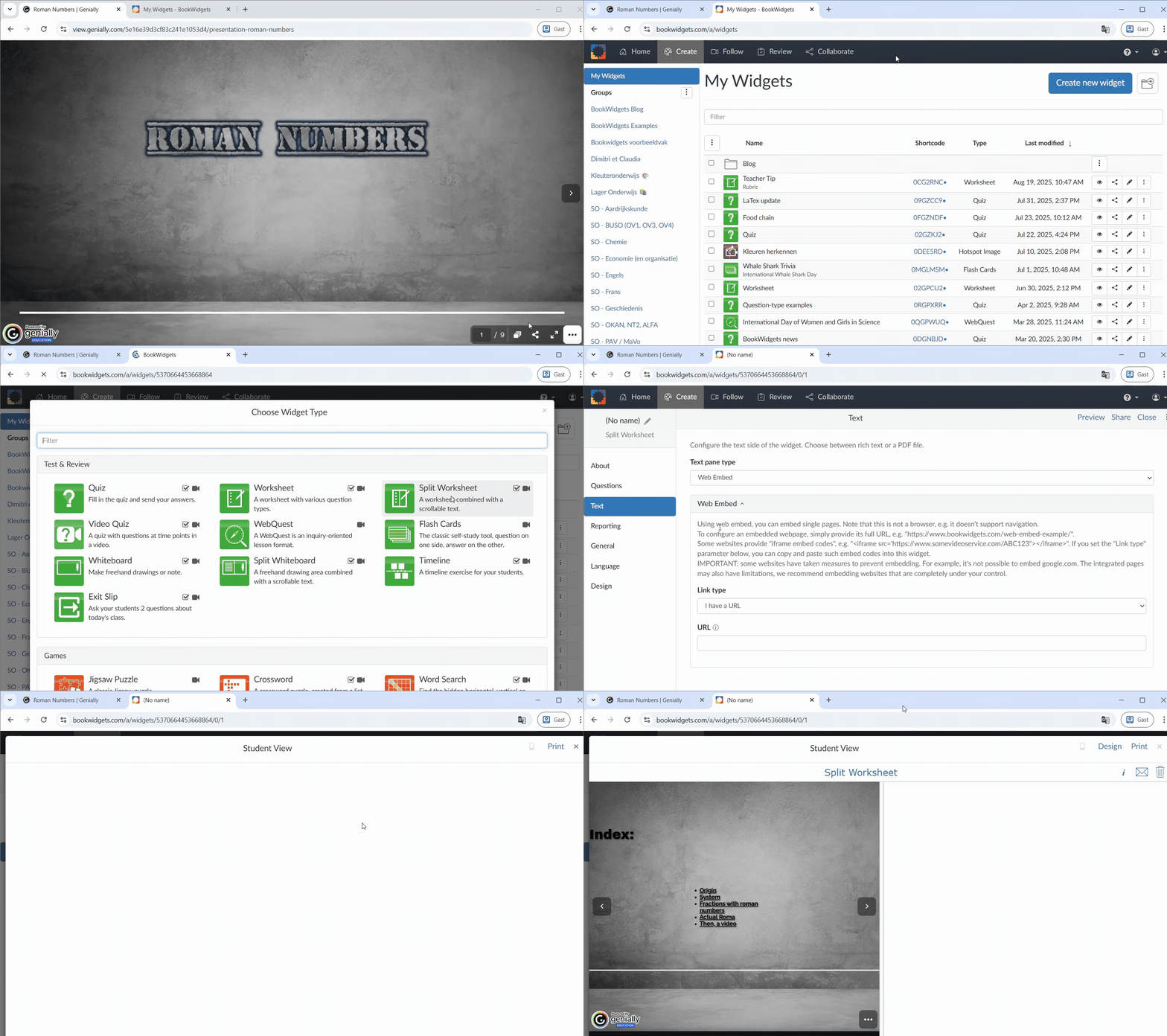](https://www.bookwidgets.com/blog/2023/09/app-smash-with-bookwidgets-and-genially-combine-the-best-of-two-edtech-tools)
[*Click to open*](https://www.bookwidgets.com/blog/2023/09/app-smash-with-bookwidgets-and-genially-combine-the-best-of-two-edtech-tools)

## Meet Claudia Fisanotti: Making Literature Interactive with BookWidgets
Meet Claudia Fisanotti, an Italian educator who transforms literature into engaging adventures for learners of all ages. She teaches English in upper secondary school and is currently a Regional Digital Curriculum Integrator. Integrating BookWidgets with Google Classroom, she designs hands-on activities that inspire her students.
The richness of BookWidgets' toolbox left a lasting impression. With more than 40 widgets that can be combined in countless ways, Claudia creates gamified challenges, dynamic timelines, and even spaces for creative writing. She says it's more than a digital exercise builder. It is a creative hub where ideas take shape quickly and effectively. The platform offers infinited opportunities to rethink traditional approaches and has become an essential partner in bringing innovation, playfulness, and meaninful engagement to her classroom.
Instead of following the usual textbook approach, Claudia looks for ways to make literature lessons interactive and immersive for her students. She transforms timeless literature into unforgettable experiences. One example is her Alice in Wonderland escape room, which turns reading into a hands-on, problem-solving adventure. Students step into stories, solve puzzles, uncover clues, and interpret characters, engaging deeply with both the narrative and its themes.
As Claudia herself says, *“Without BookWidgets, this simply wouldn’t have been possible. Its widgets gave me the freedom to design creative activities that are fun, engaging, and bring classic stories to life.”*
Let’s explore three widgets from Claudia’s escape room, as well as the full escape room itself, each bringing the story to life in playful ways. 👇
### Mystery Jigsaw Puzzle Experience
In the first activity Claudia shared with us, learners have to solve a [Jigsaw Puzzle](https://www.bookwidgets.com/widget-library/jigsaw-puzzle). Completing the puzzle reveals a book and introduces the theme of the escape room. To make the experience even more engaging, an audio fragment plays as soon as the puzzle is solved, creating a sense of mystery and excitement. Claudia also uses the *'reward word'* to provide learners with a clue, which they need to move on to the next stage of the escape room.
[](https://www.bookwidgets.com/play/GbKVGQyc-iQAEvncZvgAAA/WHDJTWW/guess-the-book)
[*Click to open*](https://www.bookwidgets.com/play/GbKVGQyc-iQAEvncZvgAAA/WHDJTWW/guess-the-book)
> **💡 Pro Tip!** You can decide how easy or challenging the puzzle will be by choosing the number of pieces, making it adaptable for different groups.
### Interactive Word Search Adventure
Her next activity is a [Word Search](https://www.bookwidgets.com/widget-library/word-search) where learners have to find a variety of words related to the theme of Alice in Wonderland. Once they discover all the words, they receive a new code to continue to the next part of the escape room.
[](https://www.bookwidgets.com/play/cFYH5EUj-iQAFrAVfPgAAA/GHCRDG2/alice-in-wonder)
[*Click to open*](https://www.bookwidgets.com/play/cFYH5EUj-iQAFrAVfPgAAA/GHCRDG2/alice-in-wonder)
> 💡 **Pro Tip!** Claudia chose to give the learners the words, but if you want to spice things up a little, you can give them a description instead, and they have to find the word in the Word Search based on that description.
### Fun Spot the Difference Challenge
The last activity that Claudia shared with us is a [Spot The Difference](https://www.bookwidgets.com/widget-library/spot-the-difference) challenge designed in an Alice in Wonderland style. Learners are shown two illustrations that look almost identical at first glance. Their task is to carefully compare the images and identify the hidden differences. This activity encourages students to look closely and pay attention to detail, because when they find all five differences, they receive another clue.
[](https://www.bookwidgets.com/play/jV9KvVnY-iQAF91eNPgAAA/5HC9P5W/the-secret-code)
[*Click to open*](https://www.bookwidgets.com/play/jV9KvVnY-iQAF91eNPgAAA/5HC9P5W/the-secret-code)
### The Alice in Wonderland Escape Room
Curious to see the full escape room experience? Follow [the link](https://www.thinglink.com/scene/1856295765983363558) to explore it yourself! Claudia combined BookWidgets with [ThinkLink](https://www.thinglink.com/) to design this immersive, interactive escape room that challenges her students.
[](https://www.thinglink.com/scene/1856295765983363558)[*Click to open*](https://www.thinglink.com/scene/1856295765983363558)
> **💡 Pro Tip!** Want to create your own escape room lesson? Watch our webinar or discover our blog post on how to create digital escape rooms with BookWidgets. 👇
> | [**Blog post**](https://www.bookwidgets.com/blog/2019/10/how-to-create-an-escape-the-classroom-game-free-lesson-examples) | [**Ready to Stream Webinar**](https://www.youtube.com/watch?v=XPRKoyKMixYt) |
|:--:|:--:|
| [](https://www.bookwidgets.com/blog/2019/10/how-to-create-an-escape-the-classroom-game-free-lesson-examples) | [](https://www.youtube.com/watch?v=XPRKoyKMixY) |
## Wrap up
All of our ambassadors share one thing in common: a passion and drive to make learning meaningful for every student. We’re proud to highlight their work and share their stories with the wider BookWidgets community. This is just the beginning, and we can’t wait to share even more inspiring stories from our BookWidgets Ambassadors! Curious to learn more about the Ambassador program? Visit [our website](https://www.bookwidgets.com/ambassadors) for all the details.
If you’re new to BookWidgets or just getting started, be sure to check out [this blog post](https://www.bookwidgets.com/blog/2025/07/bookwidgets-for-teachers-who-want-to-give-better-feedback-and-assessments) to see how you can provide more effective feedback and create assessments with BookWidgets.
Want to stay up to date with the latest BookWidgets news and new blog posts? Make sure to follow us on [Bluesky](https://bsky.app/profile/bookwidgets.bsky.social), [Instagram](https://www.instagram.com/ibookwidgets/), and [LinkedIn](https://be.linkedin.com/company/bookwidgets), or join our [Facebook Teacher Community](https://www.facebook.com/groups/bookwidgetsusers) to connect with fellow educators and get all the latest tips and inspiration.